

Cassette: AI Note Taker
REZA ABDOLI Productivity iPhoneiPadiPod touchMacApple Watch
Cassette: AI Note Taker is a free Productivity app for iPhone and iPad by REZA ABDOLI. Requires iOS 17.0. Updated October 13, 2026.
- Price
- Free
- on the App Store
- Size
- 66 MB
- Age 4+
- Updated
- Oct 13
- 2026 · v1.0.7
Screenshots


About Cassette: AI Note Taker
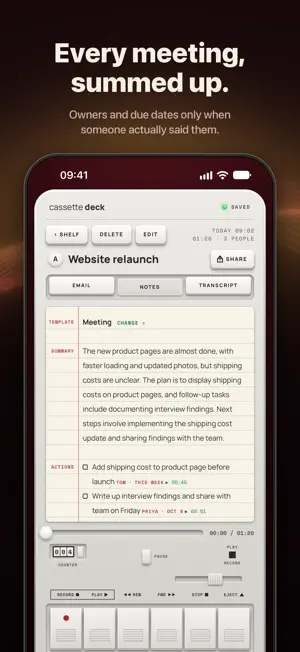
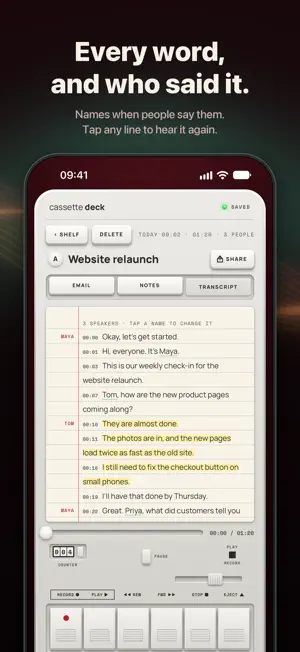
Cassette turns your iPhone into a cassette deck that listens, then writes it all down. Press RECORD for a meeting, a lecture, an interview or a quick voice memo. When you stop, Cassette writes: • A transcript with timestamps and who said what. Tap a line to hear that moment again. • Notes in the shape of the recording: meeting, 1:1, lecture, interview, client call, doctor's visit, brainstorm or voice note • Action items, with owners and due dates only when someone actually said them • Highlights, the lines worth remembering • A follow-up email draft for everyone who was there • Study cards from your lectures WRITTEN AS YOU RECORD On iOS 26 and later the transcript is written while you record, so it's ready the moment you press STOP. ASK YOUR TAPES "What's due this week?" "What did we decide?" Ask across all your tapes and get the answer from what was really said, each line pointing at its moment. PRIVATE BY DESIGN Transcripts come from Apple speech recognition, and your notes are written by Apple's own models, never by an outside AI service. Turn on On-device only and your recordings, transcripts and notes never leave your iPhone. No ads, no tracking. YOUR NOTES, IN YOUR NOTES APP One key sends a tape's notes or transcript to Apple Notes, Microsoft OneNote, Notion, Evernote or Google Keep, organized and ready to use: the summary, decisions, action items with who and when, and key points. Sign in to OneNote once and every tape can go there by itself. The follow-up email is ready when a tape is done, notes save as Markdown in Files, Cassette works with Shortcuts and Siri, and every tape exports at once. A DECK YOU CAN FEEL Piano keys you press, a tape counter, VU meters, side A and B, and a speed knob for playback. Press MARK while recording and that moment shows up in your highlights. ONE TAP TO RECORD Start a tape from a Home Screen or Lock Screen widget, or from Control Center, and follow the recording in the Dynamic Island. ON YOUR WRIST Record with Apple Watch: RECORD, PAUSE and STOP are on your wrist, and when you stop, the tape goes to your iPhone, which writes the transcript and notes. Start a tape from your watch face, from Control Center or with Siri. ON IPAD AND MAC On iPad, your notes open beside the deck. On the Mac, the same deck sits in a small window beside your video call and records the call and your microphone together, with no bot joining the call. FIND ANYTHING Search your shelf by title, by person or by any word that was said. Copy a whole tab, or save it as a PDF or Word document. YOUR TAPES, BACKED UP Use Cassette without an account. Sign in with Apple, Google or email, and with Premium your recordings, transcripts and notes are backed up and come back on a new device. Delete a tape, or your account, at any time. FREE AND PREMIUM Recording is free and unlimited, with no minute meter. Transcripts and notes are free for 5 tapes a month. Cassette Premium transcribes and writes up every tape and backs up your shelf: weekly, monthly, or annual with a 7-day free trial, or pay once with Lifetime. One Premium covers Cassette on iPhone, iPad and Mac. Subscriptions renew automatically unless cancelled at least 24 hours before the end of the period. Terms: https://onelifeco.app/termsofservice Notes by Apple Intelligence need a compatible iPhone. On other iPhones, Cassette writes simpler notes on the device.
What’s new
Version 1.0.7 · Updated October 13, 2026
SEND TO your notes app. At the end of a tape's notes and transcript, one key sends them to Apple Notes, Microsoft OneNote, Notion, Evernote or Google Keep, organized, with the summary, decisions, action items with who and when, and key points. Sign in to OneNote once and every tape can go there by itself.
App privacy
The developer, REZA ABDOLI, reported these privacy practices to Apple.
Data Linked to You
The following data, which may be collected and linked to your identity, may be used for the following purposes:
- Contact Info: Email Address, Name
- Location: Coarse Location
- Identifiers: User ID
- Usage Data: Product Interaction
- Purchases: Purchase History
- User Content: Audio Data, Other User Content
Used for: Developer’s Advertising or Marketing, Analytics, App Functionality
Alternatives to Cassette: AI Note Taker
Looking for apps like Cassette: AI Note Taker? Here are 6 similar apps on the App Store. The highest rated is Notium (5.0/5), and all 6 are free to download.
-
 RAGChat: Offline AI Chatbot
-
 Notium
5.0
Notium
5.0
-
 SummarizeYT.ai
5.0
SummarizeYT.ai
5.0
-
 inkhour: Screen Time & Focus
5.0
inkhour: Screen Time & Focus
5.0
-
 Warranty Tracker: AI Coverage
5.0
Warranty Tracker: AI Coverage
5.0
-
 Takewise: YouTube Summarizer
5.0
Takewise: YouTube Summarizer
5.0
| App | Rating | Price | Last updated | Compare |
|---|---|---|---|---|
| Cassette: AI Note Taker | – | Free | October 13, 2026 | |
| RAGChat: Offline AI Chatbot | – | Free | Oct 10, 2026 | Compare |
| Notium | 5.0 / 5 (1) | Free | Feb 3, 2026 | Compare |
| SummarizeYT.ai | 5.0 / 5 (2) | Free | Oct 6, 2026 | Compare |
| inkhour: Screen Time & Focus | 5.0 / 5 (1) | Free | Oct 13, 2026 | Compare |
| Warranty Tracker: AI Coverage | 5.0 / 5 (9) | Free | Aug 26, 2026 | Compare |
| Takewise: YouTube Summarizer | 5.0 / 5 (3) | Free | Jul 20, 2026 | Compare |