

Inspan Encrypted Notepad
Nikolay Vorobyev Productivity iPhoneiPadiPod touchMac
Inspan Encrypted Notepad is a free Productivity app for iPhone and iPad by Nikolay Vorobyev. Requires iOS 16.0. Updated October 19, 2026.
- Price
- Free
- on the App Store
- Size
- 30 MB
- Age 4+
- Updated
- Oct 19
- 2026 · v1.0.2
Screenshots


About Inspan Encrypted Notepad
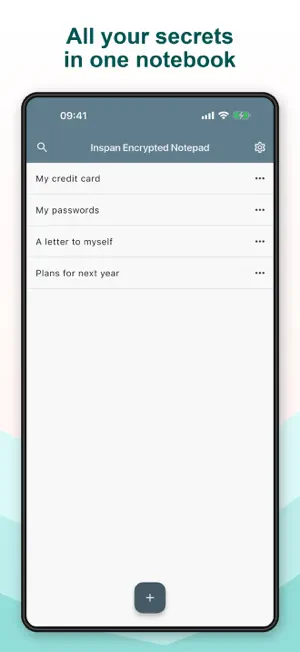
Your ideas, personal journal and private notes deserve a place of their own. Encrypted Notepad keeps many notes together in one password-protected, encrypted file on your device. Give each note a title, format your text and find what you need with search. No account is required, and you can write and read your notes offline. ONE FILE, MANY NOTES • Keep separate notes in a single encrypted notebook. • Use headings, lists and text formatting. • Search note titles and text, then jump to a matching passage. • Let autosave keep up with your edits. • Choose a light or dark appearance. When the app leaves the foreground, it locks the document and removes decrypted notes from the active session. The next time you return, enter your password to continue. Saves replace the file atomically, helping preserve the last complete file if a write is interrupted. The encrypted file can be included in your device backup, depending on your backup settings. HOW YOUR NOTES ARE PROTECTED • AES-256-GCM encrypts the whole document, including note titles and text, with a 256-bit key. Its authentication tag lets the app detect changes to the protected data instead of accepting altered content. • PBKDF2-HMAC-SHA-256 derives the encryption key from your password using 1,600,000 iterations. This makes each password guess more costly for someone who gets a copy of your file. • A random 128-bit salt helps prevent the same password from producing the same key in different documents. Each encryption uses a fresh random nonce. • Encryption uses the platform's standard cryptographic libraries, not a homemade cipher. Your password is not written into the document. IMPORTANT TO KNOW Choose a long, unique password or passphrase. Encryption cannot make a weak password strong, and there is no password reset that can unlock your existing notes if you forget it. Keep backups: encryption protects the contents of a file, not against losing or deleting it. Notes are readable while the document is unlocked, and encryption does not protect against a compromised device.
What’s new
Version 1.0.2 · Updated October 19, 2026
Fix for text selection in encrypted notes
App privacy
The developer, Nikolay Vorobyev, reported these privacy practices to Apple.
Data Not Collected
The developer does not collect any data from this app.
Alternatives to Inspan Encrypted Notepad
Looking for apps like Inspan Encrypted Notepad? Here are 6 similar apps on the App Store. The highest rated is Minimal | Notes (4.7/5), and all 6 are free to download.
-
 Think First: Screen Time
-
 CalcNotes - Calculation memo
-
 VPN Наружу
3.2
VPN Наружу
3.2
-
 Minimal | Notes
4.7
Minimal | Notes
4.7
-
 Wallet - Digital Wallet Card
4.4
Wallet - Digital Wallet Card
4.4
-
 Notesnook: Private notepad
4.7
Notesnook: Private notepad
4.7
| App | Rating | Price | Last updated | Compare |
|---|---|---|---|---|
| Inspan Encrypted Notepad | – | Free | October 19, 2026 | |
| Think First: Screen Time | – | Free | Oct 13, 2026 | Compare |
| CalcNotes - Calculation memo | – | Free | Oct 29, 2026 | Compare |
| VPN Наружу | 3.2 / 5 (17) | Free | Jun 29, 2024 | Compare |
| Minimal | Notes | 4.7 / 5 (297) | Free | Oct 12, 2026 | Compare |
| Wallet - Digital Wallet Card | 4.4 / 5 (534) | Free | Dec 17, 2025 | Compare |
| Notesnook: Private notepad | 4.7 / 5 (691) | Free | Oct 21, 2026 | Compare |