

Think First: Screen Time
HBJ Solutions Productivity iPhoneiPadiPod touch
Think First: Screen Time is a free Productivity app for iPhone and iPad by HBJ Solutions. Requires iOS 17.0. Updated October 13, 2026.
- Price
- Free
- on the App Store
- Size
- 6 MB
- Age 4+
- Updated
- Oct 13
- 2026 · v2.5
Screenshots
About Think First: Screen Time
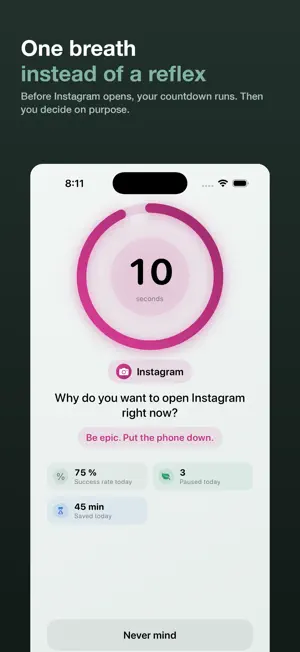
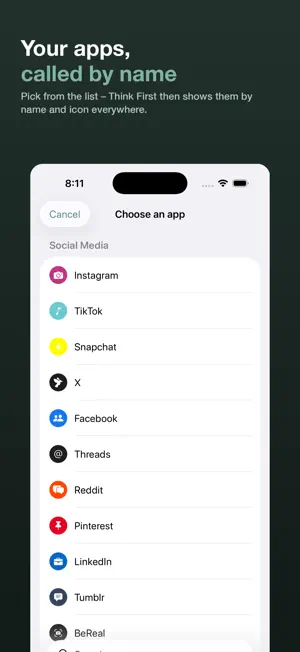
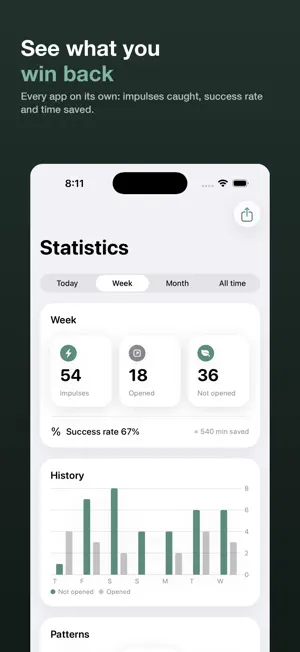
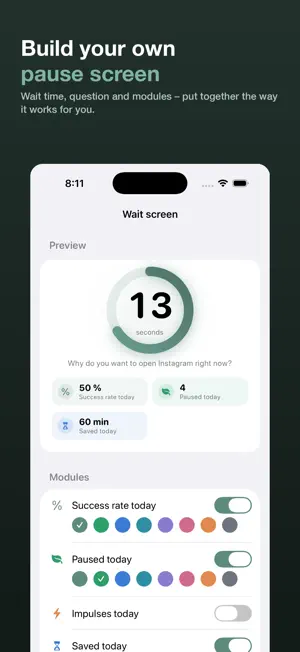
You reach for your phone – and 40 minutes later you no longer know why. Think First puts a short, deliberate moment right before that. No lecturing, no permanent lockout. The app stays closed until you have taken a moment – then the decision is yours. SETUP IN THREE STEPS • Pick your app from the list – around 70 well-known apps are built in • Link it in the system dialog so iOS knows which app you mean • Allow notifications – they take you from the blocked app to your countdown HOW YOUR MOMENT WORKS • You tap the app – it is blocked and shows its name • "Start my moment" sends you a notification • You tap it, the countdown runs, then you decide • Finally you set how long you need: 5, 15 or 30 minutes • The app then opens by itself – and locks again once your time is used HOW LONG DO YOU NEED? After the countdown you set yourself a time budget. Real usage counts, not the clock: if the phone sits on the table in between, your budget doesn't run down. Once it's used up the app locks itself again. YOUR APPS, BY NAME AND ICON Every protected app appears the way you know it: in statistics, in notifications and on the lock screen. So you see which app calls you how often – not just an anonymous total. WRITE DOWN WHAT YOU NEED IT FOR • Before the app opens you type, in one sentence, what you actually intend to do • Apple Intelligence reads along directly on your iPhone and checks that you really answered – not whether your reason is good enough • Later you see which sentence you tell yourself most often • Your text never leaves your device. Requires iPhone 15 Pro or newer with iOS 26 STAYING WITH IT, MADE REWARDING • Levels, XP and streaks for every impulse you win, 12 badges • Streak protection: once a week a day may drop out • Add friends and compare the week – free, up to 50 • Share your wins as an image: your numbers, your streak, your badges AT A GLANCE A home screen widget with your numbers per app – and one for the lock screen, right where you reach for the phone. EMERGENCY? SOS Press and hold the app icon, confirm three times: everything is open for 5 minutes. Then everything locks itself again – even if you never open Think First. PRIVACY • Your statistics stay on your iPhone. No account, no tracking, no ads • Think First never learns which apps you pick – Apple does not reveal that • The friends feature is optional and data-minimal FREE AND PREMIUM Free, no account, no ads: • Three protected apps with the deliberate moment • State your intention (iPhone 15 Pro or newer) • Instant “Focus now” sessions • Your numbers for today • Levels, XP, streaks and badges • Friends and leaderboard, up to 50 With Premium: • Hard Mode – the lock can't be clicked away while it runs • Daily limits: “30 minutes of social”, then it's done • Focus schedules: “Study 8–15, Mon–Fri” • As many apps as you like • Growing wait: every further reach costs more time today • Impulse quota: “Instagram three times a day, no more” • Time profiles, your own wait and question per app • Advanced statistics including CSV export • 11 themes, 10 app icons, widgets Both subscriptions start with 7 days free: €49.99 a year or €6.99 a month. Or €89.99 once, with no subscription at all. Already subscribed to Premium? Your current price stays. Think First Premium is available as a yearly (€49.99) or monthly (€6.99) subscription – both with the first 7 days free – or as a one-time purchase (€89.99, no subscription). Payment is charged to your Apple Account on confirmation. Subscriptions renew automatically unless cancelled at least 24 hours before the end of the current period. Manage or cancel anytime in your Apple Account settings. Terms of Use (EULA): https://www.apple.com/legal/internet-services/itunes/dev/stdeula/ Privacy Policy: https://hbj-solutions.com/thinkfirst/privacy
What’s new
Version 2.5 · Updated October 13, 2026
You decide whether we may count along On your next launch, Think First asks once whether it may anonymously count which features get used and where setup gets stuck. There are three of us, and otherwise we simply can’t see what’s holding people up. The numbers go to our own server – not to Google, not to Facebook. Never collected: IP address, location, device ID – and at no point which apps you protect. That stays on your device. You’ll see the question even if you’ve been using Think First for a while. We’ve updated the privacy policy, and that belongs in front of everyone, not just new installs. Saying no changes nothing about the app, and you can switch it any time in Settings.
App privacy
The developer, HBJ Solutions, reported these privacy practices to Apple.
Data Linked to You
The following data, which may be collected and linked to your identity, may be used for the following purposes:
- Usage Data: Product Interaction
- Identifiers: User ID
Used for: Analytics, App Functionality
Alternatives to Think First: Screen Time
Looking for apps like Think First: Screen Time? Here are 6 similar apps on the App Store. The highest rated is Lumeli: Less Scroll, More Life (1.0/5), and all 6 are free to download.
-
 The Square Is
-
 Orby: Scroll Less Together
-
 LastScroll Screen Time Control
-
 Lumeli: Less Scroll, More Life
1.0
Lumeli: Less Scroll, More Life
1.0
-
 Sleep App Blocker – CrocoFocus
-
 HourLimit: Screen Time Limits
| App | Rating | Price | Last updated | Compare |
|---|---|---|---|---|
| Think First: Screen Time | – | Free | October 13, 2026 | |
| The Square Is | – | Free | Aug 18, 2026 | Compare |
| Orby: Scroll Less Together | – | Free | Sep 10, 2026 | Compare |
| LastScroll Screen Time Control | – | Free | Sep 28, 2026 | Compare |
| Lumeli: Less Scroll, More Life | 1.0 / 5 (1) | Free | Oct 8, 2026 | Compare |
| Sleep App Blocker – CrocoFocus | – | Free | Aug 20, 2026 | Compare |
| HourLimit: Screen Time Limits | – | Free | Oct 12, 2026 | Compare |