

PhotoWidget - Photo Widgets
玉涵 张 Photo & Video iPhoneiPadiPod touch
PhotoWidget - Photo Widgets is a free Photo & Video app for iPhone and iPad by 玉涵 张. Requires iOS 17.0. Updated October 18, 2026.
- Price
- Free
- on the App Store
- Size
- 29 MB
- Age 4+
- Updated
- Oct 18
- 2026 · v1.1.3
Screenshots
About PhotoWidget - Photo Widgets
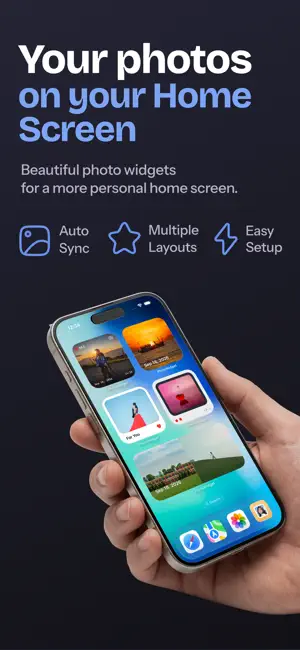
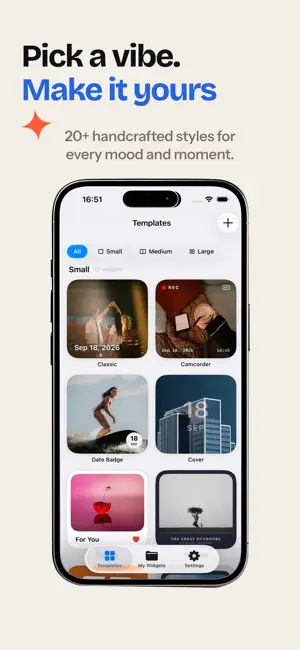
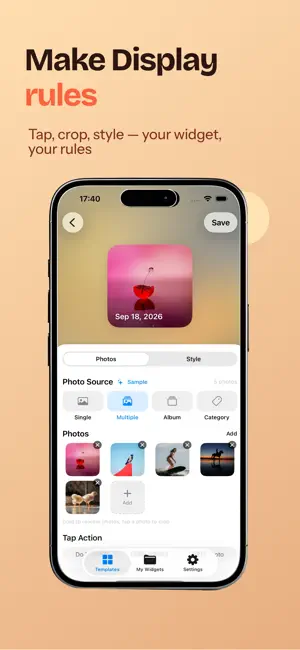
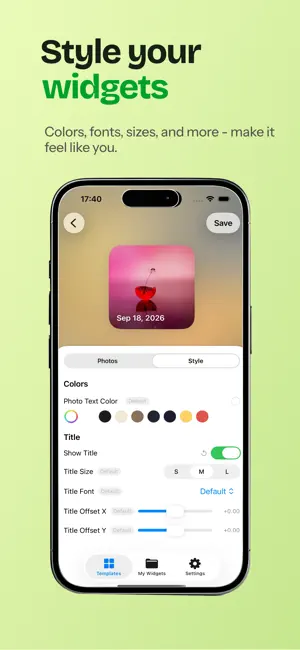
PhotoWidget turns your favorite photos into beautiful Home Screen widgets. Every time you unlock your phone, there's the people and moments you love — your family, your pet, that perfect trip. Unlike utility widgets, a photo widget gives you a tiny moment of joy, dozens of times a day. KEY FEATURES • Three sizes — Small for a single stunning shot, Medium for two photos side by side, Large for a photo wall of up to 9 pictures. • Template gallery — Not sure where to start? Pick from 8 handcrafted templates: Single Focus, Polaroid, Side by Side, 2×2 Grid, 3×3 Grid, Hero + Three and more. • Live editor — Everything updates in real time: background (solid, gradient, blurred photo, transparent), photo shapes (circle, heart, star…), padding with drag handles, overlays and borders, plus fully customizable text. • True WYSIWYG — The editor preview and the Home Screen widget share the same rendering code. What you design is exactly what you see on your Home Screen. • Photo carousel — Add multiple photos and they rotate automatically. Choose a refresh interval from 15 minutes to daily. • On This Day — Relive memories: the widget can show photos taken on this day in past years. • Fast and private — Photos stay on your device, in a shared container the widget reads directly. FREE VS PRO Free: create one widget, small size, up to 9 photos — experience the full core flow. Pro: unlimited widgets, album & category photo sources, On This Day, every shape, background, foreground and text style. Adding to your Home Screen takes three steps: pick photos → save → long-press the Home Screen and search "PhotoWidget". Terms of Use: https://appwebsites.pages.dev/photowidgets/terms Privacy Policy: https://appwebsites.pages.dev/photowidgets/privacy
What’s new
Version 1.1.3 · Updated October 18, 2026
What's New: - Free users can now select multiple photos (up to 9) for one widget - New On This Day photo source: relive photos taken on this day in past years; if none exist, the widget shows its built-in sample photo - Single and Multiple photo sources merged into one option, with multi-select by default - Smoother gallery viewing with a new blur-in transition and refined swipe-to-dismiss
App privacy
The developer, 玉涵 张, reported these privacy practices to Apple.
Data Linked to You
The following data, which may be collected and linked to your identity, may be used for the following purposes:
- Purchases: Purchase History
Used for: Analytics, App Functionality
Alternatives to PhotoWidget - Photo Widgets
Looking for apps like PhotoWidget - Photo Widgets? Here are 6 similar apps on the App Store. The highest rated is One Photo Widget (5.0/5), and all 6 are free to download.
-
 Frame: Photo Widget Album
-
 One Photo Widget
5.0
One Photo Widget
5.0
-
 Reeled VHS Filter
5.0
Reeled VHS Filter
5.0
-
 Photo Widget : Album Widget
3.8
Photo Widget : Album Widget
3.8
-
 ProFuse: AI Art Generator
5.0
ProFuse: AI Art Generator
5.0
-
 Grid Maker for Artist
| App | Rating | Price | Last updated | Compare |
|---|---|---|---|---|
| PhotoWidget - Photo Widgets | – | Free | October 18, 2026 | |
| Frame: Photo Widget Album | – | Free | Oct 23, 2026 | Compare |
| One Photo Widget | 5.0 / 5 (1) | Free | Aug 3, 2026 | Compare |
| Reeled VHS Filter | 5.0 / 5 (1) | Free | Jul 18, 2026 | Compare |
| Photo Widget : Album Widget | 3.8 / 5 (15) | Free | Oct 5, 2026 | Compare |
| ProFuse: AI Art Generator | 5.0 / 5 (2) | Free | Oct 22, 2026 | Compare |
| Grid Maker for Artist | – | Free | Oct 24, 2026 | Compare |