

ProFuse: AI Art Generator
Digital Masterpieces GmbH Photo & Video iPhoneiPadiPod touchMac
ProFuse: AI Art Generator is a free Photo & Video app for iPhone and iPad by Digital Masterpieces GmbH. Rated 5.0/5 from 3 ratings. Requires iOS 26.0.
- Rating
- 5.0
- 3 ratings
- Price
- Free
- on the App Store
- Size
- 98 MB
- Age 12+
- Updated
- Oct 22
- 2026 · v1.1.0
Screenshots


About ProFuse: AI Art Generator
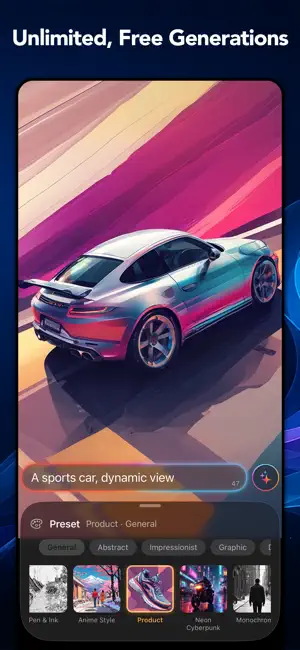
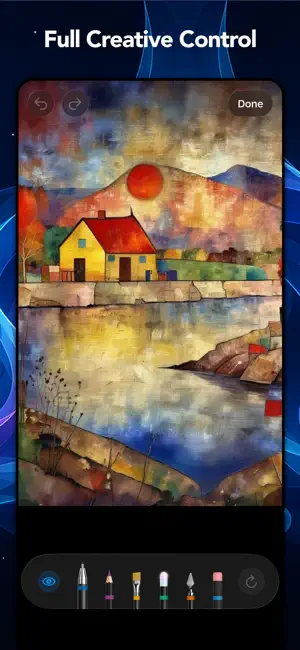
Turn your photos and ideas into real art — shaped by you, kept completely private. ProFuse combines powerful generative AI with a real editing workflow to help you create original artwork — right on your iPhone, iPad, or Mac. Unlike one-click AI generators, ProFuse keeps you in control of every result, with unlimited, free generations from the moment you open the app. ProFuse is private by design. Every photo, prompt, and finished piece is generated entirely on your device — nothing is ever uploaded to a server, stored in the cloud, or used to train AI models. No account and no internet connection are required to create. ◆ Image-to-Image Start from a photo you already love — a favorite portrait, a family moment, or a memory from a recent trip. ProFuse transforms it into a piece of art while preserving its character and composition, with more than 80 curated styles — spanning artistic traditions and photography — to choose from. ◆ Text-to-Image Start from a blank page. Describe a scene in words and watch it come to life — perfect for sparking an idea from scratch, exploring a concept, or finding inspiration. ◆ Real Creative Control Most AI art apps make you gamble on a prompt and hope. ProFuse couples diffusion stylization with a real editing workflow: separate content and style prompts, tools to control the seed, and paint-on content and style refinement tools keep you in control the whole way — turning one-shot generation into a real creative process. ◆ Authentic Artistic Styles Explore dozens of curated styles rooted in established artistic traditions — from oil painting and watercolor to pastel, drawing, and contemporary art. Every style prompt is fully transparent, so you can see and learn how each look is built. For complete creative freedom, go beyond the included styles and create your own from custom prompts or personal reference images, then save them to use again. ◆ Inspiration, Right on Your Home Screen ProFuse comes with a set of built-in projects to spark your next creation. Browse inspirations in the app or from a Home Screen widget — tap one and it opens directly in ProFuse, so you can see how it was made, get inspired, or make it your own. Download ProFuse for free and start creating art that's entirely your own. ◆ Key Features • Text-to-image and image-to-image generation, entirely on-device • Unlimited, free generations — no credits, no subscriptions required • 80+ curated styles rooted in artistic traditions and modern photography • Separate content and style prompts for precise creative direction • Content refinement — paint to fix flaws or reshape a scene • Style refinement — paint with your finger or Apple Pencil to control how strongly a style is applied, area by area • Seed control for reproducible compositions across different styles • Custom styles — create and save your own looks • Transparent style prompts — see and learn how each look is built • Built-in Inspiration projects, accessible from a Home Screen widget • Siri AI integration — create or open art with just your voice • 100% private — nothing ever leaves your device • Optimized for OS 27 — Liquid Glass design, resizable iPhone app ◆ ProFuse Premium To unlock ProFuse's full creative power, we offer weekly, monthly and yearly auto-renewing subscriptions. Payment is charged to your credit card through your Apple account at confirmation of purchase. Subscription renews automatically unless you turn off auto-renewal in Apple account settings or cancel your subscription at least 24 hours prior to the end of the subscription period. ◆ Support Questions or feedback? We're here 24/7. Contact us at: [email protected] Terms of Use: https://www.digitalmasterpieces.com/app-terms-of-use/
What’s new
Version 1.1.0 · Updated October 22, 2026
With our first big update, ProFuse says hello to iPhone Duo and gets noticeably faster on iOS 27 and iPadOS 27. What’s new: • Up to 50% faster image generation on iPhone 15 Pro or later and iPad with M1 chip or later, running iOS 27 or iPadOS 27. • Slightly faster image generation on all other devices. • A dedicated layout designed for the new iPhone Duo. • You can now touch and hold your artwork to see the original photo. • Many small UI refinements. One download, a lot more speed! For capable devices, ProFuse downloads an updated model. The download runs in the background, so you can keep creating. The download temporarily needs about 7 GB of free storage. When it’s finished, ProFuse asks you to install the new model. Questions or feedback? Email us at [email protected]. We look forward to hearing from you and are happy to help.
App privacy
The developer, Digital Masterpieces GmbH, reported these privacy practices to Apple.
Data Not Linked to You
The following data, which may be collected but is not linked to your identity, may be used for the following purposes:
- Usage Data: Product Interaction
- Diagnostics: Performance Data, Other Diagnostic Data, Crash Data
Used for: Analytics, App Functionality
Alternatives to ProFuse: AI Art Generator
Looking for apps like ProFuse: AI Art Generator? Here are 6 similar apps on the App Store. The highest rated is AnyPic: AI Photo Editor (5.0/5), and all 6 are free to download.
-
 AnyPic: AI Photo Editor
5.0
-
 AI Photo & Video: Morphly
-
 ReelClip: Video Clip Editor
-
 MDM AI Photos
5.0
-
 Mixoo: AI Generator
5.0
-
 Morphiqo: AI Face Swap Video
4.6
| App | Rating | Price | Last updated | Compare |
|---|---|---|---|---|
| ProFuse: AI Art Generator | 5.0 / 5 (3 ratings) | Free | October 22, 2026 | |
| AnyPic: AI Photo Editor | 5.0 / 5 (1) | Free | Oct 10, 2026 | Compare |
| AI Photo & Video: Morphly | – | Free | Oct 28, 2026 | Compare |
| ReelClip: Video Clip Editor | – | Free | Oct 12, 2026 | Compare |
| MDM AI Photos | 5.0 / 5 (1) | Free | Sep 17, 2026 | Compare |
| Mixoo: AI Generator | 5.0 / 5 (1) | Free | Jul 6, 2026 | Compare |
| Morphiqo: AI Face Swap Video | 4.6 / 5 (10) | Free | Sep 16, 2026 | Compare |