

Forge Slicer
mark jent Graphics & Design iPhoneiPadiPod touch
Forge Slicer is a free Graphics & Design app for iPhone and iPad by mark jent. Requires iOS 16.6. Updated October 6, 2026.
- Price
- Free
- on the App Store
- Size
- 3 MB
- Age 4+
- Updated
- Oct 6
- 2026 · v1.0
Screenshots
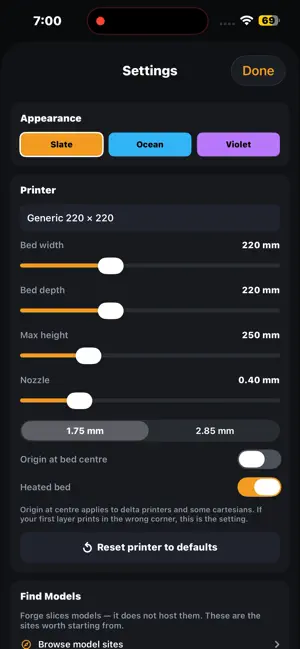


About Forge Slicer
Forge is a complete 3D printing slicer that runs entirely on your iPhone. Import an STL, place it on the bed, scale and rotate it, slice it, preview the toolpaths layer by layer, and export G-code to your printer — no laptop, no account, no upload. NOTHING LEAVES YOUR PHONE Forge contains no networking code at all. Your models are parsed, sliced and exported on the device. There is no account to create, no cloud sync, no analytics and no ads. That is not a setting you switch on — it is how the app is built. A REAL SLICER, NOT A VIEWER - Draft, Standard and Fine presets to start from - Layer height and first-layer height - Wall count, top layers and bottom layers - Five infill patterns — Lines, Grid, Triangles, Gyroid and Concentric — with adjustable density - Nozzle and bed temperature, with a separate first-layer temperature - Print speed control - Automatic retraction and a first-layer skirt - True top and bottom surface detection, so solid faces land where they belong - Filament length, weight and estimated print time before you commit SET UP FOR YOUR PRINTER Bed width, depth and maximum height. Nozzle diameter. 1.75 mm or 2.85 mm filament. Heated or unheated bed. Origin at the corner or at the bed centre for delta machines and some cartesians. SEE IT BEFORE YOU PRINT Preview the generated toolpaths layer by layer. Scrub through the model and see exactly where walls, infill and solid surfaces go — before you commit filament to it. EASY TO GET MODELS IN Open an STL from Files, iCloud Drive, AirDrop, Mail or Safari — Forge appears in Open With across the system. Six sample models are built in, including a 20 mm calibration cube, so there is something to slice the moment you install it. A built-in list of model sites points you at Printables, MakerWorld, Thingiverse and Thangs. EXPORT ANYWHERE AirDrop G-code straight to your Mac, email it, or save it to Files and copy it to a USB drive or SD card. You can also export the edited mesh back out as an STL, with your scale and rotation baked in. SHORTCUTS Import, slice and open models from the Shortcuts app. BUILT FROM SCRATCH Forge's geometry kernel was written specifically for this app and is checked against a verification suite of solids with hand-computed answers. Integer-precision arithmetic means contours close reliably instead of almost closing. Forge is free. No in-app purchases, no subscriptions, no ads.
App privacy
The developer, mark jent, reported these privacy practices to Apple.
Data Not Collected
The developer does not collect any data from this app.
Alternatives to Forge Slicer
Looking for apps like Forge Slicer? Here are 6 similar apps on the App Store. The highest rated is ShapeScript Mobile (5.0/5), and all 6 are free to download.
-
 EFUGY 3D Slicer
4.4
-
 3D Model Print Simple Edit
4.0
-
 Samurai Wallpapers 4K | HD
3.9
-
 Forma3D - 3D Modeling & Print
4.4
-
 ShapeScript Mobile
5.0
-
 Blender 3D: Image to 3D
1.5
| App | Rating | Price | Last updated | Compare |
|---|---|---|---|---|
| Forge Slicer | – | Free | October 6, 2026 | |
| EFUGY 3D Slicer | 4.4 / 5 (19) | Free | Sep 18, 2026 | Compare |
| 3D Model Print Simple Edit | 4.0 / 5 (3) | Free | Nov 1, 2026 | Compare |
| Samurai Wallpapers 4K | HD | 3.9 / 5 (9) | Free | Sep 29, 2025 | Compare |
| Forma3D - 3D Modeling & Print | 4.4 / 5 (7) | Free | Oct 27, 2026 | Compare |
| ShapeScript Mobile | 5.0 / 5 (4) | Free | Nov 1, 2026 | Compare |
| Blender 3D: Image to 3D | 1.5 / 5 (19) | Free | Jun 9, 2026 | Compare |
Compare Forge Slicer with the top alternatives: ratings, updates, ASO score and keyword gaps →