

Studio Grid: Drawing Grid
PAUL DAVIES Graphics & Design iPhoneiPadiPod touch
Studio Grid: Drawing Grid is a free Graphics & Design app for iPhone and iPad by PAUL DAVIES. Requires iOS 17.0. Updated October 20, 2026.
- Price
- Free
- on the App Store
- Size
- 1 MB
- Age 4+
- Updated
- Oct 20
- 2026 · v1.0.3
Screenshots


About Studio Grid: Drawing Grid
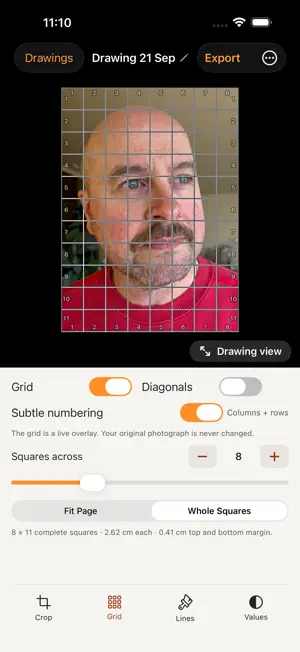
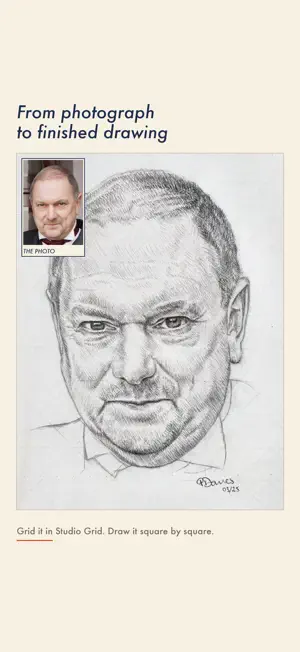
Studio Grid lays a grid over your reference photograph, matched to the paper on your desk, A5, A4, A3 or a size of your own, so every square on screen is a square you can rule. Your first three drawings include every tool, and you keep them for good. After that the grid, paper sizes and numbering stay free for as many drawings as you like, and a single payment unlocks Studio Grid Pro for life. No subscription, no ads, no account. WHY IT IS DIFFERENT Most grid apps put squares over a photo and stop there. Studio Grid starts from your paper. Tell it what you are drawing on and it works out the grid that actually fits, in whole squares if you want no awkward partial row along the edge. THE GRID - Squares across, set by you - Ink that picks itself to suit the photograph, six preset colors, or any color you like - Line thickness and opacity, so the grid sits under the image instead of shouting over it - Diagonals through every square, for placing an angle or a curve exactly - Subtle numbering on all four edges, so you can always name the square you are in SEEING IT BEFORE YOU DRAW IT - Black and white, to judge tone without color arguing with you - Three, five or seven value bands, so the shapes of the tones become obvious - Skin warmth, which lifts warm skin off a cool background that plain gray flattens DRAWING FROM IT - Drawing view puts the reference full screen with the numbers pinned to the edges, and zooms to 6x for detail, without ever moving your crop - Save the gridded reference to Photos, or share it to print or AirDrop at full resolution MADE BY SOMEONE WHO USES IT I am a pencil portrait artist. I built this because the grid apps I tried were built for phones rather than for paper, and because I wanted the reference to stop shifting every time I touched the screen. Everything in here earns its place in my own drawings first. YOUR PHOTOGRAPHS STAY YOURS No account. No sign up. No analytics. Nothing is collected and nothing leaves your device. Your original photograph is never altered: the grid is an overlay, and exporting writes a new image. STUDIO GRID PRO One payment, for good, including future updates. It unlocks diagonals, drawing view, saving and sharing, value bands, skin warmth and any grid color. Family Sharing is on, so your household is covered by the one payment. Your first three drawings keep every tool whether you buy Pro or not. Nothing you have been given is ever taken away.
What’s new
Version 1.0.3 · Updated October 20, 2026
A refreshed App Store listing. No changes to the app itself, it works just as before.
App privacy
The developer, PAUL DAVIES, reported these privacy practices to Apple.
Data Not Collected
The developer does not collect any data from this app.
Alternatives to Studio Grid: Drawing Grid
Looking for apps like Studio Grid: Drawing Grid? Here are 6 similar apps on the App Store. The highest rated is refs. (5.0/5), and all 6 are free to download.
-
 Gridline: Grid & Value Study
-
 Drawing Grid Maker: GridValue
-
 Undertint: Watercolor Mixing
-
 refs.
5.0
refs.
5.0
-
 Drawing Grid Guide
-
 Grid Maker: Drawing Reference
| App | Rating | Price | Last updated | Compare |
|---|---|---|---|---|
| Studio Grid: Drawing Grid | – | Free | October 20, 2026 | |
| Gridline: Grid & Value Study | – | Free | Oct 14, 2026 | Compare |
| Drawing Grid Maker: GridValue | – | Free | Oct 21, 2026 | Compare |
| Undertint: Watercolor Mixing | – | Free | Oct 19, 2026 | Compare |
| refs. | 5.0 / 5 (3) | Free | Mar 1, 2026 | Compare |
| Drawing Grid Guide | – | Free | Aug 27, 2026 | Compare |
| Grid Maker: Drawing Reference | – | Free | Oct 10, 2026 | Compare |