

Brevio: Daily Planner & To-Do
Kateryna Samoilova Productivity iPhoneiPadiPod touch
Brevio: Daily Planner & To-Do is a free Productivity app for iPhone and iPad by Kateryna Samoilova. Requires iOS 16.4. Updated November 2, 2026.
- Price
- Free
- on the App Store
- Size
- 82 MB
- Age 4+
- Updated
- Nov 2
- 2026 · v1.1.0
Screenshots
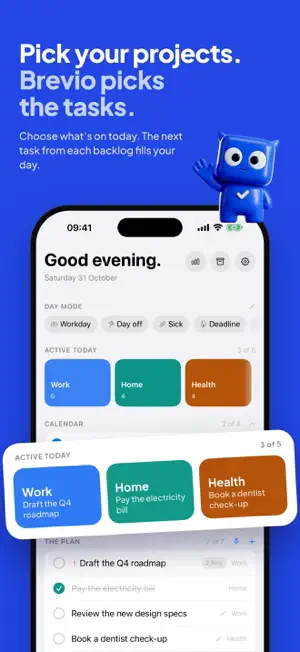
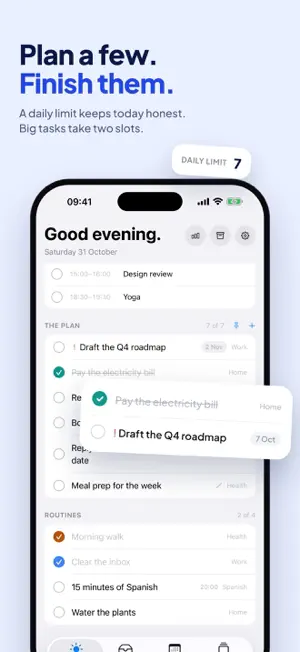


About Brevio: Daily Planner & To-Do
Brevio is a calm daily planner built around one idea: in the morning you pick which projects are on today, and Brevio fills your day with the next task from each backlog. No endless list. No overdue pile. Just today. HOW IT WORKS • Keep a backlog for every project: Work, Home, Health, a side project. The order is the priority. • Each morning, tap the projects you want to move. The top task from each one lands in your plan. • A daily limit keeps the day honest. Big tasks take two slots. • Didn't finish? At midnight, unfinished tasks quietly go back to their backlog. No red, no guilt. • Routines live in their own block and never fall behind. MADE FOR REAL DAYS • Day modes: Workday, Day off, Sick, Deadline. One tap switches which projects are on. • Inbox: catch a thought in a second, sort it into a project later. • Home Screen widgets show your next step with a Done button. • Siri and Shortcuts: "Add a task to Brevio". • Backup with Sign in with Apple. BREVIO PRO • Brevio suggests your day each morning • Custom day modes, like "Deep focus" • Your calendar next to the plan (read-only) • Live Activity and Dynamic Island, with Done right on the Lock Screen • Lock Screen widgets • Weekly, monthly and yearly review receipts • Project templates: moving, product launch, trip, exam prep and more • Color themes and alternate app icons Brevio Pro is available as a monthly or yearly subscription (the yearly plan includes a 7-day free trial for eligible users) or as a one-time lifetime purchase. Subscriptions renew automatically unless cancelled at least 24 hours before the end of the current period. Manage or cancel anytime in your App Store account settings. One thing at a time. Terms of Use: https://brevio-13a0d.web.app/terms Privacy Policy: https://brevio-13a0d.web.app/privacy
What’s new
Version 1.1.0 · Updated November 2, 2026
Brevio now speaks your language: English, German, French, Spanish, Italian, Portuguese, Ukrainian, Russian, Japanese and Korean. iPhone Duo support: open it and Today splits into two panes — plan on the left, do on the right. Also new: • Day reminders — a morning nudge to plan, and an evening look at what got done. Turn them on in Settings. • Upcoming now plans two weeks ahead. • Long task titles show in full. • Clearer VoiceOver labels throughout.
App privacy
The developer, Kateryna Samoilova, reported these privacy practices to Apple.
Data Linked to You
The following data, which may be collected and linked to your identity, may be used for the following purposes:
- Contact Info: Email Address
- User Content: Other User Content
- Identifiers: User ID
Used for: App Functionality
Data Not Linked to You
The following data, which may be collected but is not linked to your identity, may be used for the following purposes:
- Identifiers: Device ID
- Usage Data: Product Interaction
- Purchases: Purchase History
Used for: Analytics, App Functionality
Alternatives to Brevio: Daily Planner & To-Do
Looking for apps like Brevio: Daily Planner & To-Do? Here are 6 similar apps on the App Store. The highest rated is Tysh: Screen Time & Focus (5.0/5), and all 6 are free to download.
-
 Tysh: Screen Time & Focus
5.0
-
 SAFLAN
3.0
-
 Cardhop Contacts
4.4
-
 HOWOGE Wohnungssuche
3.5
-
 neurolist: AI Planner for ADHD
4.8
-
 Awesome Habits: Habit Tracker
4.8
| App | Rating | Price | Last updated | Compare |
|---|---|---|---|---|
| Brevio: Daily Planner & To-Do | – | Free | November 2, 2026 | |
| Tysh: Screen Time & Focus | 5.0 / 5 (11) | Free | Nov 2, 2026 | Compare |
| SAFLAN | 3.0 / 5 (2) | Free | Apr 2, 2026 | Compare |
| Cardhop Contacts | 4.4 / 5 (1,136) | Free | Oct 20, 2026 | Compare |
| HOWOGE Wohnungssuche | 3.5 / 5 (2) | Free | Nov 14, 2024 | Compare |
| neurolist: AI Planner for ADHD | 4.8 / 5 (914) | Free | Apr 21, 2026 | Compare |
| Awesome Habits: Habit Tracker | 4.8 / 5 (945) | Free | Oct 23, 2026 | Compare |