

Tysh: Mindful Phone System
Dmytro Malieiev Productivity iPhoneiPadiPod touch
Tysh: Mindful Phone System is a free Productivity app for iPhone and iPad by Dmytro Malieiev. Rated 5.0/5 from 8 ratings. Requires iOS 17.0.
- Rating
- 5.0
- 8 ratings
- Price
- Free
- on the App Store
- Size
- 153 MB
- Age 4+
- Updated
- Oct 19
- 2026 · v1.4.15
Screenshots

About Tysh: Mindful Phone System
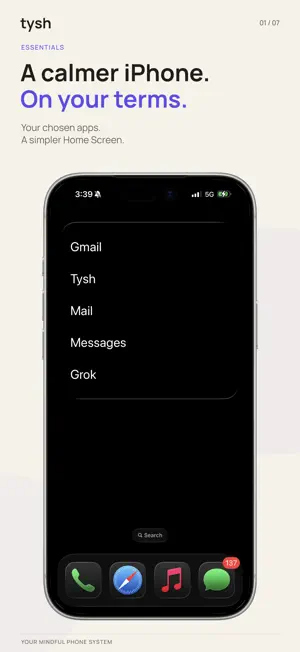
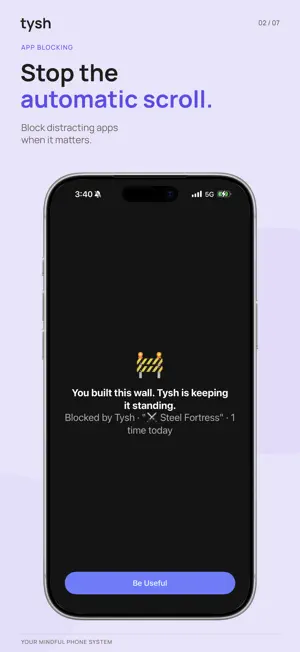
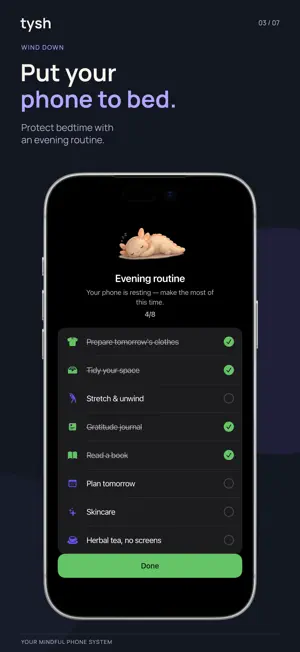
Bring the simplicity of a dumb phone to your iPhone. Tysh is a system for mindful phone use. Start with a simpler Home Screen, choose which apps deserve your attention, and build a rhythm for focus, communication, and rest. SIMPLIFY YOUR HOME SCREEN WITH ESSENTIALS Keep up to ten chosen apps in a clean, text-based widget. Rename them, arrange them your way, and choose a medium or large layout. Open your tools through app links or Apple Shortcuts; some apps need setup. Existing app blocks still apply. Use Essentials as your simpler starting point, then add Tysh's boundaries to decide when distracting apps are available. GIVE YOUR DAY A STRUCTURE Schedule app and website blocks around work, study, time with people, or rest. Choose how firm each boundary should be and see your scheduled blocks in a calendar. MAKE CHECKING A CHOICE Set a daily budget for app opens or minutes. Give the apps you enjoy a place in your day, with a clear stopping point. MAKE TIME TO CONNECT Open Lines gives selected communication apps daily access windows. Catch up at times you choose, with an Open early option when plans change. Notifications still arrive. Active Focus sessions keep their own access rules. PROTECT TIME TO CONCENTRATE Start Quick Focus for one session, or use a Rhythm with focus rounds and rests. Classic and Deep Work Rhythms are included free. Premium adds custom Rhythms, focus sounds, and selected apps you can allow through the Focus block. TURN INTENTIONS INTO ACTION Use a Challenge Block to connect app access to a goal: steps, completed Focus minutes, mindful minutes, or a workout. During its scheduled window, the block stays in place until the goal is verified and you finish the block for the day in Tysh. GIVE THE EVENING A GENTLE END Wind Down blocks apps across your sleep window and gives you separate evening and morning checklists. Add your own activities to make the routine yours. Premium lets you allow selected apps through the Wind Down block. NOTICE YOUR PATTERNS Review Screen Time, focus progress, and the boundaries you kept. Classify apps by the role they play in your day. Use what you learn to adjust your next boundary. FREE TO START Includes the Essentials launcher widget; Easy, Hard, and Challenge scheduled blocks; one reusable App List; app-open and time budgets; Quick Focus; built-in Rhythms; Open Lines with two or three daily windows; Wind Down; reports and widgets. One Easy-block pause is included each day. TYSH PREMIUM Adds unlimited App Lists, Complete Blocks, custom Focus Rhythms, focus sounds, selected allowed apps for Focus and Wind Down, Home Screen icon shortcuts, more Open Lines windows, custom early-access duration, and unlimited Easy-block pauses. Monthly and yearly subscriptions are available. Eligible subscribers can try Premium free for 7 days. Subscriptions renew automatically until canceled. Manage or cancel in your Apple Account settings. Trial availability depends on Apple eligibility. PRIVACY AND PERMISSIONS Detailed Screen Time activity and HealthKit data stay on your device. HealthKit access is read-only and checks the goals you choose. Tysh does not write to Apple Health or upload Health data. Use Tysh without an account. Optional sign-in enables backup and restore of selected settings and progress data. No advertising SDKs or third-party advertising tracking. Tysh uses Apple's Screen Time technology and requires Screen Time authorization for blocking and activity reports. Terms of Use: https://www.ty.sh/terms Privacy Policy: https://www.ty.sh/privacy Apple EULA: https://www.apple.com/legal/internet-services/itunes/dev/stdeula/
Ratings & reviews
5.0
8 ratings
What’s new
Version 1.4.15 · Updated October 19, 2026
Build a calmer phone at your own pace. • Try a gradual Budget Journey. Set a destination for a Launch or Time Budget, then choose whether to take one smaller step each week. Accepted changes begin the next day, so you stay in control. • Start a quiet Tysh Focus with the new Do Nothing Shortcut. Set it as your Double Back Tap action, choose a duration, and Tysh starts your Focus session.
App privacy
The developer, Dmytro Malieiev, reported these privacy practices to Apple.
Data Not Linked to You
The following data, which may be collected but is not linked to your identity, may be used for the following purposes:
- Contact Info: Email Address
- User Content: Other User Content
- Usage Data: Other Usage Data
Used for: App Functionality
Alternatives to Tysh: Mindful Phone System
Looking for apps like Tysh: Mindful Phone System? Here are 6 similar apps on the App Store. The highest rated is My lifecell (4.8/5), and all 6 are free to download.
-
 Мій Київстар-інтернет, дзвінки
4.6
Мій Київстар-інтернет, дзвінки
4.6
-
 My lifecell
4.8
My lifecell
4.8
-
 Google AI Edge Gallery
4.0
Google AI Edge Gallery
4.0
-
 SocialLite-Block Reels&Shorts
4.7
SocialLite-Block Reels&Shorts
4.7
-
 Freedom: Screen Time Control
4.4
Freedom: Screen Time Control
4.4
-
 Miro: your visual workspace
4.7
Miro: your visual workspace
4.7
| App | Rating | Price | Last updated | Compare |
|---|---|---|---|---|
| Tysh: Mindful Phone System | 5.0 / 5 (8 ratings) | Free | October 19, 2026 | |
| Мій Київстар-інтернет, дзвінки | 4.6 / 5 (2,677) | Free | Oct 13, 2026 | Compare |
| My lifecell | 4.8 / 5 (1,944) | Free | Sep 30, 2026 | Compare |
| Google AI Edge Gallery | 4.0 / 5 (163) | Free | Oct 8, 2026 | Compare |
| SocialLite-Block Reels&Shorts | 4.7 / 5 (11,829) | Free | Oct 16, 2026 | Compare |
| Freedom: Screen Time Control | 4.4 / 5 (6,007) | Free | Oct 19, 2026 | Compare |
| Miro: your visual workspace | 4.7 / 5 (5,836) | Free | Oct 19, 2026 | Compare |