

Drop Transcript
Alexander Joubert Productivity iPhoneiPadiPod touchMac
Drop Transcript is a paid Productivity app for iPhone and iPad by Alexander Joubert. Requires iOS 26.0. Updated October 16, 2026.
- Price
- 19.99 USD
- on the App Store
- Size
- 30 MB
- Age 4+
- Updated
- Oct 16
- 2026 · v2.4.1
Screenshots
Save to Pinterest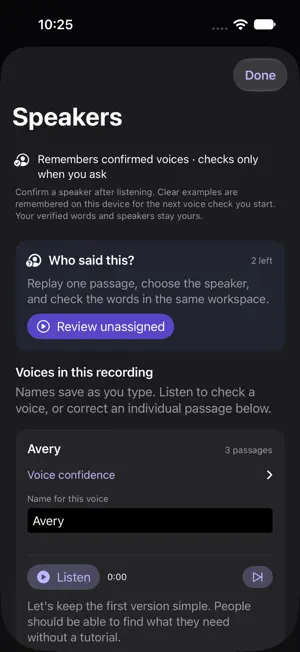

About Drop Transcript
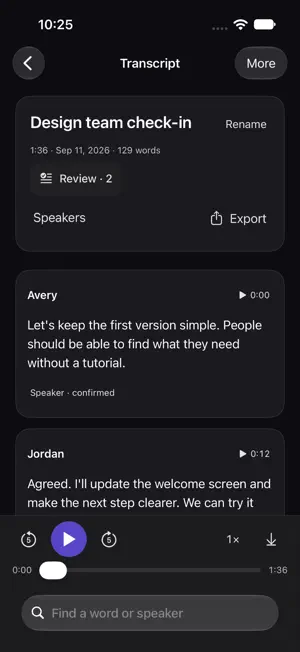
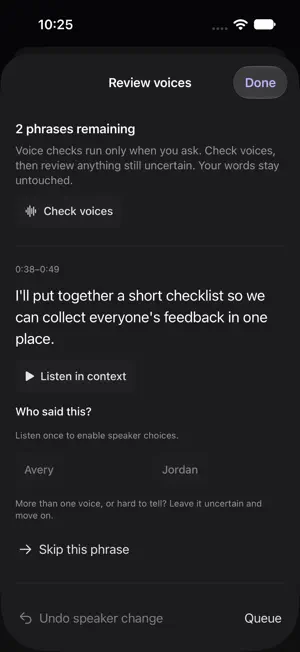
Your recordings. Clearer words. Drop Transcript turns meetings, voice memos, and screen recordings into editable transcripts, right on your iPhone, iPad, or Mac. No account. No subscription. Your recording isn't uploaded for transcription. • Import audio or video from Files, or drag a recording into the Mac app. • Transcribe with on-device speech recognition. • Separate voices, name speakers, and review connected phrases with speaker-confidence details. • Record your own voice example or confirm a speaker in a transcript. Remembered people and voice references stay in a local, app-wide library on that device. • Run Check voices when you choose. Revisit speaker matches without rewriting your words or starting the transcript over. • Listen to the original audio, correct words, and mark passages reviewed. • Export readable text, Markdown, subtitles, or a full JSON record that keeps the original recognition alongside your edits. Speaker models are included with the app. First use may download speech assets for your language from Apple. After those assets are available, transcription and speaker identification run locally without a cloud transcription service. Requires iOS/iPadOS 26 or later on supported hardware, or macOS 26 or later on Apple silicon. Format support depends on the audio codec supported by your device. Keep the iPhone/iPad app open while processing. People libraries do not sync between devices. Speech recognition and speaker matching can make mistakes, especially with overlapping voices, noise, and unfamiliar names. Listen to the recording before relying on an important quotation or speaker attribution.
What’s new
Version 2.4.1 · Updated October 16, 2026
Adds compatibility support for running the iPhone and iPad app on Apple silicon Macs, with a Mac-friendly single-window experience, system file import, visible native export, and keyboard shortcuts for Import and Settings. Drop Transcript remains privacy-first: recordings and transcripts stay local unless you explicitly export or share them.
App privacy
The developer, Alexander Joubert, reported these privacy practices to Apple.
Data Not Collected
The developer does not collect any data from this app.
Alternatives to Drop Transcript
Looking for apps like Drop Transcript? Here are 6 similar apps on the App Store. The highest rated is Meeting Assist Local (5.0/5), and all 6 are free to download.
-
 Meeting Assist Local
5.0
-
 Private Transcribe
5.0
-
 Transcribe - Voice to Text App
4.5
-
 Speech to Text+
3.0
-
 Image Converter to JPG-PDF-PNG
4.6
-
 Image Converter: JPEG PDF HEIC
4.7
| App | Rating | Price | Last updated | Compare |
|---|---|---|---|---|
| Drop Transcript | – | 19.99 USD | October 16, 2026 | |
| Meeting Assist Local | 5.0 / 5 (1) | Free | Oct 23, 2026 | Compare |
| Private Transcribe | 5.0 / 5 (3) | Free | Nov 12, 2026 | Compare |
| Transcribe - Voice to Text App | 4.5 / 5 (14) | Free | Oct 22, 2026 | Compare |
| Speech to Text+ | 3.0 / 5 (2) | Free | May 18, 2026 | Compare |
| Image Converter to JPG-PDF-PNG | 4.6 / 5 (371) | Free | Nov 17, 2026 | Compare |
| Image Converter: JPEG PDF HEIC | 4.7 / 5 (9,023) | Free | Nov 4, 2025 | Compare |
Compare Drop Transcript with the top alternatives: ratings, updates, ASO score and keyword gaps →