

Private Transcribe
Nelson Lai Productivity iPhoneiPadiPod touch
Private Transcribe is a free Productivity app for iPhone and iPad by Nelson Lai. Rated 5.0/5 from 2 ratings. Requires iOS 16.4. Updated September 27, 2026.
- Rating
- 5.0
- 2 ratings
- Price
- Free
- on the App Store
- Size
- 63 MB
- Age 4+
- Updated
- Sep 27
- 2026 · v1.2.3
Screenshots

About Private Transcribe
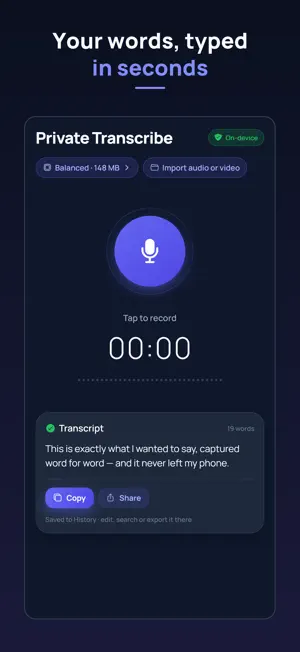
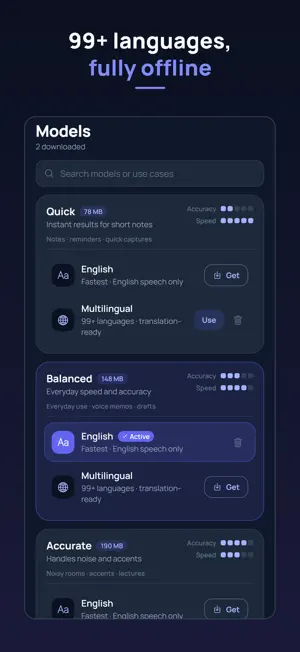
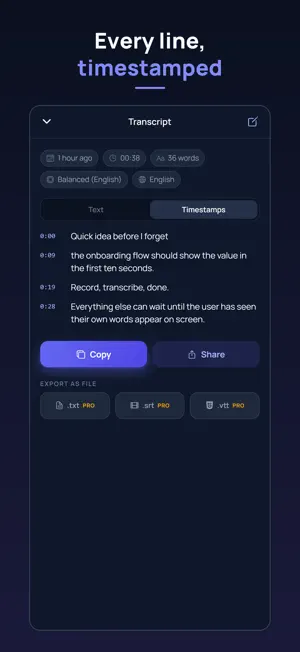
Speech to text that never leaves your phone. Private Transcribe turns your voice into accurate text entirely on your device — Whisper AI runs on the phone itself, so nothing you say is ever uploaded, analyzed, or stored on a server. It even works in airplane mode. HOW IT WORKS 1. Download a speech model once (from 78 MB) 2. Tap the mic and talk — a live waveform shows you're being heard 3. Your words appear as text in seconds. Copy, edit, share, or export. After the one-time model download, no internet connection is ever needed. Transcribe on a plane, in the field, in a dead zone — anywhere. PICK YOUR ACCURACY Unlike cloud transcription apps, you choose the engine: • Quick (78 MB) — instant results for short notes • Balanced (148 MB) — everyday speed and accuracy (recommended) • Accurate (190 MB) — handles background noise and accents • Professional (539 MB) — high accuracy for meetings and interviews • Best (574 MB) — Whisper large-v3-turbo, the most accurate model that runs on a phone Every tier comes in an English-optimized version (fastest) and a multilingual version that understands 99+ languages, including Spanish, French, German, Portuguese, Chinese, Japanese, Korean, Hindi, and Arabic. Pin the spoken language or let Whisper detect it. BUILT FOR REAL WORK • Voice memos that become editable text • Meeting notes and interview transcription • Lecture capture for students • Drafting messages, emails, and ideas by voice • Journaling — speak your thoughts, keep them private EVERYTHING YOU NEED • Import audio and video files — voice memos, meeting recordings, lecture videos, podcasts (m4a, mp3, wav, aac, mp4, mov) — transcribed on-device; videos contribute their audio track • Pause and resume while recording; keeps recording when the screen locks or you switch apps • Custom vocabulary: names, products and jargon come out spelled your way • Timestamps for every line — view, copy, or share a timestamped transcript • Searchable, editable transcription history, grouped by date • Cancel a long transcription; unfinished recordings are recovered if the app is closed • Back up all transcripts to a file you keep, and restore them on a new phone • Word counts and per-recording playback • Copy or share any transcript in one tap • Auto-copy each result to the clipboard (optional) • Keep recordings, or delete the audio automatically and keep only the text • Dark interface designed for long sessions FREE TO USE, PRO IF YOU WANT MORE Private Transcribe is free, supported by ads. A single one-time upgrade — never a subscription — removes all ads permanently, adds speech translation from 99+ languages into English text, and unlocks exporting transcripts as .txt files or .srt and .vtt subtitles with timestamps. PRIVACY, PLAINLY Your recordings and transcripts live only on your device. There is no account, no sign-up, and no server that receives your audio — the transcription engine physically runs on your phone. Delete everything at any time from Settings. If your voice is worth writing down, it's worth keeping private.
What’s new
Version 1.2.3 · Updated September 27, 2026
• Open files from other apps: send an audio or video file to Private Transcribe from the share sheet or the Files app • Titles: an imported file keeps its name as the title, and you can rename any transcription; search finds titles too • Play along with a transcript: tap any line to jump there, follow the highlighted line as it plays, and change speed from 0.75× to 2× • Your edits now carry into timestamps and subtitles, and Pro adds WebVTT (.vtt) export • Nothing gets lost: recordings you haven't transcribed wait in a list, every unfinished recording is recovered if the app closes, and long histories are stored safely • Fixed: videos from the iPhone camera (.MOV) now import • Search shows where your words appear, long transcriptions show the time left, and downloaded models no longer fill your iCloud backup • As always: every word is transcribed on your device, never uploaded
App privacy
The developer, Nelson Lai, reported these privacy practices to Apple.
Data Used to Track You
The following data may be used to track you across apps and websites owned by other companies:
- Identifiers: Device ID
Data Not Linked to You
The following data, which may be collected but is not linked to your identity, may be used for the following purposes:
- Identifiers: Device ID
Used for: Third-Party Advertising
Alternatives to Private Transcribe
Looking for apps like Private Transcribe? Here are 6 similar apps on the App Store. The highest rated is PDF Merger - Bindly (5.0/5), and all 6 are free to download.
-
 CalcSnap
-
 Chronisle
-
 PDF Merger - Bindly
5.0
-
 Link Saver: Video Playlists
-
 WorkIntent - Time Tracker
-
 PDF Splitter 2025
4.0
| App | Rating | Price | Last updated | Compare |
|---|---|---|---|---|
| Private Transcribe | 5.0 / 5 (2 ratings) | Free | September 27, 2026 | |
| CalcSnap | – | Free | Jan 21, 2026 | Compare |
| Chronisle | – | Free | Jun 28, 2026 | Compare |
| PDF Merger - Bindly | 5.0 / 5 (2) | Free | Mar 15, 2026 | Compare |
| Link Saver: Video Playlists | – | Free | Apr 20, 2026 | Compare |
| WorkIntent - Time Tracker | – | Free | Sep 13, 2026 | Compare |
| PDF Splitter 2025 | 4.0 / 5 (4) | Free | May 11, 2025 | Compare |
Compare Private Transcribe with the top alternatives: ratings, updates, ASO score and keyword gaps →