

Chronisle
ACHILLEFS KALATHAS Productivity iPhoneiPadiPod touch
Chronisle is a free Productivity app for iPhone and iPad by ACHILLEFS KALATHAS. Requires iOS 17.6. Updated October 26, 2026.
- Price
- Free
- on the App Store
- Size
- 83 MB
- Age 4+
- Updated
- Oct 26
- 2026 · v1.7.0
Screenshots


About Chronisle
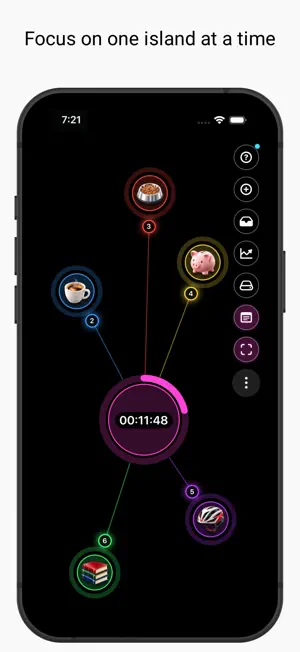
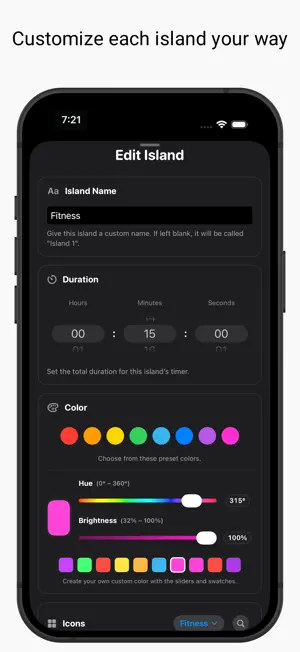
Chronisle — Focus through visual time islands Chronisle is a visual focus timer that transforms your tasks, routines, and goals into customizable time islands. Organize your day, stay focused, and track your progress in a calm, visual workspace. Each island can represent a different task, routine, or goal, helping you build a workspace that feels visual, calm, and easy to understand. **What you can do** - Create multiple focus islands for different tasks - Customize each island with its own name, color, icon, duration, notes, and custom image - Use Countdown or Stopwatch mode - Press and hold a running island to pause or resume - Double-tap an island to reveal its controls - Move and arrange islands freely across your workspace - Automatically save completed sessions in your Activity Log - Save, reuse, and share setups with Template Library - Use Auto Chain to continue from one island to the next - Start and stop timers from the interactive Island Timer Home Screen widget - Cycle through your islands and set a custom duration for the next run directly through the widget and its editor - Track your progress with the small Focus Goal widget - Receive timer-completion notifications with a clear, distinctive alert sound **Live Activities** Follow your running session from the Lock Screen and use Restart, Next, and Stop controls. On supported iPhones, your session and controls can also appear in Dynamic Island. **Why people use Chronisle** - Stay organized without visual clutter - Make focus sessions feel clearer and more motivating - Track progress in a more visual way - Build reusable setups for routines and repeated tasks - Keep important focus tools visible without constantly reopening the app **Privacy-first** No account required. Your islands, sessions, and settings are stored locally on your device and are not automatically uploaded to our servers. Exported template files do not include custom user-selected images.
What’s new
Version 1.7.0 · Updated October 26, 2026
What's New in Chronisle 1.7.0 This update brings more control to your Home Screen, clearer timer alerts, and improved reliability. • New Interactive Island Timer Widget Start and stop timers directly from your Home Screen, see your selected island at a glance, and cycle through your islands with Next. • Flexible Timer Duration Set a custom duration for your next run without changing your island's saved timer settings. • Clearer Completion Sound A new, distinctive notification sound makes timer completions easier to recognize. • Improved Timer Reliability More reliable completion notifications and Auto Chain transitions, with improved handling of paused, stopped, and restarted timers. Thank you for using Chronisle and making time for what matters.
App privacy
The developer, ACHILLEFS KALATHAS, reported these privacy practices to Apple.
Data Not Collected
The developer does not collect any data from this app.
Alternatives to Chronisle
Looking for apps like Chronisle? Here are 6 similar apps on the App Store. The highest rated is Copia: Clipboard Manager (5.0/5), and all 6 are free to download.
-
 Methodica
-
 Copia: Clipboard Manager
5.0
-
 TagTags – Your Day, Tagged
-
 Toodolo
-
 Orbb - Bookmark Everything
1.0
-
 Atelier Timesheet
| App | Rating | Price | Last updated | Compare |
|---|---|---|---|---|
| Chronisle | – | Free | October 26, 2026 | |
| Methodica | – | Free | Feb 3, 2026 | Compare |
| Copia: Clipboard Manager | 5.0 / 5 (2) | Free | Sep 24, 2026 | Compare |
| TagTags – Your Day, Tagged | – | Free | Oct 22, 2026 | Compare |
| Toodolo | – | Free | Feb 13, 2026 | Compare |
| Orbb - Bookmark Everything | 1.0 / 5 (1) | Free | Aug 31, 2026 | Compare |
| Atelier Timesheet | – | Free | Oct 16, 2026 | Compare |
Compare Chronisle with the top alternatives: ratings, updates, ASO score and keyword gaps →