

Video Stabilizer, Stabivio
Amir Ashrafi Photo & Video iPhoneiPadiPod touch
Video Stabilizer, Stabivio is a free Photo & Video app for iPhone and iPad by Amir Ashrafi. Rated 5.0/5 from 3 ratings. Requires iOS 15.0.
- Rating
- 5.0
- 3 ratings
- Price
- Free
- on the App Store
- Size
- 47 MB
- Age 4+
- Updated
- Oct 19
- 2026 · v1.2.0
Screenshots
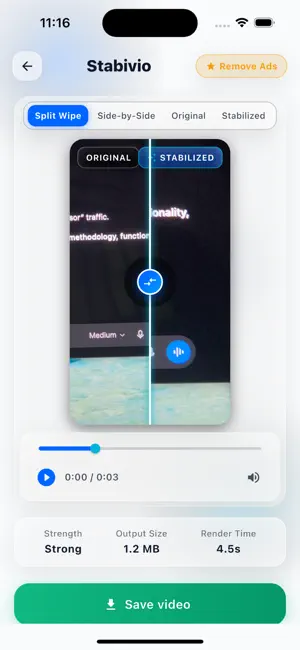
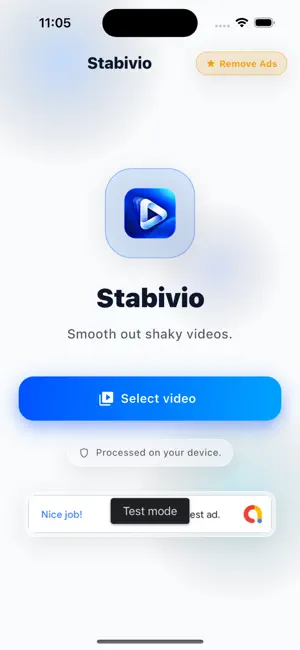

About Video Stabilizer, Stabivio
Turn shaky handheld footage into smooth, steady video. Stabivio analyzes camera motion and stabilizes your clips right on your device: no uploads, no account. WHY STABIVIO • Powerful stabilization: removes shake, jitter and wobble from walking shots, action clips, vlogs, travel and drone footage • Smart Path engine: ignores moving subjects and crops only as much as your clip needs. The Classic engine is included too • 3 strength levels: Light, Balanced or Strong • Tripod mode: lock the shot as if it were filmed on a tripod • Before & after comparison: slide between the original and the stabilized video, or view them side by side • Keep your quality: export in original resolution or 1080p, HDR videos supported • 100% private: all processing happens on your device. Your videos never leave it • Save to Photos or share to any app in one tap • My Videos: your stabilized videos stay in the app, ready to save or share again • Background processing: on iOS 26 and later, keep using your iPhone while Stabivio works, and get a notification when your video is ready HOW IT WORKS 1. Pick a video from your library 2. Choose a stabilization strength 3. Tap Stabilize, compare and save FREE & PRO Stabivio is free with ads. Free exports include a small Stabivio watermark, which you can remove from any video by watching a short ad. Stabivio Pro is a one-time purchase that removes all ads and the watermark forever. No subscription. Download Stabivio and make your next video smooth and steady. Questions or feedback? Visit binarycodert.com
What’s new
Version 1.2.0 · Updated October 19, 2026
• Smart Path: a new, recommended stabilization engine that ignores moving subjects and crops only as much as your clip needs. Classic is still available. • Tripod mode: lock the shot as if it were filmed on a tripod. • My Videos: your stabilized videos stay in the app, ready to save or share again. • Background processing: on iOS 26 and later, keep using your iPhone while Stabivio works, and get a notification when your video is ready. • HDR and 10-bit videos keep their colors, and more formats are supported. • Much faster processing for 4K videos, and smoother playback. • Better handling of portrait videos. • Fewer interruptions: at most one full-screen ad per video, and you can remove the watermark by watching a short ad while you wait.
App privacy
The developer, Amir Ashrafi, reported these privacy practices to Apple.
Data Used to Track You
The following data may be used to track you across apps and websites owned by other companies:
- Location: Coarse Location
- Identifiers: Device ID
- Usage Data: Product Interaction, Advertising Data
Data Not Linked to You
The following data, which may be collected but is not linked to your identity, may be used for the following purposes:
- Location: Coarse Location
- Identifiers: Device ID
- Usage Data: Product Interaction, Advertising Data
- Purchases: Purchase History
- Diagnostics: Crash Data, Performance Data, Other Diagnostic Data
Used for: Third-Party Advertising, Analytics, App Functionality
Alternatives to Video Stabilizer, Stabivio
Looking for apps like Video Stabilizer, Stabivio? Here are 6 similar apps on the App Store. The highest rated is Video Stabilizer Pro (5.0/5), and all 6 are free to download.
-
 Video Stabilizer Pro
5.0
-
 Stabilizer - Video Stabilizer
-
 TapVV
5.0
-
 Stablify: Video Stabilizer
-
 Pxlit: Stabilized Video Editor
-
 Slowmo Pro
| App | Rating | Price | Last updated | Compare |
|---|---|---|---|---|
| Video Stabilizer, Stabivio | 5.0 / 5 (3 ratings) | Free | October 19, 2026 | |
| Video Stabilizer Pro | 5.0 / 5 (3) | Free | Oct 15, 2026 | Compare |
| Stabilizer - Video Stabilizer | – | Free | Jul 17, 2026 | Compare |
| TapVV | 5.0 / 5 (1) | Free | Oct 3, 2026 | Compare |
| Stablify: Video Stabilizer | – | Free | Oct 24, 2026 | Compare |
| Pxlit: Stabilized Video Editor | – | Free | Sep 17, 2026 | Compare |
| Slowmo Pro | – | Free | Oct 19, 2026 | Compare |