

Slowmo Pro
JIRI CHOMAT Photo & Video iPhoneiPadiPod touch
Slowmo Pro is a free Photo & Video app for iPhone and iPad by JIRI CHOMAT. Requires iOS 26.0. Updated October 19, 2026.
- Price
- Free
- on the App Store
- Size
- 55 MB
- Age 17+
- Updated
- Oct 19
- 2026 · v1.0.2
Screenshots


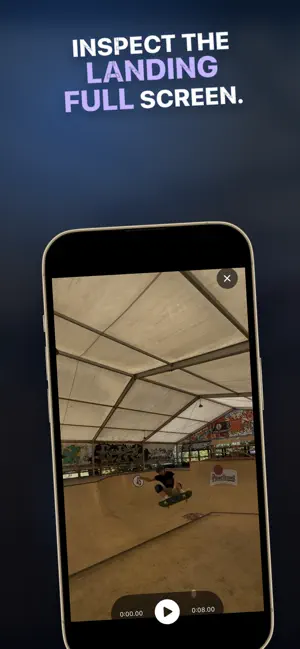
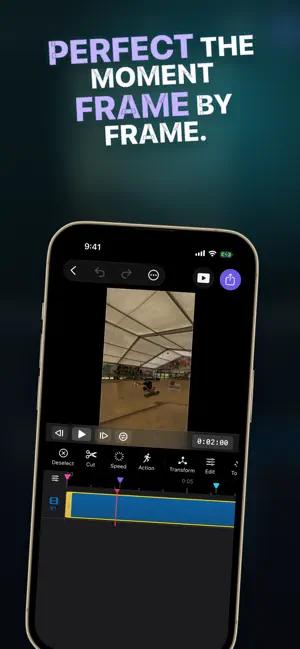
About Slowmo Pro
Capture more moments. Decide how time moves afterward. Slowmo Pro is a camera-first slow-motion studio. Choose a frame rate your current camera really supports, record with the active FPS and resolution always visible, and open the finished take directly in a complete editor. CAPTURE WITH CONFIDENCE • Choose from supported 30, 60, 120, and 240 FPS formats • See the exact committed frame rate and resolution before recording • Switch cameras with automatic frame-rate revalidation • Get a low-light hint when high-speed capture needs more light • Keep a persistent red recording indicator and elapsed time on screen • Recover a playable take after an interrupted session SHAPE SLOW MOTION IN POST • Start with the full take slowed automatically, then add more sections if needed • Adjust section boundaries and speed with a clear slider at any time • See the effective frame rate for the selected speed and where 30 real FPS ends • Step frame by frame for precise timing • Choose 30 or 60 FPS output • See exactly where captured frames end and synthesized frames begin • Keep pitch-preserving audio or create a silent slow-motion take SMOOTH MOTION, HONESTLY LABELED Slowmo Pro uses every real captured frame first. If you push a section beyond the capture budget, choose Blend or Enhanced Smooth Motion. Enhanced uses on-device motion estimation and automatically falls back to Blend when needed, so one difficult frame never ruins the whole render. NON-DESTRUCTIVE BY DESIGN Every speed-ramp edit renders from the untouched original capture—not from a previous slow-motion copy. Reopen the tool, change your timing, or remove the effect without degrading the source. A COMPLETE EDITOR AFTER CAPTURE Trim and split clips, add captions, text, graphics, color adjustments, audio, transitions, and effects, then export for your preferred social format. Import existing high-frame-rate footage from Photos or Files too. PRIVATE BY DESIGN Recording, motion estimation, editing, and export run on your device. No account is required. Your video and audio are not uploaded to our server. Your first successful export is watermark-free. After that, Watermark-Free Export is an optional Pro purchase that removes only the watermark from exported videos. Every capture, Smooth Motion, editing, and export tool remains available for free. Terms of Use: https://www.apple.com/legal/internet-services/itunes/dev/stdeula/
What’s new
Version 1.0.2 · Updated October 19, 2026
Improved preview stability after repeated high-frame-rate recordings. Slow Motion previews now recover when the media system resets. Saving exports to Photos is more reliable, with Save to Files available if saving is interrupted.
App privacy
The developer, JIRI CHOMAT, reported these privacy practices to Apple.
Data Linked to You
The following data, which may be collected and linked to your identity, may be used for the following purposes:
- User Content: Customer Support
- Identifiers: Device ID
- Usage Data: Product Interaction
- Diagnostics: Crash Data, Other Diagnostic Data
Used for: App Functionality
Alternatives to Slowmo Pro
Looking for apps like Slowmo Pro? Here are 6 similar apps on the App Store. The highest rated is TakeCut: AI Video Editor (5.0/5), and all 6 are free to download.
-
 TakeCut: AI Video Editor
5.0
TakeCut: AI Video Editor
5.0
-
 Speed Contact Sheet
-
 Fast Camera Video Editor
-
 Cut Trim Split Video Editor
5.0
Cut Trim Split Video Editor
5.0
-
 Video Speed Editor - Changer
-
 Slowed and Reverb
3.0
Slowed and Reverb
3.0
| App | Rating | Price | Last updated | Compare |
|---|---|---|---|---|
| Slowmo Pro | – | Free | October 19, 2026 | |
| TakeCut: AI Video Editor | 5.0 / 5 (2) | Free | Oct 29, 2026 | Compare |
| Speed Contact Sheet | – | Free | Oct 9, 2026 | Compare |
| Fast Camera Video Editor | – | Free | Aug 3, 2026 | Compare |
| Cut Trim Split Video Editor | 5.0 / 5 (1) | Free | Oct 4, 2026 | Compare |
| Video Speed Editor - Changer | – | Free | Sep 1, 2026 | Compare |
| Slowed and Reverb | 3.0 / 5 (2) | Free | Jul 25, 2026 | Compare |
Compare Slowmo Pro with the top alternatives: ratings, updates, ASO score and keyword gaps →