

RITMUS: Habits & Screen Time
Gunhee Lee Productivity iPhoneiPadiPod touch
RITMUS: Habits & Screen Time is a free Productivity app for iPhone and iPad by Gunhee Lee. Requires iOS 17.0. Updated September 30, 2026.
- Price
- Free
- on the App Store
- Size
- 29 MB
- Age 4+
- Updated
- Sep 30
- 2026 · v0.3.2
Screenshots


About RITMUS: Habits & Screen Time
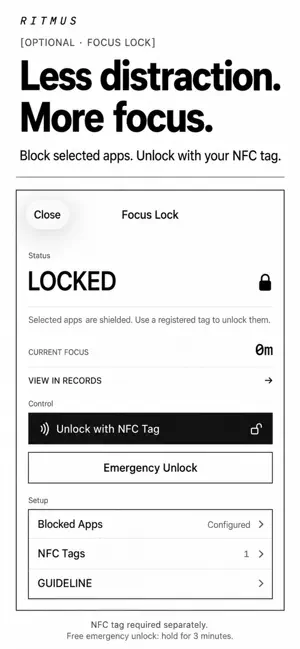
Build habits. Spend less time on your phone. RITMUS brings daily habit tracking and phone usage goals together. Follow through on what matters and become more intentional about the time you spend on your phone. [Daily habits and tasks] Keep recurring habits and today's tasks in one place. Mark success or failure, or leave a result unrecorded. See your day in time order and check habits from your Home Screen widget. [Build a habit of less phone time] Set a daily phone usage goal with a PHONE habit and check off the result yourself. With Apple Screen Time access, review measured usage and explore weekly and monthly records of phone time, offline time, and daily patterns. Start spending less time on your phone by understanding where your time goes. A usage goal does not automatically block apps. Use Focus Lock below when you want to block selected apps. [Records and stats] Review weekly and monthly habit records and completion rates. Explore results by habit and date, and look back on your phone usage records to plan your next step. [When you need focus — Focus Lock] Block selected distracting apps to make room for what you want to do. Unlock them with a registered NFC tag. Focus Lock does not lock your entire phone. A compatible physical NFC tag is required separately. Free Emergency Unlock requires a continuous three-minute hold. [When you want company — Together] Invite friends to practice the same habit. Up to four people, including you, can fill a circle together using results each person enters. Friends' actual phone usage time is not shared. [Milestones that add up] From your first check to cumulative milestones and consecutive streaks, see small actions add up through achievements. [Your usage stays on your device] Measured phone usage and selected-app information are not sent off your device. Screen Time features require access on that device. Notion is optional: export personal habit records to your own workspace, one way from RITMUS to Notion. [English and Korean] Choose English or Korean in the app's Settings. Check your day. Make time for what matters. RITMUS by NEICA
What’s new
Version 0.3.2 · Updated September 30, 2026
[A clearer introduction] Updated App Store copy and screenshots show habit tracking alongside phone usage goals and records. They also clarify how Together and Focus Lock can support your daily practice.
App privacy
The developer, Gunhee Lee, reported these privacy practices to Apple.
Data Linked to You
The following data, which may be collected and linked to your identity, may be used for the following purposes:
- Identifiers: User ID, Device ID
- Usage Data: Other Usage Data
- Other Data: Other Data Types
- Location: Coarse Location
- Contact Info: Email Address, Name, Phone Number
- User Content: Other User Content
Used for: Analytics, App Functionality
Data Not Linked to You
The following data, which may be collected but is not linked to your identity, may be used for the following purposes:
- Diagnostics: Other Diagnostic Data
Used for: Analytics
Alternatives to RITMUS: Habits & Screen Time
Looking for apps like RITMUS: Habits & Screen Time? Here are 6 similar apps on the App Store. The highest rated is Simple Todo: Four Boxes (5.0/5), and all 6 are free to download.
-
 미루지마 - 초단기 일정관리 앱
-
 Mosco - Calendar & To-Do
-
 Simple Todo: Four Boxes
5.0
-
 오늘치
-
 Yooti 유티 - 캘린더 할일 루틴 기념일
-
 워너비 : 5분 루틴, 오늘 습관, 하루 회고
| App | Rating | Price | Last updated | Compare |
|---|---|---|---|---|
| RITMUS: Habits & Screen Time | – | Free | September 30, 2026 | |
| 미루지마 - 초단기 일정관리 앱 | – | Free | Jan 13, 2026 | Compare |
| Mosco - Calendar & To-Do | – | Free | Oct 14, 2026 | Compare |
| Simple Todo: Four Boxes | 5.0 / 5 (1) | Free | Aug 29, 2026 | Compare |
| 오늘치 | – | Free | Aug 6, 2026 | Compare |
| Yooti 유티 - 캘린더 할일 루틴 기념일 | – | Free | Sep 27, 2026 | Compare |
| 워너비 : 5분 루틴, 오늘 습관, 하루 회고 | – | Free | Apr 25, 2024 | Compare |