

Mosco - Calendar & To-Do
JunYoung Seo Productivity iPhoneiPadiPod touch
Mosco - Calendar & To-Do is a free Productivity app for iPhone and iPad by JunYoung Seo. Requires iOS 17.0. Updated November 3, 2026.
- Price
- Free
- on the App Store
- Size
- 7 MB
- Age 4+
- Updated
- Nov 3
- 2026 · v1.6.0
Screenshots
Save to Pinterest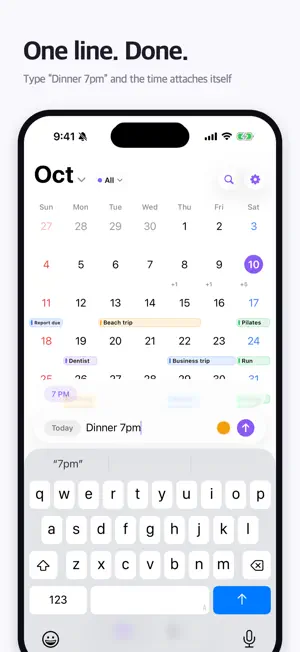

About Mosco - Calendar & To-Do
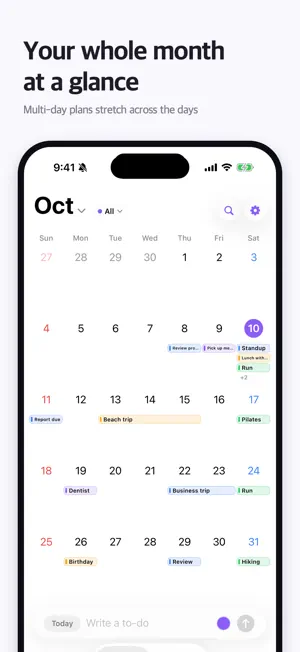
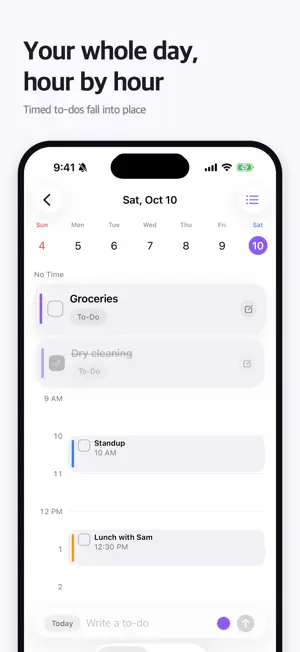
Do you skip writing things down because to-do apps take too many taps? With Mosco, one line is enough. Type "Dinner 7pm" and the time is set. Type "Run" and it lands in your exercise category. No separate screens for picking a date, a time, and a category. ■ Write one line "Meeting 3pm", "Study 4pm to 7pm", "Lunch at noon" — write the way you'd say it and Mosco picks up the time. ■ Categories sort themselves Create your categories once. Mosco reads what you wrote and files it in the right one. All of this happens on your device. What you write never leaves it. ■ Your month at a glance Open the calendar and your to-dos appear as colored bars. Multi-day plans stretch across the days. ■ One day at a time Tap a date on the calendar to see that day on one page. There's an hour-by-hour view too. ■ What to do first lives in the To-Do tab Overdue, undated, and upcoming to-dos, in the order they need you. D-Days sit at the top, nearest first. ■ Home Screen widgets Today's to-dos, a week calendar, and a month calendar. See them without opening the app. ■ Also Repeating to-dos, reminders before start, a daily wrap-up, Lock Screen countdown, iCloud sync, weather, theme color. No account needed.
What’s new
Version 1.6.0 · Updated November 3, 2026
The button on the right of each to-do is now Note. To change a to-do, touch and hold it and pick Edit. The button looks solid when there's a note and faint when there isn't. New • A Notes tab. No checkboxes, no dates, no categories — just writing. The first line becomes the title. • To-dos that don't need finishing, like a birthday or payday. They get no checkbox and never pile up in your list, but they stay on the calendar and in D-Days. • A "Completion check" switch on each category. Turn it off and everything in that category comes without a checkbox. • A D-Day widget. The nearest one sits on your Home Screen. Better • One line now reads dates: "tomorrow", "next Friday", "the 28th". • Start a new line and everything below it is the note. • The week strip above a day lines its dates up with the weekday columns. • Days you marked as D-Days show a flag on the calendar. Fixed • Finishing a repeating to-do in the To-Dos tab now shows on the calendar too. • Moving a repeating to-do's date clears the input bar with it, so you no longer end up with a second copy. • All-day repeating events let you pick their first day.
App privacy
The developer, JunYoung Seo, reported these privacy practices to Apple.
Data Not Linked to You
The following data, which may be collected but is not linked to your identity, may be used for the following purposes:
- Location: Coarse Location
- Usage Data: Product Interaction
Used for: App Functionality
Alternatives to Mosco - Calendar & To-Do
Looking for apps like Mosco - Calendar & To-Do? Here are 6 similar apps on the App Store.
-
 Yooti 유티 - 캘린더 할일 루틴 기념일
-
 달빛 캘린더 - 위젯 달력
-
 OhMaCal: Calendar & Countdown
-
 PureFlow - 심플 투두리스트
-
 Ripen - Before Your Tasks Rot
-
 Planner: Tasks & Goals
| App | Rating | Price | Last updated | Compare |
|---|---|---|---|---|
| Mosco - Calendar & To-Do | – | Free | November 3, 2026 | |
| Yooti 유티 - 캘린더 할일 루틴 기념일 | – | Free | Sep 27, 2026 | Compare |
| 달빛 캘린더 - 위젯 달력 | – | Free | Nov 5, 2026 | Compare |
| OhMaCal: Calendar & Countdown | – | Free | Nov 17, 2026 | Compare |
| PureFlow - 심플 투두리스트 | – | Free | Feb 8, 2026 | Compare |
| Ripen - Before Your Tasks Rot | – | Free | Oct 5, 2026 | Compare |
| Planner: Tasks & Goals | – | Free | Aug 17, 2026 | Compare |