

ScrollCop: App Blocker
Jashandeep Singh Health & Fitness iPhoneiPadiPod touch
ScrollCop: App Blocker is a free Health & Fitness app for iPhone and iPad by Jashandeep Singh. Requires iOS 18.0. Updated October 25, 2026.
- Price
- Free
- on the App Store
- Size
- 7 MB
- Age 4+
- Updated
- Oct 25
- 2026 · v3.2.0
Screenshots



About ScrollCop: App Blocker
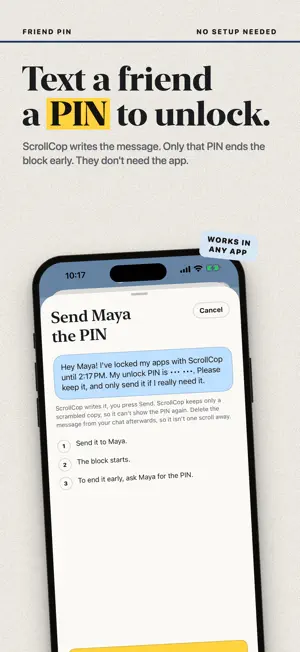
Every app blocker has an off switch. At 11 p.m. you will find it. ScrollCop is a friendly cop for your phone: you decide, before the urge, who gets to let your apps out. BLOCK APPS IN TWO TAPS Tap the apps that eat your time: Instagram, TikTok, YouTube, Reddit, X, or any app on your phone, plus whole categories and websites. Pick how long. The apps disappear from your Home Screen and won't open until time's up. It runs on Apple's Screen Time, so it holds even if you close ScrollCop. Try to open one and you get pulled over. YOU CHOOSE WHO CAN END IT EARLY Every block starts as "Nobody", so it really holds. Change it with one tap: • Me: end it whenever you want, after a ten-second pause. • Nobody: not even you. It opens when time's up. • A friend: ScrollCop texts them a one-time PIN. Only that PIN ends the block early. Your friend doesn't need the app. Want it even stronger? Give a friend your key, and codes come only from their phone. Locks hold even if you change the date or time, and ScrollCop can't be deleted while a locked block runs. Schedules start locked too. SCHEDULES THAT RUN EVERY DAY Block apps at the same time every day, automatically, even with ScrollCop closed. Give each schedule its own apps: games during study time, social apps at dinner, everything at bedtime. Choose who can switch it off: you, nobody, or your friend. Start from Bedtime, Mornings, Work hours, Study time or Dinner, or make your own. A COP THAT CHEERS YOU ON Over 5,000 short, original lines turn up around the app: on Home, while a block runs, on the screen you see when you try to open a blocked app, and when a block is done. Some are jokes, some are pep talks, all of them are on your side. Every block you finish is a numbered case, and the cop salutes when you close one. 165 THINGS TO DO INSTEAD Bored? Stressed? Up too late? ScrollCop suggests three small things that fit the time you have and the time of day: stretch for three minutes, write a two-line poem, tidy one drawer, lay out tomorrow's clothes. Tap "Show me three others" for more. A PLAN FOR THE URGE Decide once what you'll do when the pull hits: drink a glass of water, do ten squats, text a friend. Your plan shows up on the screen a blocked app opens to, right when you need it. SOS FOR THE MOMENT IT HITS Tap "I feel the urge" and ScrollCop asks what you actually need: bored, stressed, tired, lonely, avoiding something. It gives you one small thing to do instead, then checks whether the pull dropped. BOREDOM GYM Scrolling trained you to fill every gap. This trains the opposite: short exercises in sitting with nothing, thirty seconds first, then longer. YOUR WEEK AT A GLANCE One sentence about your week, a simple chart, an optional weekly goal and three plain numbers, like "45 min blocked today" and "12 days in a row without your blocked apps". Everything else is one tap away, each number with a line saying what it means. Counted on your phone. A slip is data, not failure. No guilt notifications. PRIVATE BY DESIGN No account. No server. No ads, no analytics, no subscription. Apple's Screen Time gives ScrollCop opaque tokens, so it can't see which apps you use. Export or delete everything whenever you like. Free. Made in Canada. A behaviour-change tool, not medical advice.
What’s new
Version 3.2.0 · Updated October 25, 2026
ScrollCop 3.2 is easier to use and a little more fun. • Every block you finish is a numbered case. Close one and the cop salutes. • Tap the cop for a new line. It wiggles. • Keys you hold for friends fold into one tidy row on Home, with Send right there. • Ending a block early asks a different question each time, so the pause stays fresh. • The 30-Day Rebuild shows steps done, then days to go. • Schedules can switch on Screen Time right from the Schedules page. • Turning on a locked schedule during its hours now asks first. • Long blocks show the date they end, not just the day. • Rate ScrollCop after your first finished block, if you like it. • Clearer words throughout: "Same apps as Home", "Day off the loop", "Skip for now". • Big headings follow your text size. Fixes: • A "Nobody" schedule stays Nobody when you add a friend key later. • "Thank your friend" now appears after every block a friend held. • Delete everything also removes your plan and weekly goal. • The weekly goal waits for your first block to finish. • "Welcome back" only shows after a few days away from the app.
App privacy
The developer, Jashandeep Singh, reported these privacy practices to Apple.
Data Not Collected
The developer does not collect any data from this app.
Alternatives to ScrollCop: App Blocker
Looking for apps like ScrollCop: App Blocker? Here are 6 similar apps on the App Store. The highest rated is Food & Activity Log: Vivenote (5.0/5), and all 6 are free to download.
-
 TestoCheck: Boost Testosterone
-
 Widgets for Garmin: WristGrid
4.2
-
 Food & Activity Log: Vivenote
5.0
-
 Essence: Quit Addiction
4.7
-
 Celibacy Tracker: Streak Count
4.9
-
 Mysa: Sleep & Sounds App
4.6
| App | Rating | Price | Last updated | Compare |
|---|---|---|---|---|
| ScrollCop: App Blocker | – | Free | October 25, 2026 | |
| TestoCheck: Boost Testosterone | – | Free | Sep 24, 2026 | Compare |
| Widgets for Garmin: WristGrid | 4.2 / 5 (5) | Free | Oct 22, 2026 | Compare |
| Food & Activity Log: Vivenote | 5.0 / 5 (4) | Free | Jul 11, 2025 | Compare |
| Essence: Quit Addiction | 4.7 / 5 (19) | Free | Jun 16, 2026 | Compare |
| Celibacy Tracker: Streak Count | 4.9 / 5 (8) | Free | Jul 29, 2026 | Compare |
| Mysa: Sleep & Sounds App | 4.6 / 5 (215) | Free | Mar 25, 2026 | Compare |