

PDF Files Snap
Fuzhou Mahu Zhenmei Network Technology Co,. Ltd. Productivity iPhoneiPadiPod touch
PDF Files Snap is a free Productivity app for iPhone and iPad by Fuzhou Mahu Zhenmei Network Technology Co,. Ltd. Rated 2.5/5 from 2 ratings.
- Rating
- 2.5
- 2 ratings
- Price
- Free
- on the App Store
- Size
- 97 MB
- Age 4+
- Updated
- Oct 29
- 2026 · v1.1.0
Screenshots
Save to Pinterest


About PDF Files Snap
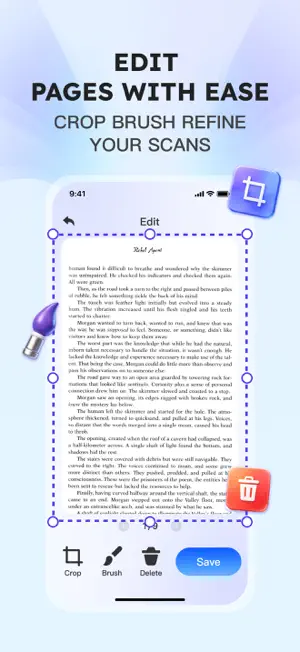
Use your device camera to capture photos or paper documents and convert the scanned pages into PDF files. The home screen provides quick access to document scanning and image-to-PDF tools. Convert Images to PDF Select images from your photo gallery and create a PDF in just a few steps. This makes it easy to turn photos and other image files into a PDF document. Edit Scanned Pages After scanning a document, you can make basic adjustments before saving. Available editing tools include: · Crop scanned pages · Use the Brush tool for page adjustments · Delete unwanted pages · Save the edited scan as a PDF OCR Text Extraction Use OCR to recognize text from scanned documents or images. After recognition, you can view the extracted text directly in the app. Merge PDF Files Select multiple PDF files, adjust their order, and combine them into a single PDF document. Split PDF Files Split one PDF document into multiple separate PDF files when you only need certain parts of the original document. Simple PDF Tools in One Place PDF Files Snap brings together commonly used document tools, including document scanning, image-to-PDF conversion, scan editing, OCR text extraction, PDF merging, and PDF splitting. These tools are designed to support common document scanning, conversion, editing, and PDF file processing needs in one app.
What’s new
Version 1.1.0 · Updated October 29, 2026
Bug fixes and stability improvements for a smoother experience.
App privacy
The developer, Fuzhou Mahu Zhenmei Network Technology Co,. Ltd., reported these privacy practices to Apple.
Data Used to Track You
The following data may be used to track you across apps and websites owned by other companies:
- Identifiers: Device ID
Data Not Linked to You
The following data, which may be collected but is not linked to your identity, may be used for the following purposes:
- Identifiers: Device ID
- Diagnostics: Crash Data, Performance Data
Used for: Third-Party Advertising, App Functionality
Alternatives to PDF Files Snap
Looking for apps like PDF Files Snap? Here are 6 similar apps on the App Store. The highest rated is PDF View-Picture Create (5.0/5), and all 6 are free to download.
-
 PDF Scanner: AI PDF Scan
3.3
-
 PDF View-Picture Create
5.0
-
 Document Scanner: PDF Scan App
5.0
-
 CleanSpace: Photo & File Tools
5.0
-
 PDF Reader&Scanner
5.0
-
 LiLit Cleaner: Scroll & Tidy
4.3
| App | Rating | Price | Last updated | Compare |
|---|---|---|---|---|
| PDF Files Snap | 2.5 / 5 (2 ratings) | Free | October 29, 2026 | |
| PDF Scanner: AI PDF Scan | 3.3 / 5 (3) | Free | Oct 14, 2026 | Compare |
| PDF View-Picture Create | 5.0 / 5 (1) | Free | Nov 6, 2026 | Compare |
| Document Scanner: PDF Scan App | 5.0 / 5 (1) | Free | Oct 6, 2026 | Compare |
| CleanSpace: Photo & File Tools | 5.0 / 5 (1) | Free | Nov 12, 2026 | Compare |
| PDF Reader&Scanner | 5.0 / 5 (3) | Free | Sep 14, 2026 | Compare |
| LiLit Cleaner: Scroll & Tidy | 4.3 / 5 (16) | Free | Nov 6, 2026 | Compare |
Compare PDF Files Snap with the top alternatives: ratings, updates, ASO score and keyword gaps →