

Freezon - Dual-Layer Vault
阳 钟 Photo & Video iPhoneiPadiPod touch
Freezon - Dual-Layer Vault is a free Photo & Video app for iPhone and iPad by 阳 钟. Requires iOS 18.0. Updated October 28, 2026.
- Price
- Free
- on the App Store
- Size
- 27 MB
- Age 4+
- Updated
- Oct 28
- 2026 · v1.0.7
Screenshots

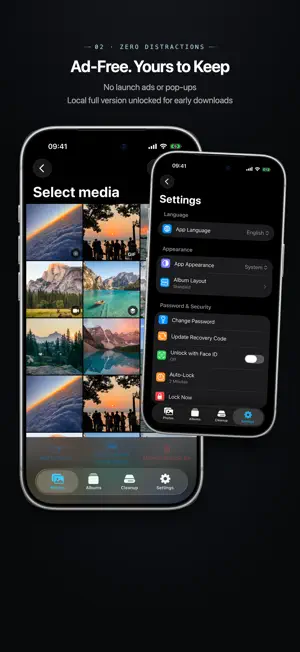


About Freezon - Dual-Layer Vault
Freezon is an on-device encrypted photo vault for iPhone and iPad. Import selected photos and videos, then view, organize, and back them up on your own device. No account is required. TWO SEPARATE ALBUMS Freezon includes an Everyday Album and a Private Album. Each uses its own password, encryption keys, index, and media storage. Enter the corresponding password from the same unlock screen to open either album. The Everyday Album can use Face ID or Touch ID for quick access, depending on your device. The Private Album always requires its own password. Each album has a separate Recovery Code for resetting its password and restoring encrypted backups. BROAD MEDIA SUPPORT Freezon supports photos, videos, Live Photos, GIFs, RAW/ProRAW, and more. It saves the original resources made available by Photos without intentionally compressing or replacing them, along with available details such as capture date, location, favorite status, media type, and album relationships. Items stored only in iCloud are downloaded by the system before import. After each import, a detailed result shows what was saved, already present, waiting for download, or unsupported. BROWSE, ORGANIZE, AND FIND Create albums within Freezon, mark favorites, add notes, and browse by date or media type. Search by filename, capture date, album name, note, or location. Photos with location data can be viewed on a map, and nearby photos can be found. Map network access is off by default. MOVE BETWEEN ALBUMS Selected items can be moved between the Everyday and Private Albums. Freezon confirms the destination and selected items, verifies both album passwords, and protects the moved items with the destination album’s password and keys. MANAGE ORIGINALS IN PHOTOS After importing, keep the originals in Photos or select them for removal later. Before requesting deletion, Freezon checks the encrypted copy, backup status, and selected items again. Only verified items that you confirm are submitted to the system for deletion. Deleted originals normally remain in Recently Deleted until the system removes them. ENCRYPTED BACKUP AND RECOVERY Create a separate encrypted backup for each album through the Files picker. Freezon supports incremental backups, status checks, and resuming interrupted work. Backups can be stored in Files, on a computer, on external storage, or with a file provider you choose. Use the matching Recovery Code to restore an album after reinstalling the app or moving to another device. Photos and videos can also be saved back to Photos or exported through the system share sheet. Exported copies are not encrypted by Freezon. PRIVACY Freezon requires no account and includes no ads, analytics, or tracking SDKs. Your photos and album contents are not uploaded to the developer’s servers. iCloud downloads are handled by Apple, and encrypted backup syncing depends on the storage location you select. The developer has no access to your passwords, Recovery Codes, or encryption keys. If both an album password and its Recovery Code are lost, the developer cannot recover its contents. BENEFITS FOR EXISTING USERS Freezon currently offers all features for free. A future version will introduce a one-time purchase. If you download Freezon before that purchase option launches, you will keep all benefits included in the one-time purchase for life, at no extra cost. Launch details will be announced separately.
What’s new
Version 1.0.7 · Updated October 28, 2026
- Added Korean, Latin American Spanish, and Brazilian Portuguese. - Improved text layout on iPhone and iPad. - Improved navigation in Settings and fixed issues with split-view switching and titles.
App privacy
The developer, 阳 钟, reported these privacy practices to Apple.
Data Not Collected
The developer does not collect any data from this app.
Alternatives to Freezon - Dual-Layer Vault
Looking for apps like Freezon - Dual-Layer Vault? Here are 6 similar apps on the App Store. The highest rated is Senvra: Private Photo Vault (5.0/5), and all 6 are free to download.
-
 Inner20
-
 Senvra: Private Photo Vault
5.0
Senvra: Private Photo Vault
5.0
-
 Amazingface - Photo Vault
-
 SnapVault: Space Cloud
5.0
SnapVault: Space Cloud
5.0
-
 Photo Vault-Private Photos
-
 PixVault - Private Photo Vault
5.0
PixVault - Private Photo Vault
5.0
| App | Rating | Price | Last updated | Compare |
|---|---|---|---|---|
| Freezon - Dual-Layer Vault | – | Free | October 28, 2026 | |
| Inner20 | – | Free | Aug 19, 2025 | Compare |
| Senvra: Private Photo Vault | 5.0 / 5 (1) | Free | Sep 16, 2026 | Compare |
| Amazingface - Photo Vault | – | Free | Oct 4, 2026 | Compare |
| SnapVault: Space Cloud | 5.0 / 5 (1) | Free | Aug 28, 2026 | Compare |
| Photo Vault-Private Photos | – | Free | May 12, 2026 | Compare |
| PixVault - Private Photo Vault | 5.0 / 5 (1) | Free | Sep 26, 2026 | Compare |