

Amazingface - Photo Vault
OFFERSEES Photo & Video iPhoneiPadiPod touchMac
Amazingface - Photo Vault is a free Photo & Video app for iPhone and iPad by OFFERSEES. Requires iOS 17.0. Updated October 4, 2026.
- Price
- Free
- on the App Store
- Size
- 23 MB
- Age 12+
- Updated
- Oct 4
- 2026 · v1.0.6
Screenshots



About Amazingface - Photo Vault
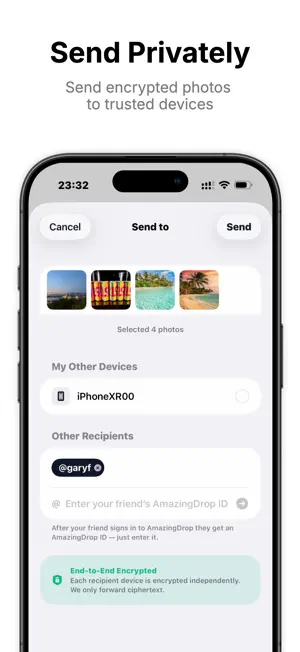
Amazingface keeps your private photos and videos safe on your own iPhone, Mac, or an external drive connected to your Mac. Imported files are encrypted and stored in a vault. Your files are yours, forever. Create separate vaults to organize your collection your way. When you want to send something, use AmazingDrop to securely send selected photos and videos to your other devices or someone you trust. Need to send something privately? AmazingDrop uses end-to-end encryption to send files to a trusted recipient. The relay handles encrypted transfer data and removes it after delivery or expiration — without creating a shared cloud album. WHY AMAZINGFACE • Encrypted files, not just a locked screen Imported photos and videos are encrypted with XChaCha20-Poly1305 inside an app-managed local vault. Your vault key is protected with Argon2id-based password key derivation. Read the technical details at amazingface.app/security • Local vault, under your control Your private vault remains on your iPhone instead of becoming an Amazingface cloud photo library. • End-to-end encrypted AmazingDrop Send selected files privately to a trusted recipient—without a public link, social feed, or shared cloud album. The relay temporarily holds encrypted transfer data and removes it after delivery or expiration. • Recovery stays with you Amazingface does not store your vault password or recovery phrase. Save your Recovery Phrase separately. If you lose both, Amazingface cannot restore access to your vault. • Focused and private No public feed or photo discovery network—just a private place for photos and videos you want to keep separate. • No ads or cross-app tracking Amazingface does not use advertising or third-party analytics SDKs. Its services keep only the account identifiers, device public keys, purchase status, quota usage, and encrypted-delivery records needed to operate sign-in, subscriptions, and AmazingDrop. Vault media, vault passwords, and recovery phrases are not sent to Amazingface. IMPORTANT Before deleting Amazingface, export anything you want to keep. Deleting the app may also delete its local encrypted vault data. Terms of Use (EULA): https://www.apple.com/legal/internet-services/itunes/dev/stdeula/ Privacy Policy: https://amazingface.app/privacy
What’s new
Version 1.0.6 · Updated October 4, 2026
• Create and switch between multiple vaults to organize your private photos and videos the way you want. • Thumbnails now load faster when you open the app, so you can spend less time waiting and more time browsing.
App privacy
The developer, OFFERSEES, reported these privacy practices to Apple.
Data Linked to You
The following data, which may be collected and linked to your identity, may be used for the following purposes:
- Purchases: Purchase History
- Identifiers: User ID, Device ID
- Usage Data: Other Usage Data
Used for: App Functionality
Alternatives to Amazingface - Photo Vault
Looking for apps like Amazingface - Photo Vault? Here are 6 similar apps on the App Store. The highest rated is Sablefold: Photo & Video Vault (5.0/5), and all 6 are free to download.
-
 Phorder: Photo Vault Organizer
-
 Sablefold: Photo & Video Vault
5.0
Sablefold: Photo & Video Vault
5.0
-
 Vaultify: Hide Photos & Videos
5.0
Vaultify: Hide Photos & Videos
5.0
-
 AlbumFort: Private Photo Vault
5.0
AlbumFort: Private Photo Vault
5.0
-
 ArkWarden Hidden Photo Vault
5.0
ArkWarden Hidden Photo Vault
5.0
-
 AtticAlbum: Encrypted Photos
| App | Rating | Price | Last updated | Compare |
|---|---|---|---|---|
| Amazingface - Photo Vault | – | Free | October 4, 2026 | |
| Phorder: Photo Vault Organizer | – | Free | Sep 21, 2026 | Compare |
| Sablefold: Photo & Video Vault | 5.0 / 5 (1) | Free | Oct 10, 2026 | Compare |
| Vaultify: Hide Photos & Videos | 5.0 / 5 (1) | Free | Sep 26, 2026 | Compare |
| AlbumFort: Private Photo Vault | 5.0 / 5 (1) | Free | Oct 20, 2026 | Compare |
| ArkWarden Hidden Photo Vault | 5.0 / 5 (6) | Free | Oct 26, 2026 | Compare |
| AtticAlbum: Encrypted Photos | – | Free | Oct 21, 2026 | Compare |