

One Touch Work Log
lu qi hao Productivity iPhoneiPadiPod touch
One Touch Work Log is a free Productivity app for iPhone and iPad by lu qi hao. Requires iOS 16.4. Updated October 13, 2026.
- Price
- Free
- on the App Store
- Size
- 51 MB
- Age 4+
- Updated
- Oct 13
- 2026 · v1.2
Screenshots

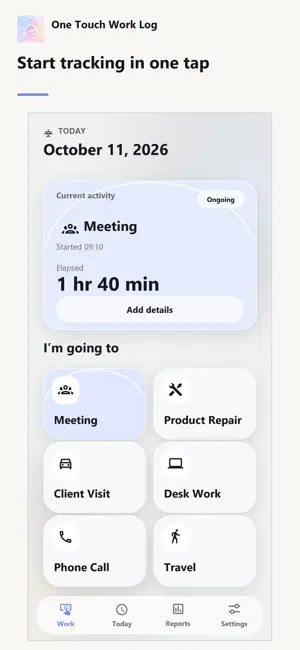


About One Touch Work Log
Know where your workday went, one tap at a time. One Touch Work Log is a simple work-time tracker. Tap the activity you're doing to start recording. When you switch to the next activity, the previous entry ends automatically, building a clear timeline of your day. SWITCH ACTIVITIES WITH ONE TAP Choose from your work activities to start logging a meeting, client visit, desk work, phone call, travel, or whatever your day involves. SEE YOUR DAY AS A TIMELINE Review each entry's start and end times, details, and notes. Edit an activity, its times, or its content whenever you need to correct a record. GET A DAILY REPORT Pick a date from the calendar to see total work time, time by activity, and the full timeline. No manual totaling required. SHARE YOUR WORK LOG Copy a daily report as text, email it, or use the system share menu. When you choose to, you can also add completed work entries to Calendar. MAKE IT YOUR WORKFLOW Add, edit, reorder, or hide activities. Choose light, dark, or system appearance and use the app in English, Traditional Chinese, Simplified Chinese, or Japanese. Core work entries are stored on your device, and no account is required. The app may display ads. See the privacy policy for information about ad-related data processing and your choices.
What’s new
Version 1.2 · Updated October 13, 2026
Version 1.2 improves startup stability and the bottom layout, keeping content, ads, and navigation clearly separated. You can choose a report date directly from a calendar, and the interface updates when you change the app language.
App privacy
The developer, lu qi hao, reported these privacy practices to Apple.
Data Linked to You
The following data, which may be collected and linked to your identity, may be used for the following purposes:
- Identifiers: Device ID
- Diagnostics: Crash Data, Performance Data
Used for: Third-Party Advertising, Analytics
Data Not Linked to You
The following data, which may be collected but is not linked to your identity, may be used for the following purposes:
- Location: Coarse Location
- Usage Data: Product Interaction, Advertising Data
Used for: Third-Party Advertising, Analytics
Alternatives to One Touch Work Log
Looking for apps like One Touch Work Log? Here are 6 similar apps on the App Store. The highest rated is Firefly Todo - Drag Calendar (5.0/5), and all 6 are free to download.
-
 Methodly: Goals & Routines
-
 Firefly Todo - Drag Calendar
5.0
Firefly Todo - Drag Calendar
5.0
-
 Wise 40: Work Hours & Shifts
-
 萊姆輸入法
5.0
萊姆輸入法
5.0
-
 掌管 HRconnect
-
 Hours + Minutes Calculator Pro
4.5
Hours + Minutes Calculator Pro
4.5
| App | Rating | Price | Last updated | Compare |
|---|---|---|---|---|
| One Touch Work Log | – | Free | October 13, 2026 | |
| Methodly: Goals & Routines | – | Free | Jul 26, 2026 | Compare |
| Firefly Todo - Drag Calendar | 5.0 / 5 (1) | Free | Oct 22, 2026 | Compare |
| Wise 40: Work Hours & Shifts | – | Free | Oct 4, 2026 | Compare |
| 萊姆輸入法 | 5.0 / 5 (1) | Free | Aug 10, 2026 | Compare |
| 掌管 HRconnect | – | Free | Sep 9, 2026 | Compare |
| Hours + Minutes Calculator Pro | 4.5 / 5 (175) | Free | Jun 22, 2025 | Compare |
Compare One Touch Work Log with the top alternatives: ratings, updates, ASO score and keyword gaps →