

Voice Clock: Talking Clock
ORIENTPRO - LAM AN INVESTMENT & TRADE.,JSC Lifestyle iPhoneiPadiPod touchApple Watch
Voice Clock: Talking Clock is a free Lifestyle app for iPhone and iPad by ORIENTPRO - LAM AN INVESTMENT & TRADE.,JSC. Requires iOS 26.0.
- Price
- Free
- on the App Store
- Size
- 14 MB
- Age 4+
- Updated
- Sep 28
- 2026 · v1.0
Screenshots
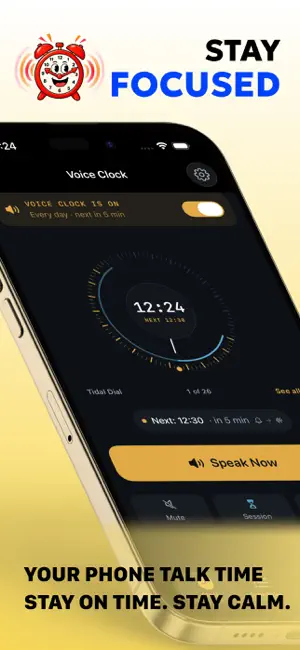
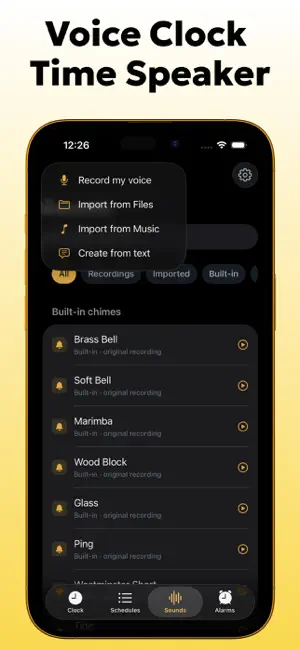
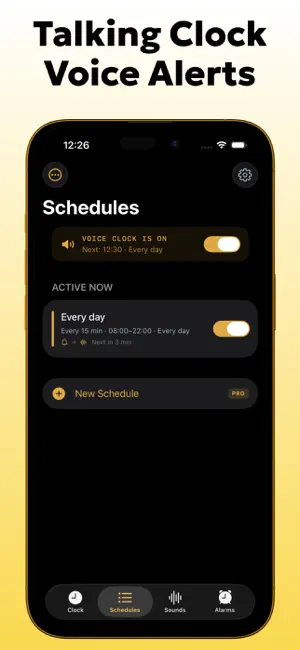

About Voice Clock: Talking Clock
Voice Clock says the time out loud, on a schedule you choose — and keeps working when the app is closed. Most talking clocks stop after a few days. Voice Clock is built on iOS 26's alarm system, so announcements survive a force-quit and a reboot. If anything goes wrong, it tells you before you notice, and why. ANNOUNCE THE TIME, YOUR WAY • On the hour, or every 30, 15, 10 or 5 minutes • Custom minute and second intervals, down to five seconds • A five-minute heads-up before each announcement • Active hours, quiet hours and per-weekday rules • Four ways to say it, from "It's quarter past three" to "Three fifteen" • Write your own phrase: "Hey — it's {time}. {message}" TWENTY-SIX CLOCK FACES — SWIPE TO CHANGE Swipe left or right on the clock to try another, or tap See all to browse the set by theme. The default, Tidal Dial, is a 24-hour dial where every brass tick is a moment it will speak. Classic — Tidal Dial · Classic Analog · Rings · Minimal Typographic — Large Type · Word Clock · Digital · Terminal · Dot Matrix · Pixel · Editorial Retro — Flip · Nixie · Vinyl Expressive — Neon · Love · Starfield Instrument — Speed · Sunrise · Orbit · Chronograph Calm — Aurora · Wave · Breathe Luxe — Mesh · Gold Fifteen of them move — Love beats once a second, Gold catches a shine that travels across the hour, and the Speed gauge redlines in the last minute before it speaks. All hold still with Reduce Motion on. Keep one face everywhere, or give each surface its own. BUILD YOUR OWN FACE • Five layouts: centred, stacked, corner, hands, or in words • Five typefaces, six weights, ten colours, previewed as you pick • Your own photo as the background, from your library or the camera • A dimming slider, so digits stay readable over a busy picture Your photo is copied into the app and never leaves your device. BUILT FOR PEOPLE WHO NEED IT • VoiceOver from the first screen, not bolted on afterwards • Dynamic Type to the largest accessibility sizes • High-contrast theme, Reduce Motion and Reduce Transparency • Simple Mode: one enormous "Say the time" button and nothing else YOUR OWN SOUNDS • Record your voice — or anyone's — as the announcement • Bring in a track, a voice memo, or any audio file • Turn a sentence into a sound, in a system voice or your Personal Voice • A real waveform editor: trim, fades, gain, loudness matching, speed • Nothing is destructive. Your original file is never modified. ALARMS AND TIMERS THAT TALK • Alarms that speak their label — "Time to take your tablets" • Prominent alarms ring through silent mode and Focus • Spoken cues at halfway, 1 minute, 30 seconds and 3·2·1 • Multi-step interval timers for circuits and recipes • Focus Sessions that announce elapsed time — "Twenty minutes in" EVERYWHERE YOU ALREADY ARE Apple Watch app and complications · Home Screen, Lock Screen and StandBy widgets · Control Center · Siri and Shortcuts · Live Activity · iPad and Mac TWO THINGS NOBODY ELSE HAS Sound Check runs nine live checks and says in plain language whether the app will work, with the fix beside each. The Delivery Log records every announcement — spoken, skipped or failed — with the reason. "Skipped 3:00 PM — you were on a call." No account. No server. No analytics. No ad identifiers. No third-party code. Speech is synthesised on device. Your recordings, photos, schedules and settings stay there, and sync only through your own private iCloud. Pro adds unlimited schedules, all twenty-six faces, the face builder, Personal Voice, custom phrases, second-level intervals, the full audio editor, multi-step timers and CarPlay. Privacy Policy: https://orlproducts.pages.dev/privacy.html Terms of Use: https://www.apple.com/legal/internet-services/itunes/dev/stdeula/ Got ideas or feedback? Send them our way: [email protected]
App privacy
The developer, ORIENTPRO - LAM AN INVESTMENT & TRADE.,JSC, reported these privacy practices to Apple.
Data Not Linked to You
The following data, which may be collected but is not linked to your identity, may be used for the following purposes:
- User Content: Photos or Videos, Audio Data
Used for: App Functionality
Alternatives to Voice Clock: Talking Clock
Looking for apps like Voice Clock: Talking Clock? Here are 6 similar apps on the App Store. The highest rated is Remember – Life Journal (5.0/5), and all 6 are free to download.
-
 Monolog – Voice & Video Diary
-
 Remember – Life Journal
5.0
Remember – Life Journal
5.0
-
 More Chime: Talking Clock
4.2
More Chime: Talking Clock
4.2
-
 Shanti Journal: Video Diary
4.3
Shanti Journal: Video Diary
4.3
-
 Talking Clock: Time Announcer
1.0
Talking Clock: Time Announcer
1.0
-
 Chime Machine
1.0
Chime Machine
1.0
| App | Rating | Price | Last updated | Compare |
|---|---|---|---|---|
| Voice Clock: Talking Clock | – | Free | September 28, 2026 | |
| Monolog – Voice & Video Diary | – | Free | Apr 14, 2026 | Compare |
| Remember – Life Journal | 5.0 / 5 (7) | Free | Jun 26, 2026 | Compare |
| More Chime: Talking Clock | 4.3 / 5 (4) | Free | Jul 15, 2026 | Compare |
| Shanti Journal: Video Diary | 4.3 / 5 (3) | Free | Oct 15, 2026 | Compare |
| Talking Clock: Time Announcer | 1.0 / 5 (1) | Free | Aug 25, 2026 | Compare |
| Chime Machine | 1.0 / 5 (1) | Free | Nov 4, 2025 | Compare |