

Pro System Monitor: CPU & RAM
Netkreatives bv Utilities iPhoneiPadiPod touch
Pro System Monitor: CPU & RAM is a free Utilities app for iPhone and iPad by Netkreatives bv. Requires iOS 18.0. Updated October 9, 2026.
- Price
- Free
- on the App Store
- Size
- 22 MB
- Age 4+
- Updated
- Oct 9
- 2026 · v1.1.5
Screenshots

About Pro System Monitor: CPU & RAM
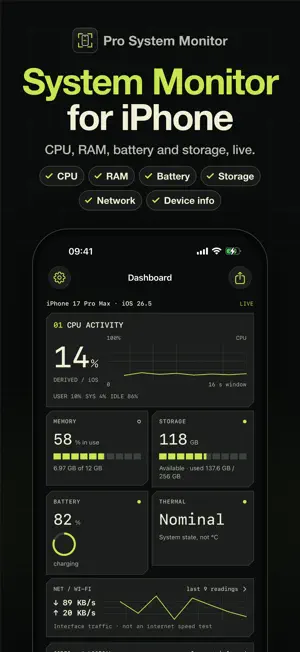
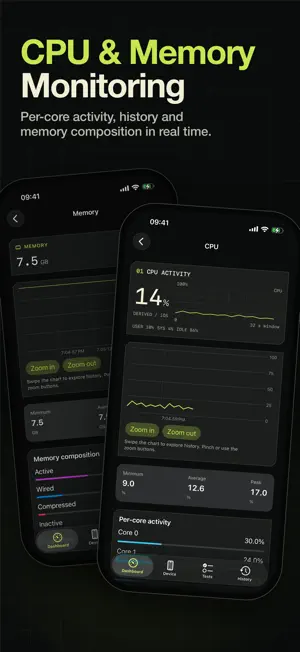
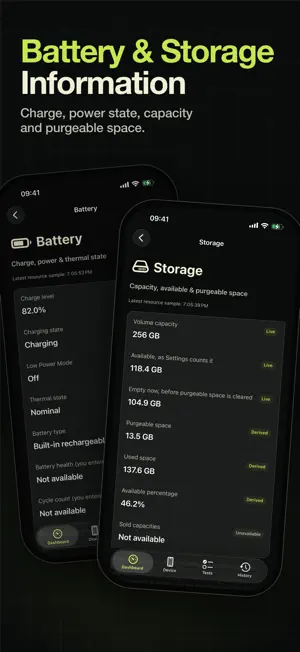
Pro System Monitor shows what your iPhone is doing right now and what hardware it has: live CPU, memory, battery, storage and network monitoring, full device information, hardware tests and a performance benchmark. Every value says where it comes from: read live from iOS, derived from those readings, published by Apple, or entered by you. SYSTEM MONITOR • CPU activity per core, with history and load averages • Memory in use and memory composition: active, wired, compressed and inactive • Storage capacity, available space as Settings counts it, and purgeable space • Battery level, charging state, Low Power Mode and thermal state • Network activity for Wi-Fi and cellular DEVICE INFORMATION • Model, chip, display, cameras, audio, sensors, system and connectivity • Apple's published specifications for your model, and side-by-side comparisons with other models • The sensors, cameras and radios iOS reports HARDWARE TESTS • 11 tests you run yourself: display patterns, HDR and SDR, touch coverage, camera and microphone, speaker channels, motion sensors, step measurement, proximity sensor, Face ID or Touch ID, haptic feedback and NFC tags • A guided device inspection for buying or selling a phone. You judge each result; the app does not certify hardware. PERFORMANCE BENCHMARK • Processor, GPU, memory and storage workloads in about 15 seconds • Benchmark points for comparing the same iPhone over time, not a ranking against other phones DEVICE CHECK AND REPORTS • Condition checks with stated thresholds for storage, thermal state, battery and memory, and no made-up score • Share a check card image, save snapshots, and export PDF, CSV and spreadsheet reports • Recordings, long-term trends and a battery health log you fill in from Settings ONE PURCHASE One in-app purchase unlocks the full app. No subscription, no ads and no account. The purchase belongs to your Apple Account and restores on your other devices. WHAT THIS APP DOES NOT DO It does not clean memory, speed up your device, read battery health or temperature, or see other apps. Readings stay on your device unless you share them.
What’s new
Version 1.1.5 · Updated October 9, 2026
Each Pro tool explains what it does, and after unlocking you return to your selected tool. Manual hardware checks now offer a personal assessment. Live readings and the existing free tools remain available.
App privacy
The developer, Netkreatives bv, reported these privacy practices to Apple.
Data Linked to You
The following data, which may be collected and linked to your identity, may be used for the following purposes:
- Purchases: Purchase History
- Identifiers: Device ID
- Usage Data: Product Interaction
Used for: Analytics, App Functionality
Alternatives to Pro System Monitor: CPU & RAM
Looking for apps like Pro System Monitor: CPU & RAM? Here are 6 similar apps on the App Store.
-
 Omni Recorder
-
 Temperatura Monitor
-
 System Edge
-
 PadPub: Ad Blocker & DNS
-
 Device Info - Phone info
-
 Phone Hardware & Diagnostics
| App | Rating | Price | Last updated | Compare |
|---|---|---|---|---|
| Pro System Monitor: CPU & RAM | – | Free | October 9, 2026 | |
| Omni Recorder | – | Free | Feb 11, 2026 | Compare |
| Temperatura Monitor | – | Free | Oct 4, 2026 | Compare |
| System Edge | – | Free | Nov 4, 2024 | Compare |
| PadPub: Ad Blocker & DNS | – | Free | Oct 18, 2026 | Compare |
| Device Info - Phone info | – | Free | Jun 30, 2026 | Compare |
| Phone Hardware & Diagnostics | – | Free | Sep 14, 2026 | Compare |