

Phone Hardware & Diagnostics
Emre Atik Utilities iPhoneiPadiPod touch
Phone Hardware & Diagnostics is a free Utilities app for iPhone and iPad by Emre Atik. Requires iOS 26.0. Updated September 14, 2026.
- Price
- Free
- on the App Store
- Size
- 22 MB
- Age 4+
- Updated
- Sep 14
- 2026 · v1.0
Screenshots

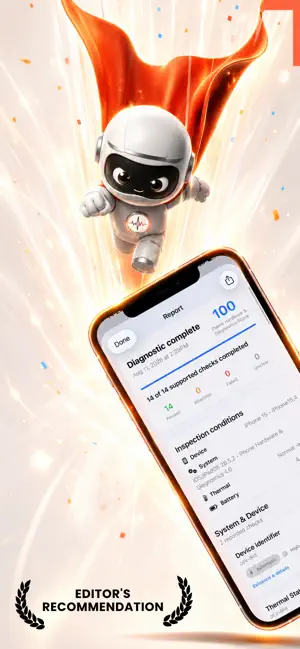
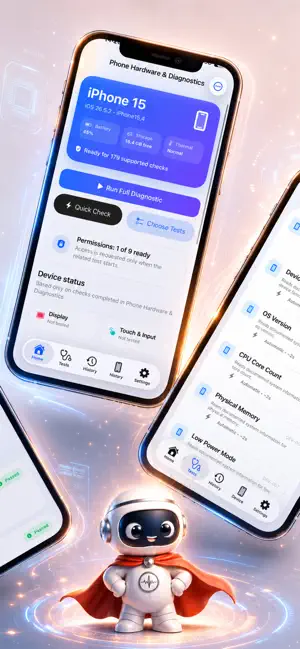

About Phone Hardware & Diagnostics
"Know what your iPhone or iPad can do, verify key hardware functions, and understand performance with guided diagnostics designed for real-world use. Choose a fast Quick Check, run a Full Diagnostic, or open individual tests. Check display colors and touch coverage, speakers and microphones, cameras and torch, motion and environmental sensors, storage, charging state, network and Bluetooth connectivity, biometrics, and supported features such as NFC, UWB, LiDAR and Apple Pencil. Performance tools can measure CPU, GPU, memory, storage throughput, frame pacing and thermal-state changes using repeatable workloads. Every test explains what it checks, how it works, and what the result can actually prove. Automatic measurements are kept separate from user confirmations. Permission limits, unsupported hardware and inconclusive conditions are shown clearly instead of being treated as failures. Use focused inspection modes when buying or selling a used device or after a repair. Save diagnostic history, compare selected results over time, retry items that need attention, and create clear reports that can be shared when needed. Privacy is built into the testing flow. Camera, microphone and sensor access is requested only when a relevant test needs it. Test captures are not kept permanently unless you choose to save or share them. The available test list adapts to the hardware your device actually supports, so you are not asked to run features that are not present. Some advanced checks may require compatible hardware, an accessory, an NFC tag or a second Apple device. Important: this is an independent diagnostic utility, not an Apple service tool. iOS does not provide third-party apps with every low-level metric. Exact CPU/GPU sensor temperatures, real-time processor clock speeds, official Battery Health percentage and cycle count are not presented as measured values when the public APIs do not provide them." All features and tools are available via in-app purchases with auto-renewable subscriptions. Auto-Renewable Subscription Terms: • The payment will be charged to your Apple ID Account at confirmation of purchase. • The subscription renews automatically unless the auto-renew is turned off at least 24 hours before the end of the current billing period. • Your account will be charged for renewal within 24 hours before the end of your selected subscription. • Your subscriptions can be managed, and auto-renewal can be turned off by going to your App Store Account Settings. Terms: https://eatkdevtermsofuse.carrd.co This application includes fee-based content: • Phone Hardware & Diagnostics Weekly ( with 3 days trial ) Then $4.99 • Phone Hardware & Diagnostics Monthly $9.99 • Phone Hardware & Diagnostics Yearly $24.99
App privacy
The developer, Emre Atik, reported these privacy practices to Apple.
Data Not Collected
The developer does not collect any data from this app.
Alternatives to Phone Hardware & Diagnostics
Looking for apps like Phone Hardware & Diagnostics? Here are 6 similar apps on the App Store. The highest rated is Synapse: Device Check (5.0/5), and all 6 are free to download.
-
 Synapse: Device Check
5.0
Synapse: Device Check
5.0
-
 MicCheck - Mic&Speaker Tester
-
 Phone Diagnostics - Hardware
-
 CallSign Check
5.0
CallSign Check
5.0
-
 Pro System Monitor: CPU & RAM
-
 PhoneScore — IMEI Checker
| App | Rating | Price | Last updated | Compare |
|---|---|---|---|---|
| Phone Hardware & Diagnostics | – | Free | September 14, 2026 | |
| Synapse: Device Check | 5.0 / 5 (10) | Free | Jul 19, 2026 | Compare |
| MicCheck - Mic&Speaker Tester | – | Free | Sep 9, 2026 | Compare |
| Phone Diagnostics - Hardware | – | Free | Sep 10, 2026 | Compare |
| CallSign Check | 5.0 / 5 (4) | Free | Aug 25, 2026 | Compare |
| Pro System Monitor: CPU & RAM | – | Free | Oct 9, 2026 | Compare |
| PhoneScore — IMEI Checker | – | Free | Oct 6, 2026 | Compare |