

Presub — Video Subtitles
KYOUNG HOON SONG Utilities iPhoneiPadiPod touch
Presub — Video Subtitles is a free Utilities app for iPhone and iPad by KYOUNG HOON SONG. Requires iOS 26.0. Updated October 19, 2026.
- Price
- Free
- on the App Store
- Size
- 7 MB
- Age 17+
- Updated
- Oct 19
- 2026 · v1.2.0
Screenshots


About Presub — Video Subtitles
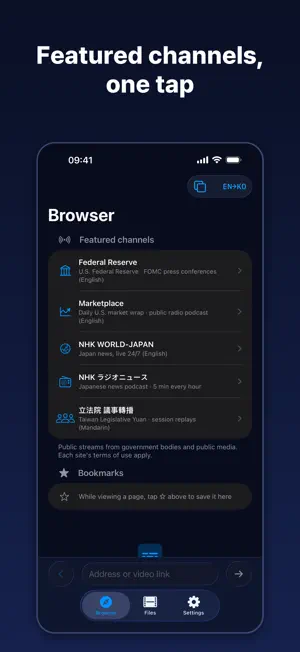
Turn what a video says into original and translated subtitles. This is not live interpretation. Subtitles are built ahead of playback and kept, so wherever you rewind to, the captions are already there. What you build is saved and reopens instantly. ■ It all happens on your device Speech recognition and translation both run on this iPhone. No server, no account, no login. The audio never leaves your phone. ■ Rewind and the subtitles are still there When you want to hear a line again, a live-captioning app cannot caption sound that has already passed. Presub builds captions ahead of playback and keeps them, so they are there when you rewind or reopen. ■ Original and translation together Read what you hear next to what it means. Choose which one is larger and how big the text is. Move sentence by sentence, "Repeat this line", or slow playback down. Keep listening with the screen off, and skip to the previous or next line from the Lock Screen. ■ A whole textbook as one set For textbooks with many tracks, like TOEIC and TOEFL listening audio, select the files together or pick a folder and they're saved as a set. Pick up where you left off from the track list, and the next track starts when one ends. The original and translation appear for each line. Press and hold a line you missed to repeat only that line. Press and hold an unknown word to look it up instantly. Add words that often get misheard, like names in your textbook, to "My Words" and they're used as hints for speech recognition. ■ Dictation Listen with the original text hidden, and playback pauses at the end of each line. Write it down, check it with "Show Text", and save the lines you found hard to Review in one go. ■ Save and review Save sentences and words from subtitles to gather them in the "Review" tab. Move expressions you have memorized to "Learned", mark difficult ones with a star to filter by "Difficulty", and "Review with cards". Listen again with device audio, and export to Anki/CSV. ■ The subtitle list is a transcript Open the sentences as a list, read back through them, and tap one to jump to that moment. Export as an SRT subtitle file or plain text. ■ Not just English Speech in Korean, English, Japanese and Chinese becomes subtitles, translated between them. Keep the original and the translation side by side and read it like a script. ■ Featured channels Open public broadcasts such as the U.S. Federal Reserve's FOMC press conferences, NHK news and Taiwan's Legislative Yuan right inside the app. ■ What you can open Video and audio files on your device, and unprotected web video opened in the app's browser. Protected video (YouTube, Netflix and the like) is not supported. Languages: Korean · English · Japanese · Chinese (Traditional) Free for 3 new videos a day. Within a set, each track counts as one video. Video length is not counted, and reopening subtitles you already made is not counted either. You can save up to 30 expressions in "Learning" for free ("Learned" expressions are not counted). A single purchase removes this limit and enables exporting to Anki/CSV. It is not a subscription.
What’s new
Version 1.2.0 · Updated October 19, 2026
• Sets — Open multiple files or a folder at once and save them as a set. Resume from the track list, and the next track plays when one ends • Dictation — Hides the original text and pauses after each line. Check with "Show Text" and save hard lines to Review • My Words — Add names and terms so speech recognition can use them as hints when making subtitles • With limits removed, subtitles for the next track are made in advance
App privacy
The developer, KYOUNG HOON SONG, reported these privacy practices to Apple.
Data Not Collected
The developer does not collect any data from this app.
Alternatives to Presub — Video Subtitles
Looking for apps like Presub — Video Subtitles? Here are 6 similar apps on the App Store. The highest rated is AI Recorder: Live Transcriber (5.0/5), and all 6 are free to download.
-
 ReinCloud
3.9
ReinCloud
3.9
-
 블루게이트(방문객등록)
-
 Rila Cleaner: Phone Cleaning
4.1
Rila Cleaner: Phone Cleaning
4.1
-
 AI Recorder: Live Transcriber
5.0
AI Recorder: Live Transcriber
5.0
-
 JVC
JVC
-
 Mobile Display – HDMI Monitor
5.0
Mobile Display – HDMI Monitor
5.0
| App | Rating | Price | Last updated | Compare |
|---|---|---|---|---|
| Presub — Video Subtitles | – | Free | October 19, 2026 | |
| ReinCloud | 3.9 / 5 (7) | Free | Sep 24, 2024 | Compare |
| 블루게이트(방문객등록) | – | Free | Aug 5, 2026 | Compare |
| Rila Cleaner: Phone Cleaning | 4.1 / 5 (23) | Free | Oct 21, 2026 | Compare |
| AI Recorder: Live Transcriber | 5.0 / 5 (6) | Free | Oct 12, 2026 | Compare |
| JVC | – | Free | Oct 25, 2026 | Compare |
| Mobile Display – HDMI Monitor | 5.0 / 5 (1) | Free | Oct 21, 2026 | Compare |