

Mobile Display – HDMI Monitor
Satoshi Sakuma Utilities iPhoneiPadiPod touch
Mobile Display – HDMI Monitor is a free Utilities app for iPhone and iPad by Satoshi Sakuma. Rated 5.0/5 from 1 ratings. Requires iOS 17.0.
- Rating
- 5.0
- 1 ratings
- Price
- Free
- on the App Store
- Size
- 17 MB
- Age 4+
- Updated
- Oct 21
- 2026 · v2.1
Screenshots


About Mobile Display – HDMI Monitor
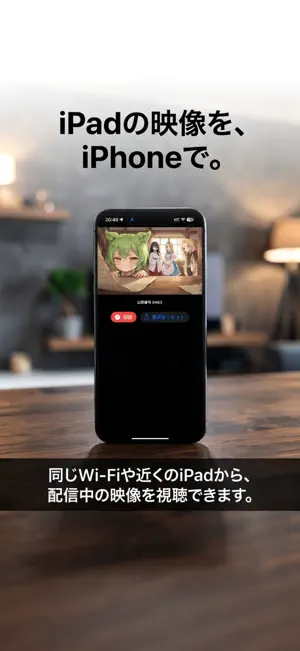
Turn your iPad into a powerful HDMI monitor—and share what you see with iPhone or another iPad. Mobile Display shows HDMI video from game consoles, cameras and computers on your iPad using a compatible UVC (USB Video Class) capture device. You can also browse the web directly on your iPad and stream the displayed content to nearby devices over a local connection. HDMI / UVC MONITOR • Preview input from a compatible capture device connected to your iPad's USB-C port. • Move the image with a swipe and zoom with a pinch. • Fine-tune scale and position; rotate or mirror the image. • Adjust brightness, contrast, saturation and color filters. • Choose a low-latency or image-quality display mode. • Save adjustments as profiles and lock controls against accidental touches. • Monitor input audio, including background audio playback. BUILT-IN WEB BROWSER • Open web pages on your iPad and share the browser view by local streaming. • Organize bookmarks with folders, search, editing and reordering. • Keep web links in the browser whenever possible rather than opening another app. • Start on a search homepage selected for your device's region. Note: Some sites restrict video playback or how content can be displayed. LOCAL STREAMING TO iPHONE AND iPAD Watch content displayed on the host iPad from an iPhone or another iPad over the same Wi-Fi network or another supported nearby local connection. This is local device-to-device sharing, not a public internet broadcast. • Video-only or video-with-audio streaming. • Optional passcode protection. • Standby image when there is no input. • Portrait and landscape viewing. • The host iPad manages the viewer limit and current connection count. GREAT FOR Gaming monitors, camera shoots, live-production confidence monitors, viewing from another position, sharing PC video and displaying web content. COMPATIBLE DEVICES HDMI/UVC input requires a USB-C iPad: • iPad Pro 12.9-inch (3rd generation or later) • iPad Pro 11-inch (1st generation or later) • iPad Air (4th generation or later) • iPad (10th generation or later) • iPad mini (6th generation or later) Use an iPhone or iPad to watch a local stream. HDMI/UVC capture input is available on iPad; a compatible capture device and HDMI cable are sold separately. GETTING STARTED HDMI: Connect a UVC capture device to the iPad and connect your video source over HDMI. Browser: Open the built-in browser on the host iPad. Viewing: Start local streaming on the iPad, then choose the stream under Watch on an iPhone or another iPad. Enter the host's passcode if prompted. FREE USE AND IN-APP PURCHASES Free local streaming is limited to 10 minutes per day and one simultaneous viewer. Local Streaming Unlimited removes the time limit, supports up to four simultaneous viewers and hides in-app ads. Remove Ads hides ads only; it does not change streaming time or viewer limits. Make more of your iPad screen.
What’s new
Version 2.1 · Updated October 21, 2026
What's new in Mobile Display 2.1 • Improved bookmark management in the built-in browser, with folders, reordering, editing and deletion. • Reduced unwanted switching from web links to external apps, where supported by iOS and the website. • The browser now chooses its initial search homepage based on the device's region. • Improved reliability when stopping and restarting browser-view streaming. • Fixed unnecessary disconnections when opening Control Center on a viewing device. • Updated viewer discovery to use the host's advertised connection limit and current viewer count. • Additional usability and interface refinements.
App privacy
The developer, Satoshi Sakuma, reported these privacy practices to Apple.
Data Not Linked to You
The following data, which may be collected but is not linked to your identity, may be used for the following purposes:
- Identifiers: Device ID
- Usage Data: Advertising Data
Used for: Third-Party Advertising
Alternatives to Mobile Display – HDMI Monitor
Looking for apps like Mobile Display – HDMI Monitor? Here are 6 similar apps on the App Store. The highest rated is HDMeye (5.0/5), and all 6 are free to download.
-
 HDMeye
5.0
HDMeye
5.0
-
 Screen Link: HDMI Monitor
-
 Dongled
4.6
Dongled
4.6
-
 FitDisplay - HDMI Monitor UVC
-
 CapView - Capture Monitor
2.0
CapView - Capture Monitor
2.0
-
 HDMI Monitor - Video Capture
3.0
HDMI Monitor - Video Capture
3.0
| App | Rating | Price | Last updated | Compare |
|---|---|---|---|---|
| Mobile Display – HDMI Monitor | 5.0 / 5 (1 rating) | Free | October 21, 2026 | |
| HDMeye | 5.0 / 5 (3) | Free | Dec 16, 2025 | Compare |
| Screen Link: HDMI Monitor | – | Free | Jul 11, 2026 | Compare |
| Dongled | 4.6 / 5 (24) | Free | Jul 15, 2026 | Compare |
| FitDisplay - HDMI Monitor UVC | – | Free | Jan 30, 2026 | Compare |
| CapView - Capture Monitor | 2.0 / 5 (1) | Free | Nov 22, 2024 | Compare |
| HDMI Monitor - Video Capture | 3.0 / 5 (124) | Free | Aug 29, 2026 | Compare |