

Daymark: Calendar Widgets
Super Bigly, LLC Productivity iPhoneiPadiPod touch
Daymark: Calendar Widgets is a free Productivity app for iPhone and iPad by Super Bigly, LLC. Requires iOS 17.0. Updated September 25, 2026.
- Price
- Free
- on the App Store
- Size
- 24 MB
- Age 4+
- Updated
- Sep 25
- 2026 · v1.1
Screenshots
About Daymark: Calendar Widgets
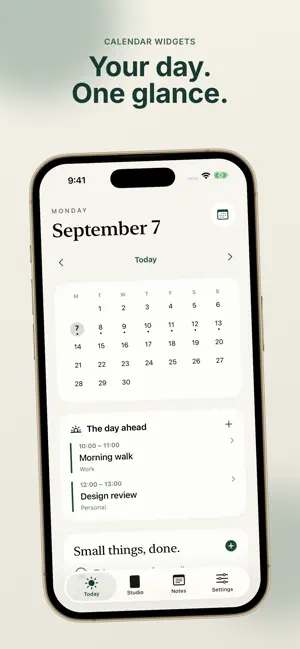
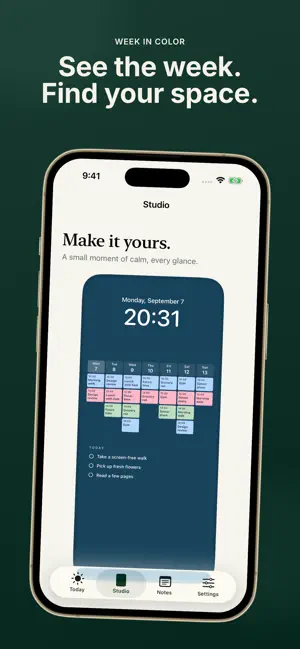
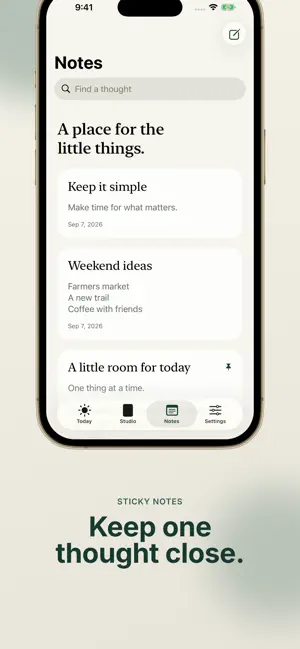
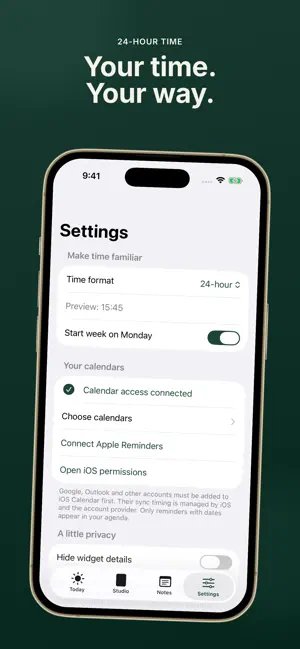
Your calendar, right where you look. Daymark puts your daily planner, sticky notes and next event on your Home Screen and Lock Screen. See your week in pastel event blocks, keep a note close, and make a calendar wallpaper that feels like yours. SEE YOUR WEEK IN COLOR Plan around seven days of calendar events. The Week in color widget uses compact, colored blocks and shows an overflow count on busy days. Choose the large Home Screen widget for a short agenda below your week. Start on Sunday or Monday. KEEP THE NEXT THING CLOSE Check your next calendar event or a pinned note from a Lock Screen widget. Add a month calendar, daily agenda or notes widget to your Home Screen. Hide personal text when you would rather show counts. MAKE TIME FEEL FAMILIAR Choose System, 12-hour or 24-hour military time. Your time format carries through the agenda, widgets and wallpaper. See the time your way, from morning plans to an evening reminder. MAKE A WALLPAPER YOURS Choose a calm palette or your own photo. Adjust the dimming and export a week, month or agenda wallpaper. The clock in Studio is a preview; iOS adds the real clock when you set your wallpaper. SMALL TASKS. LESS TO REMEMBER. Keep a dated to-do list with daily or weekly repeats. Future tasks stay on their dates and overdue tasks are labeled. Complete local tasks from a Home Screen widget. Write and edit sticky notes, then pin the one you want to see. USE YOUR EXISTING CALENDARS Choose which iOS calendars appear in Daymark. Google and Outlook events work through accounts already added to Apple Calendar. Create and edit events with the familiar iOS calendar editor, including repeats and alerts. Connect dated Apple Reminders and complete them from your agenda. WIDGETS WITHOUT A SHORTCUT SETUP Native widgets use iOS timelines and request a refresh when you change Daymark. iOS controls update timing, so instant background refresh is not guaranteed. Calendar syncing is managed by iOS and your calendar provider. Wallpaper exports are still images. For automatic replacement, use the included Create Daymark Wallpaper action with Apple's Set Wallpaper Photo action in a personal Shortcuts automation. The app includes setup instructions. OPTIONAL DAYMARK PLUS Save named calendar and appearance setups, then switch between them. Give each configurable widget its own saved setup or note. Plus is a one-time purchase with no subscription. Your current calendar, tasks, notes, basic widgets, photo and palette controls, and wallpaper exports stay free. Restore an eligible purchase from Settings or the upgrade screen. YOUR DAY, YOUR DATA No account required and no ads. Local tasks, notes, saved setups and selected photos stay on your device. Calendar changes use your existing iOS calendar services. RevenueCat handles purchase verification and restores; Superwall presents upgrade offers and measures their performance. These services process purchase records, pseudonymous identifiers and app/device information, not your calendar, task, note or photo contents. Read the privacy policy for details. A little more room for today.
What’s new
Version 1.1 · Updated September 25, 2026
Daymark Plus adds saved calendar and appearance setups, plus configurable widgets that can each use a different saved setup or note. Plus is an optional one-time purchase with no subscription. Your existing calendar, tasks, notes, basic widgets and wallpaper tools stay free. You can restore an eligible Plus purchase from Settings.
App privacy
The developer, Super Bigly, LLC, reported these privacy practices to Apple.
Data Linked to You
The following data, which may be collected and linked to your identity, may be used for the following purposes:
- Purchases: Purchase History
- Location: Coarse Location
- Identifiers: User ID, Device ID
- Usage Data: Product Interaction
- Diagnostics: Performance Data, Other Diagnostic Data
- Other Data: Other Data Types
Used for: Analytics, App Functionality
Alternatives to Daymark: Calendar Widgets
Looking for apps like Daymark: Calendar Widgets? Here are 6 similar apps on the App Store. The highest rated is Calendar Widget: Day & Month (3.0/5), and all 6 are free to download.
-
 Oden — AI Todo Assistant
-
 NOW TODO
-
 WhenDay: Calendar Planner
-
 Calendar Widget: Day & Month
3.0
Calendar Widget: Day & Month
3.0
-
 Planwall: Lock Screen Calendar
1.0
Planwall: Lock Screen Calendar
1.0
-
 HR PULSE ADMIN
| App | Rating | Price | Last updated | Compare |
|---|---|---|---|---|
| Daymark: Calendar Widgets | – | Free | September 25, 2026 | |
| Oden — AI Todo Assistant | – | Free | May 16, 2026 | Compare |
| NOW TODO | – | Free | May 26, 2026 | Compare |
| WhenDay: Calendar Planner | – | Free | Aug 18, 2026 | Compare |
| Calendar Widget: Day & Month | 3.0 / 5 (2) | Free | Sep 18, 2026 | Compare |
| Planwall: Lock Screen Calendar | 1.0 / 5 (2) | Free | Oct 7, 2026 | Compare |
| HR PULSE ADMIN | – | Free | Oct 6, 2026 | Compare |