

Glass Half Full
Samuel Moss Photo & Video iPhoneiPadiPod touch
Glass Half Full is a free Photo & Video app for iPhone and iPad by Samuel Moss. Rated 5.0/5 from 1 ratings. Requires iOS 17.0. Updated October 27, 2026.
- Rating
- 5.0
- 1 ratings
- Price
- Free
- on the App Store
- Size
- 44 MB
- Age 4+
- Updated
- Oct 27
- 2026 · v1.23
Screenshots



About Glass Half Full
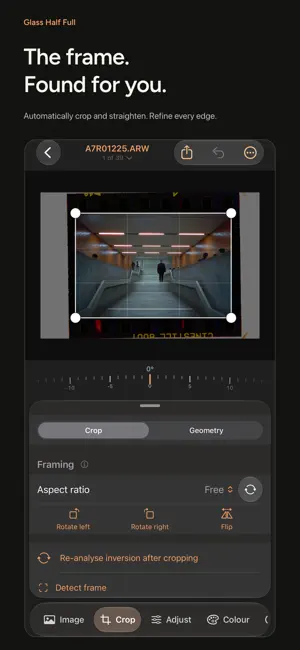
A powerful photo editor designed with film in mind. Edit your everyday photos and camera RAW files, try the colour of real film on them, and turn film negatives into finished pictures, with each frame found, cropped and straightened for you. Everything happens on your device, with no account and no subscription. EDIT YOUR PHOTOS Choose Edit photos to bring in JPEG, HEIC, TIFF or camera RAW files from Files or Photos, several at a time. RAW files are developed from their sensor data, with any lens corrections they carry. Start with Auto, then adjust exposure, contrast, highlights, shadows, whites, blacks, clarity and dehaze. Set white balance, shape tone and colour with curves, fine-tune eight colour ranges with the colour mixer and grade shadows, mid-tones and highlights with colour wheels. Crop, straighten and correct perspective, reduce noise, sharpen, take out colour fringes and remove dust with the repair brush. TRY A FILM ON YOUR PHOTO Choose a film and see it on your own photo first. Natural films are modelled on real film stocks, with their grain and halation, and you can shoot them under or over and push or pull the development. Nostalgic films are softer and dreamier, for a light, airy feel. FIND YOUR LOOK Choose looks across colour, cinema and black and white, from natural palettes and cinema grades to selenium toning and lith prints. Browse them all on your photo and set each one's strength. BRING YOUR FILM TO LIFE Photograph your negatives with a camera and light source, import the scans and choose the film type. Glass Half Full finds the picture area, crops and straightens it, and converts colour or black-and-white negatives into positives. Convert one frame at a time or a whole roll at once. Choose a clean standard conversion, a lab scanner's look measured from real scans, or a print on photographic paper or cinema film. Slides have their own workflow too. WORK ON JUST ONE AREA Brighten a face, darken a distracting background or bring back a bright sky with masks. Draw linear and radial gradients, paint with a brush, or select by colour or brightness. Masks work on digital photos and converted film alike. FINISH IT LIKE A PRINT Add grain measured from real film scans, halation and a vignette. Put the photo on a strip of film with its edge lettering and frame numbers, or print it on paper, from cotton and baryta to newsprint, in soft window light. MORE TOOLS Lay photos and text across several slides for seamless carousel posts. Layer up to nine photos into a multiple exposure. Plan, time and log your film development, with times from the makers' data sheets. ONE PHOTO OR A WHOLE ROLL Edit single photos, keep film scans together in rolls and gather photos from anywhere in your library into folders. Mark picks and rejects, copy settings across a set and export in batches. Save your settings as recipes to reuse, or share them as files and recipe cards. KEEP YOUR ORIGINALS Edits are saved separately and never change your imported originals. Compare with the original at any time and undo any change. Export a JPEG to share or a 16-bit TIFF for further editing, then save it to Files or Photos, or share it. Back up your library as a ZIP archive and restore it whenever you need to. RAW support depends on your camera. On a Mac with Apple silicon, Glass Half Full runs as its iPad app, with mouse, trackpad and keyboard controls, zoom buttons and keyboard shortcuts. TRY IT WITH YOUR OWN PHOTOS Import and edit as much as you like for free, and export up to 12 photos at full quality with no watermark. Re-export those photos whenever you like, including in other formats. A one-time Full Unlock removes the export limit. One purchase covers iPhone, iPad and Mac with Apple silicon, with Family Sharing included. No subscription or expiry. I’m Sam, the developer behind Glass Half Full. If something gets in the way of your photographs, I’d like to hear about it. You can reach me through Help & about in the app.
What’s new
Version 1.23 · Updated October 27, 2026
New textures and borders, and crisper sharpening
App privacy
The developer, Samuel Moss, reported these privacy practices to Apple.
Data Not Collected
The developer does not collect any data from this app.
Alternatives to Glass Half Full
Looking for apps like Glass Half Full? Here are 6 similar apps on the App Store. The highest rated is Darkplug (5.0/5), and 5 of the 6 are free to download.
-
 Eightstop: AI Photo Enhancer
-
 Avenger Grip Catalogue
-
 Silverlog
-
 ShutterDoc: Shutter Speed Test
-
 Darkplug
5.0
Darkplug
5.0
-
 Codeck: Pro Video Tools
| App | Rating | Price | Last updated | Compare |
|---|---|---|---|---|
| Glass Half Full | 5.0 / 5 (1 rating) | Free | October 27, 2026 | |
| Eightstop: AI Photo Enhancer | – | Free | Oct 20, 2026 | Compare |
| Avenger Grip Catalogue | – | Free | Aug 8, 2025 | Compare |
| Silverlog | – | Free | Oct 8, 2026 | Compare |
| ShutterDoc: Shutter Speed Test | – | 2.99 USD | Oct 28, 2026 | Compare |
| Darkplug | 5.0 / 5 (1) | Free | Sep 20, 2026 | Compare |
| Codeck: Pro Video Tools | – | Free | Sep 19, 2026 | Compare |
Compare Glass Half Full with the top alternatives: ratings, updates, ASO score and keyword gaps →