

Eightstop: AI Photo Enhancer
Alec Attie Photo & Video iPhoneiPadiPod touch
Eightstop: AI Photo Enhancer is a free Photo & Video app for iPhone and iPad by Alec Attie. Requires iOS 26.0. Updated October 20, 2026.
- Price
- Free
- on the App Store
- Size
- 238 MB
- Age 4+
- Updated
- Oct 20
- 2026 · v1.3.1
Screenshots


About Eightstop: AI Photo Enhancer
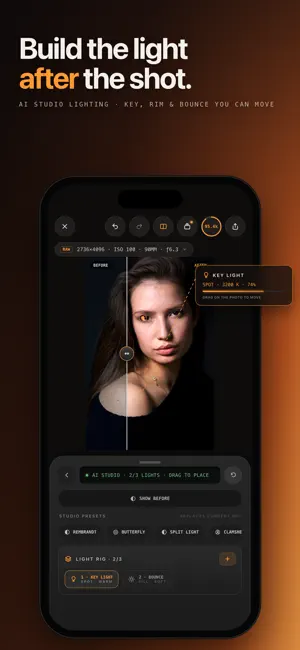
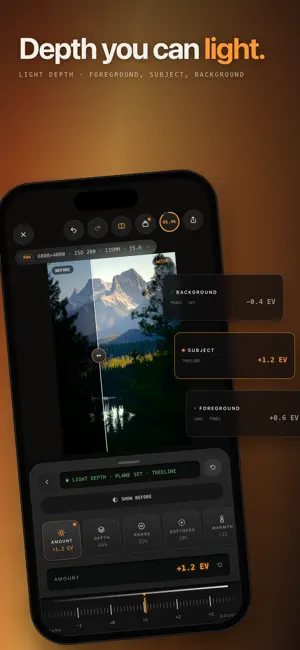
Develop RAW photos, blur backgrounds, remove unwanted objects, and shape light after the shot. Eightstop combines precise photo editing controls with 13 AI tools for portraits, landscapes, and everyday photographs. RAW DEVELOPMENT AND PRECISE COLOR Import camera RAW files, including ProRAW, DNG, NEF, CR3, and ARW. Work from the scene-linear RAW image, adjust exposure and white balance, and refine highlights, shadows, curves, and HSL color. Finish with clarity, dehaze, texture, grain, vignette, filters, and presets. 13 AI TOOLS, WITH CONTROL OVER THE RESULT • AI HDR: reconstruct detail in blown highlights and deep shadows from one photo. Reconstructed detail is AI-generated. Review an editable 32-bit HDR result and keep adjusting exposure after accepting it. • AI Focus: blur the background or foreground using scene depth. Tap to set the focus plane and adjust aperture, focal length, bokeh, and focus falloff. Refocus the depth effect as you edit. • AI Studio: place up to three virtual lights on your photograph. Choose from nine fixture types and adjust intensity, temperature, size, softness, and direction for editable portrait, product, or landscape lighting. • Light Depth: adjust near and distant parts of the scene separately using depth. • Enhance: improve light, color, and detail with adaptive corrections you can adjust individually. • Relight: change the direction and character of light with a cloud-generated edit. • Sky: replace the sky with a library image or your own, then refine the mask and placement. • Skin Enhance: smooth skin and adjust tone, shine, and texture with on-device face analysis. • Body Transform: use on-device person analysis and adjustable body-shaping controls for portrait edits. • Erase: use the object remover to remove people, unwanted objects, and distractions. • Expand: extend the photo beyond its original frame, with optional guidance for the generated area. • Upscale: use the image upscaler to double each edge while retaining the framing and proportions. • Denoise: reduce image noise while preserving the photograph's original dimensions. SMART MASKS AND LOCAL ADJUSTMENTS Detect subjects, backgrounds, people, and skies to make selective edits. Brighten a backlit subject, adjust the background, or refine a sky without tracing every outline by hand. EDIT ON YOUR DEVICE, USE CLOUD TOOLS WHEN NEEDED RAW development, manual adjustments, masks, Enhance, AI Focus, AI Studio, Light Depth, Sky, and portrait analysis run on your device. Cloud tools send a processed image with its metadata removed, rather than your original RAW file. Compare edits before keeping them and keep refining the photograph with manual controls. AI-generated detail may differ from the original scene. AI tools require sign-in and Eightstop Pro. Cloud AI tools also require an internet connection and credits. Eightstop Pro unlocks unlimited full-resolution exports. Sample photography courtesy of Signature Edits community contributors. All images were edited in Eightstop. Terms of Use (EULA): https://www.apple.com/legal/internet-services/itunes/dev/stdeula/
What’s new
Version 1.3.1 · Updated October 20, 2026
Minor Bug Fixes
App privacy
The developer, Alec Attie, reported these privacy practices to Apple.
Data Linked to You
The following data, which may be collected and linked to your identity, may be used for the following purposes:
- Identifiers: User ID, Device ID
- Usage Data: Product Interaction
- Diagnostics: Crash Data, Performance Data, Other Diagnostic Data
Used for: Analytics, App Functionality
Data Not Linked to You
The following data, which may be collected but is not linked to your identity, may be used for the following purposes:
- Contact Info: Email Address
- User Content: Photos or Videos
Used for: App Functionality
Alternatives to Eightstop: AI Photo Enhancer
Looking for apps like Eightstop: AI Photo Enhancer? Here are 6 similar apps on the App Store. The highest rated is CN41P - DNG Developer (4.5/5), and all 6 are free to download.
-
 Rake Plus: Relight & Refocus
-
 CN41P - DNG Developer
4.5
CN41P - DNG Developer
4.5
-
 Microprism: Honest Camera
-
 Rebrilo
-
 Tayf: AI Color Grading
-
 OneClickCamera
| App | Rating | Price | Last updated | Compare |
|---|---|---|---|---|
| Eightstop: AI Photo Enhancer | – | Free | October 20, 2026 | |
| Rake Plus: Relight & Refocus | – | Free | Oct 5, 2026 | Compare |
| CN41P - DNG Developer | 4.5 / 5 (2) | Free | Oct 26, 2026 | Compare |
| Microprism: Honest Camera | – | Free | Oct 6, 2026 | Compare |
| Rebrilo | – | Free | Oct 22, 2026 | Compare |
| Tayf: AI Color Grading | – | Free | Oct 25, 2026 | Compare |
| OneClickCamera | – | Free | Oct 8, 2026 | Compare |