

AI Architecture Plan
OANA RINALDI Graphics & Design iPhoneiPadiPod touch
AI Architecture Plan is a free Graphics & Design app for iPhone and iPad by OANA RINALDI. Requires iOS 17.0. Updated October 23, 2026.
- Price
- Free
- on the App Store
- Size
- 19 MB
- Age 4+
- Updated
- Oct 23
- 2026 · v1.3
Screenshots

About AI Architecture Plan
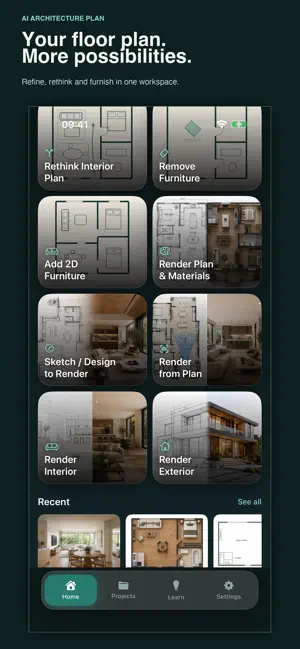
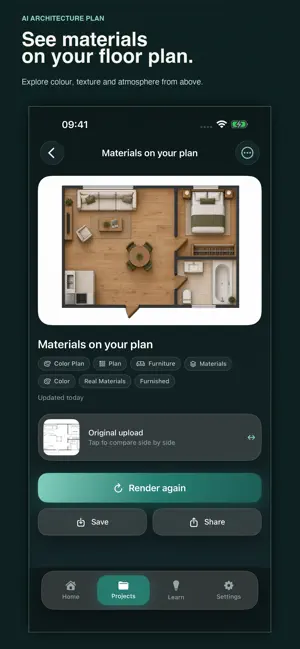
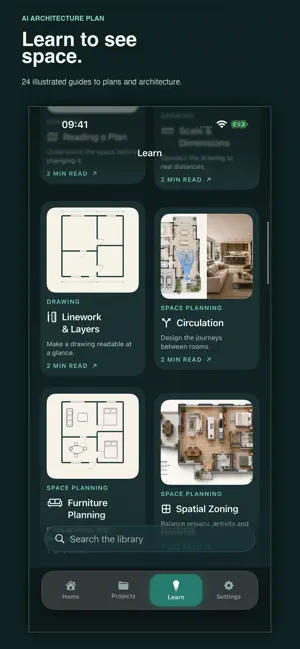
YOUR FLOOR PLAN. MORE POSSIBILITIES. AI Architecture Plan is a workspace for exploring floor plans on iPhone and iPad. Start with a drawing, a scanned plan or a sketch. Refine its presentation, rethink how the interior works, arrange furniture and explore the spaces your plan could become. WORK WITH YOUR PLAN • Render to 2D Elevation — turn a facade or interior render into a frontal drawing image. Supply overall width and height or choose illustrative estimates; verify all dimensions. This does not recover measured scale. • Add Plan Details — refine wall linework, door swings and existing labels. • Sketch to Plan — turn a hand-drawn layout into a clean-looking 2D plan image. • Rethink Interior Plan — explore furniture arrangements, activity zones and circulation, with walls kept in place by default. • Remove Furniture — clear loose furniture while retaining walls, openings and fixed fixtures. • Add 2D Furniture — add top-down line symbols for seating, beds, tables and storage. PRESENT YOUR ARCHITECTURE • Section Study — clarify cut lines, depth and material relationships from an existing section. • Elevation Study — present facade rhythm, visible materials and shadow. • Exploded Axonometry — explain visible layers with aligned parallel projection. • Concept Detail — explore a visible junction with schematic unknowns and a clear conceptual notice. • Site & Context — clarify the geometry and relationships visible in a site drawing or aerial image. Choose dedicated visual treatments, colour directions and compositions. Inferred information remains conceptual and must be verified. BRING PLANS INTO VIEW • Render Plan & Materials — explore colour, floor finishes and furniture in a top-down presentation plan. • Render from Plan — position a viewing cone on your plan and generate a view from that direction. • Sketch / Design to Render — develop a sketch or model view into a rendered concept. • Render Interior and Render Exterior — explore finishes and atmosphere in additional architectural views. KEEP YOUR IDEAS TOGETHER Import from Photos, Camera or Files. PDF import uses the first page. Compare source images with generated results, keep versions, organise local projects, mark favourites, and save or share your images. LEARN TO READ AND DESIGN SPACE Explore 24 illustrated guides covering plans, dimensions, circulation, furniture, materials, daylight and building design. Each guide includes focused chapters, an image study, practical exercises and key terms. Search the library and follow related guides. The learning library works offline. CHOOSE HOW TO GENERATE Use your own OpenAI API key with no app subscription required. OpenAI usage charges apply separately. Or use our managed generation service with an optional monthly subscription or one-time credit pack. Monthly includes 30 credits per month. Pro Monthly includes 100 credits per month. Monthly credits reset at renewal and do not roll over. Packs of 15 or 50 credits do not expire. Standard generation uses 1 credit; High quality uses 3 credits. Each generation or variation is charged separately. Prices are shown in your local currency before purchase. Subscriptions renew automatically unless cancelled at least 24 hours before the current period ends. Payment is charged to your Apple Account. Manage or cancel subscriptions in Apple account settings. Optional Sign in with Apple links credits across devices. Account deletion is available in Settings and does not cancel an Apple subscription. AI-generated images are concepts, not measured construction drawings or CAD documents. Review all results before relying on them. Privacy Policy: https://aiarch-plan.oanaunciuleanu.workers.dev/privacy Terms of Use: https://www.apple.com/legal/internet-services/itunes/dev/stdeula/
What’s new
Version 1.3 · Updated October 23, 2026
New Render to 2D Elevation: • Convert a facade or interior render into a frontal 2D drawing image. • Supply overall width and height, or use clearly marked illustrative estimates. • Choose mm, cm, m or inches; add known opening sizes in your brief. • Saved and shared images carry a permanent measurement-verification note. Check all labels and proportions before use. Also includes five new presentation tools: Section Study, Elevation Study, Exploded Axonometry, Concept Detail and Site & Context, with dedicated treatments, palettes and compositions. New matching home artwork. Existing plan tools, renders, projects and offline learning remain available.
App privacy
The developer, OANA RINALDI, reported these privacy practices to Apple.
Data Linked to You
The following data, which may be collected and linked to your identity, may be used for the following purposes:
- Purchases: Purchase History
- User Content: Photos or Videos, Other User Content
- Identifiers: User ID
- Usage Data: Product Interaction
Used for: App Functionality
Alternatives to AI Architecture Plan
Looking for apps like AI Architecture Plan? Here are 6 similar apps on the App Store. The highest rated is SPACES by Grey Atlantic (5.0/5), and all 6 are free to download.
-
 ATMOS Studio: AI Architecture
-
 Exin AI - AI Interior Design
-
 Floor Plan AI Home 3D
-
 Exterior AI: House Design
4.5
Exterior AI: House Design
4.5
-
 Syntina: AI Render & Interior
-
 SPACES by Grey Atlantic
5.0
SPACES by Grey Atlantic
5.0
| App | Rating | Price | Last updated | Compare |
|---|---|---|---|---|
| AI Architecture Plan | – | Free | October 23, 2026 | |
| ATMOS Studio: AI Architecture | – | Free | Oct 27, 2026 | Compare |
| Exin AI - AI Interior Design | – | Free | Feb 3, 2026 | Compare |
| Floor Plan AI Home 3D | – | Free | Sep 5, 2026 | Compare |
| Exterior AI: House Design | 4.5 / 5 (34) | Free | Oct 12, 2026 | Compare |
| Syntina: AI Render & Interior | – | Free | Oct 12, 2026 | Compare |
| SPACES by Grey Atlantic | 5.0 / 5 (1) | Free | Oct 28, 2026 | Compare |