

Scribble Calendar & Planner
Gabor Auth Productivity iPhoneiPadiPod touch
Scribble Calendar & Planner is a free Productivity app for iPhone and iPad by Gabor Auth. Requires iOS 17.0. Updated October 25, 2026.
- Price
- Free
- on the App Store
- Size
- 50 MB
- Age 12+
- Updated
- Oct 25
- 2026 · v1.10.1
Screenshots
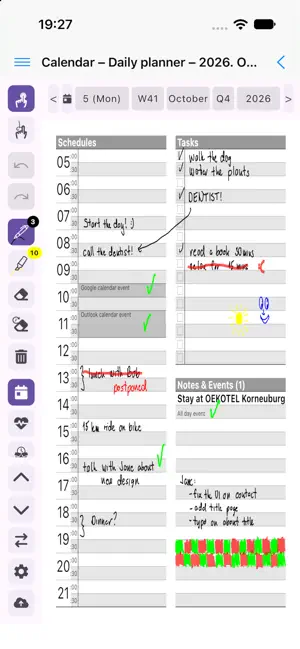


About Scribble Calendar & Planner
Scribble Calendar & Planner feels like a canvas for your life - a place where you don’t just schedule dates, but draw your days and design your future. Write, sketch, annotate, and plan with Apple Pencil or any compatible stylus. Turn scattered thoughts into something you can see, shape, and make your own. PLAN. FOCUS. REFLECT. Plan your days with clarity. Focus your time on what matters. Reflect on your habits, health, and how your days really feel. In a world where calendars are often rigid and impersonal, ScribblCal offers softness, freedom, and a bit of soul... a quiet invitation to plan with intention, reflect with clarity, and live with purpose. EVERYTHING YOU NEED TO ORGANIZE YOUR LIFE • Versatile Views - Seamlessly switch between Yearly, Monthly, Weekly, and Daily planning pages. • Infinity Notes - Endless space for sketches, mind maps, brain dumps, and whatever is on your mind. • Time-Boxed Daily Planner - Give your day a shape, see where your time goes, and stay focused without the stress. • Mood & Health Tracker - Keep track of your mood, sleep, water, food with your own handwriting. • Habit Tracking - Build awareness around the habits and routines that shape your days. • Calendar Integration - Connect your Google or Outlook Calendar too and keep your appointments alongside your handwritten plans. PRIVACY-FIRST BY DESIGN Your life, your timeline, your design. Your handwritten plans, notes, sketches, and journal entries belong to your personal planner. No ScribblCal account is required, and ScribblCal does not require you to upload your planner to a ScribblCal-owned cloud service. Keep your data on your device, or sync it to your own cloud storage using the supported sync options. You choose where your planner lives, and your entries stay with your planner. A DIFFERENT KIND OF DIGITAL PLANNER Whether you use it as a productivity tool, a digital bullet journal, a handwritten calendar, or a life organizer, ScribblCal helps you get thoughts out of your head, focus on what matters today, and design where you want to go next. Your life is your canvas. Optimized for iPad, iPad Pro, iPhone, and Apple Pencil.
What’s new
Version 1.10.1 · Updated October 25, 2026
Bug fixes: • Events are drawn in their calendar's colour again • The header's menu and back buttons are easier to tap • Swipes navigate again after writing in Hand-Draw mode • Dashboard tiles in the same order on every device
App privacy
The developer, Gabor Auth, reported these privacy practices to Apple.
Data Not Linked to You
The following data, which may be collected but is not linked to your identity, may be used for the following purposes:
- Purchases: Purchase History
- Location: Coarse Location
- Identifiers: Device ID
- Usage Data: Product Interaction
- Diagnostics: Crash Data, Performance Data, Other Diagnostic Data
- User Content: Other User Content
Used for: Analytics, App Functionality
Alternatives to Scribble Calendar & Planner
Looking for apps like Scribble Calendar & Planner? Here are 6 similar apps on the App Store.


| App | Rating | Price | Last updated | Compare |
|---|---|---|---|---|
| Scribble Calendar & Planner | – | Free | October 25, 2026 | |
| Penciled In. | – | Free | Sep 24, 2026 | Compare |
| Chartula: Handwriting Calendar | – | Free | Oct 23, 2026 | Compare |
| Calendear | – | Free | Oct 15, 2026 | Compare |
| Syvra Planner | – | Free | Oct 27, 2026 | Compare |
| KNoted | – | Free | Jul 23, 2026 | Compare |
| NotaTask | – | Free | Oct 2, 2026 | Compare |