

Tickbase
Daniel Carreras Productivity iPhoneiPadiPod touch
Tickbase is a free Productivity app for iPhone and iPad by Daniel Carreras. Rated 5.0/5 from 6 ratings. Requires iOS 16.4. Updated November 20, 2026.
- Rating
- 5.0
- 6 ratings
- Price
- Free
- on the App Store
- Size
- 70 MB
- Age 4+
- Updated
- Nov 20
- 2026 · v1.5.1
Screenshots


About Tickbase
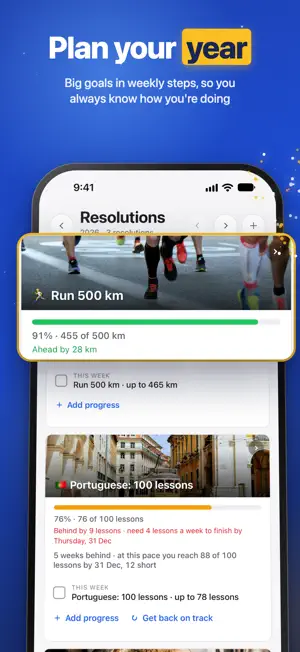
Tickbase is the to-do list with everything you need to get things done, and none of the noise. Type a task the way you’d say it, “Call mum tomorrow at 5pm”, and the date, time and list are set for you. No feeds, no clutter, and no AI of its own. WORKS WITH SIRI Add a task, tick one off, or ask what’s due today, without opening the app. With Apple Intelligence, ask in your own words: “the passport one, tick it off”. Two switches decide whether Siri may change your tasks and see them, and locked lists always stay out of it. PLAN YOUR YEAR Turn a resolution into steps: read 24 books, run 500 km. Tickbase puts a milestone in your list each week, tells you whether you’re ahead or behind, and offers a new plan when one slips. Keep a bucket list beside it, with steps, shared with the people you’ll do it with. PLAN WORK THAT TAKES MORE THAN ONE SITTING Give a big task several work sessions across your week. Each one sits on your calendar, reminds you before it starts, and records the time you spent. COUNT DOWN TO WHAT MATTERS Birthdays, holidays and anniversaries, with the days to go and your own photo behind any of them. REMINDERS THAT RING • On time, even when Tickbase is closed • Set a reminder on your laptop and it rings on your phone • Done and Snooze right on the notification • Keep reminding until you act, as often as every 30 seconds • Ring as an alarm for the ones you can’t miss, through silent mode and Focus • Reminders before your calendar’s events, with a lead time for each calendar MADE FOR IPHONE DUO AND IPAD Open your iPhone Duo and your list sits beside the task you’re working on. Close it and the task carries on full screen. On iPad, your views open beside the menu. ON YOUR HOME AND LOCK SCREEN • A Today widget with your tasks and the day’s calendar events, ticked off right there • Widgets for habits, a resolution and a countdown • The focus timer on the lock screen and in the Dynamic Island • An Add a task button for Control Center, the lock screen and the Action Button • Your tasks in iPhone search EVERYTHING ELSE IN ONE PLACE • Today, Tomorrow, Next 7 days and an Inbox for everything else • Lists, folders, tags, priorities, subtasks and notes • Plan your day by the hour • Habits with streaks, and a focus timer with white, pink or brown noise • Your phone’s calendars beside your tasks • A weekly and monthly review that shows how it went and helps you tidy up • Deadlines with the days left, and a heads-up on Today when they’re close • Hold and drag tasks, sections and board columns wherever you want them • Shared lists, with assignees and comments • Forward an e-mail to your private address and it becomes a task, attachments included • A journal line for each day, and Print today for your day on one sheet PRIVATE BY DESIGN Everything is encrypted on your phone before it leaves, shared lists included. We don’t read your tasks: our servers only hold encrypted data. Tickbase works without an account; sign in to back up and sync. SYNC FOR FREE Sign in with Apple, Google or your e-mail and your tasks sync between your phone and the Tickbase web and desktop apps at no cost. Import from Apple Reminders and other to-do apps, and export everything whenever you like. TICKBASE PREMIUM Free is a complete to-do list, free for good. Premium adds work sessions and planning by the hour, unlimited lists, habits, resolutions and reminders, shared lists, attachments, tasks by e-mail, full statistics, themes, app icons and live sync. Buy it right here, no account needed; sign in and it comes with you to all your devices. New accounts get 14 days of Premium free. Subscribe yearly, or pay once for Lifetime while it’s on offer. Payment is charged to your Apple Account. The yearly subscription renews automatically unless it’s turned off at least 24 hours before the end of the period; manage it in your App Store account settings. Terms of Use: https://tickbase.app/terms Privacy Policy: https://tickbase.app/privacy
Ratings & reviews
5.0
6 ratings
What’s new
Version 1.5.1 · Updated November 20, 2026
Share to Tickbase Share a page from Safari, a video or a link from another app, and it becomes a task, titled with the page's name and the link in its description. Change either before you add it, and pick the list it goes into: the Inbox unless you choose another in Settings → General. Free on every plan. Subtasks on the list Tick Show subtasks in the ••• menu of any list or view and each task's subtasks sit under its title, ready to tick off without opening the task. Finish subtasks first (Settings → General) stops a task being ticked off until all of its subtasks are. Less digging into tasks • Set a task's progress from the list: hold it and choose Progress…, then slide. Track progress % turns it on for any task. • Type how long a task will take in quick add, like "estimate 1h" or "est 30m", in every language Tickbase speaks. (Premium) • Show full titles, in the ••• menu, wraps long titles instead of cutting them off. And more • The calendar can keep tasks on their day after you tick them off: Show completed tasks, in its ••• menu. • A finished resolution's gold card on Today can be put away straight off, with the close button in its corner. • Added the wrong amount to a resolution? Add progress offers Undo, even when that amount finished it, and a resolution's editor lists the progress you've added so any of it can be removed. • Finished resolutions fold into one line on the Resolutions page, so the ones you're still working on come first. • Moving from Microsoft To Do or another app? Import has Paste a list: copy any list of tasks, one per line, and paste it in. Fixes • Messages shown from Settings and other sheets appear on top, rather than hidden underneath. • Tall sheets, like Turn on strict mode, stay clear of the clock at the top of the screen. • The hint in password boxes is no longer spread out after signing in with a code. • Quick add leaves web addresses as you typed them, and no stray space before a comma. • German: the milestone options in a resolution's editor are no longer cut short.
App privacy
The developer, Daniel Carreras, reported these privacy practices to Apple.
Data Linked to You
The following data, which may be collected and linked to your identity, may be used for the following purposes:
- Identifiers: Device ID, User ID
- Purchases: Purchase History
- Contact Info: Email Address, Name
- User Content: Photos or Videos, Other User Content
- Diagnostics: Other Diagnostic Data
Used for: Analytics, App Functionality
Data Not Linked to You
The following data, which may be collected but is not linked to your identity, may be used for the following purposes:
- Usage Data: Product Interaction
Used for: App Functionality
Alternatives to Tickbase
Looking for apps like Tickbase? Here are 6 similar apps on the App Store. The highest rated is LocalGateKeys Password Vault (5.0/5), and all 6 are free to download.
-
 Classycal – Calendar & Tasks
4.8
-
 Calendar+ 2: Planner Widget
-
 LocalGateKeys Password Vault
5.0
-
 Harbor Notes
5.0
-
 Stellata: Save Links & Reels
5.0
-
 #memory
3.7
| App | Rating | Price | Last updated | Compare |
|---|---|---|---|---|
| Tickbase | 5.0 / 5 (6 ratings) | Free | November 20, 2026 | |
| Classycal – Calendar & Tasks | 4.8 / 5 (5) | Free | Nov 20, 2026 | Compare |
| Calendar+ 2: Planner Widget | – | Free | Nov 20, 2026 | Compare |
| LocalGateKeys Password Vault | 5.0 / 5 (5) | Free | Nov 14, 2026 | Compare |
| Harbor Notes | 5.0 / 5 (8) | Free | Nov 20, 2026 | Compare |
| Stellata: Save Links & Reels | 5.0 / 5 (12) | Free | Nov 17, 2026 | Compare |
| #memory | 3.7 / 5 (3) | Free | Nov 17, 2026 | Compare |
Compare Tickbase with the top alternatives: ratings, updates, ASO score and keyword gaps →