

TranslaCat: Game Translator
OZAN KIVANC Utilities iPhoneiPadiPod touch
TranslaCat: Game Translator is a free Utilities app for iPhone and iPad by OZAN KIVANC. Requires iOS 18.0. Updated October 24, 2026.
- Price
- Free
- on the App Store
- Size
- 29 MB
- Age 4+
- Updated
- Oct 24
- 2026 · v1.0.16
Screenshots


About TranslaCat: Game Translator
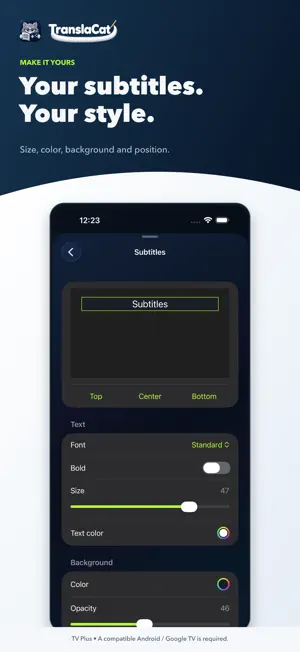
Follow the story in your language. TranslaCat reads game subtitles through your iPhone camera and translates them as you play. Read the translation free on your phone, or display it on a compatible smart TV running the TranslaCat TV app with TV Plus. HOW IT WORKS 1. Choose Phone or TV mode. 2. Select the source and target languages. 3. Frame only the subtitle area in the camera. 4. Start translating and get back to the story. FREE PHONE MODE No account, subscription, TV app or pairing is required. The translated subtitle appears directly on your iPhone. TV PLUS Open TranslaCat TV on a compatible television, scan the QR code and complete the free HDMI visibility test. Follow translated subtitles on the game screen and adjust their size, colour, background and position from your iPhone. TV Plus requires a weekly, monthly or annual subscription. Eligible Apple accounts may receive a 7-day free trial. Exact prices and terms appear before purchase. PRIVACY TranslaCat does not record camera images, upload them to the cloud or send them to the TV. After supported language models are downloaded, translation runs on your iPhone. In TV mode, only translated text is shared over your trusted local network. COMPATIBILITY TV mode requires an smart TV whose system can run the TranslaCat TV app and display an app overlay over HDMI. Not every model is supported; complete the free HDMI test before subscribing. External streaming boxes cannot overlay another HDMI input. Readable in-game subtitles are required. Small or fast-changing text, reflections and camera movement can affect accuracy. TranslaCat does not generate subtitles from speech. TranslaCat is independent and is not affiliated with console manufacturers or game publishers. OPTIONAL AI TRANSLATION Sign in with Apple and use AI tokens for AI translation. AI runs only after you allow it: the selected subtitle text, languages and game context are sent to TranslaCat and its translation provider DeepL. Results may be cached to speed up repeated translations. You can turn sharing off at any time. Token packs are one-time purchases and do not expire. Privacy: https://translacat.info/privacy.html#en Support: https://translacat.info/#contact
What’s new
Version 1.0.16 · Updated October 24, 2026
Uninterrupted AI translation: a slow reply or a single error no longer turns AI off. Translate the whole screen: menus and hints are translated with AI too; switch it in Settings → Quick settings. Button prompts such as "R1 to aim" no longer merge into subtitles.
App privacy
The developer, OZAN KIVANC, reported these privacy practices to Apple.
Data Not Linked to You
The following data, which may be collected but is not linked to your identity, may be used for the following purposes:
- Identifiers: Device ID
- Purchases: Purchase History
- Diagnostics: Other Diagnostic Data
- Other Data: Other Data Types
Used for: Developer’s Advertising or Marketing, Analytics, App Functionality
Alternatives to TranslaCat: Game Translator
Looking for apps like TranslaCat: Game Translator? Here are 6 similar apps on the App Store. The highest rated is Side Screen: Game Translator (5.0/5), and all 6 are free to download.
-
 Side Screen: Game Translator
5.0
-
 Console Translator
-
 Game Caption: Oyun Çevirisi
4.0
-
 Subtify: All in One Translator
3.0
-
 Live Screen & Voice Translate
2.5
-
 GameLens AI
| App | Rating | Price | Last updated | Compare |
|---|---|---|---|---|
| TranslaCat: Game Translator | – | Free | October 24, 2026 | |
| Side Screen: Game Translator | 5.0 / 5 (1) | Free | Oct 21, 2026 | Compare |
| Console Translator | – | Free | Oct 22, 2026 | Compare |
| Game Caption: Oyun Çevirisi | 4.0 / 5 (1) | Free | Oct 24, 2026 | Compare |
| Subtify: All in One Translator | 3.0 / 5 (2) | Free | Oct 21, 2026 | Compare |
| Live Screen & Voice Translate | 2.5 / 5 (4) | Free | Oct 20, 2026 | Compare |
| GameLens AI | – | Free | Oct 21, 2026 | Compare |