

Side Screen: Game Translator
ERTUGRUL GULERYUZ Utilities iPhoneiPadiPod touch
Side Screen: Game Translator is a free Utilities app for iPhone and iPad by ERTUGRUL GULERYUZ. Rated 5.0/5 from 1 ratings. Requires iOS 26.2.
- Rating
- 5.0
- 1 ratings
- Price
- Free
- on the App Store
- Size
- 616 MB
- Age 17+
- Updated
- Oct 21
- 2026 · v2.0.6
Screenshots
About Side Screen: Game Translator
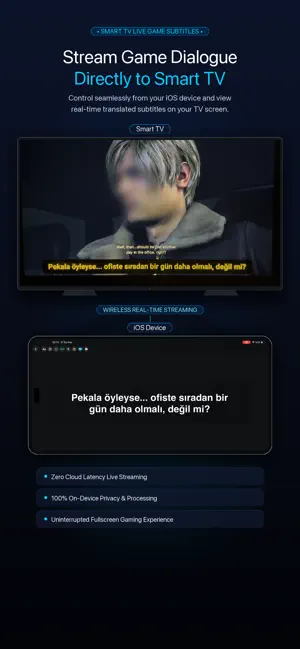
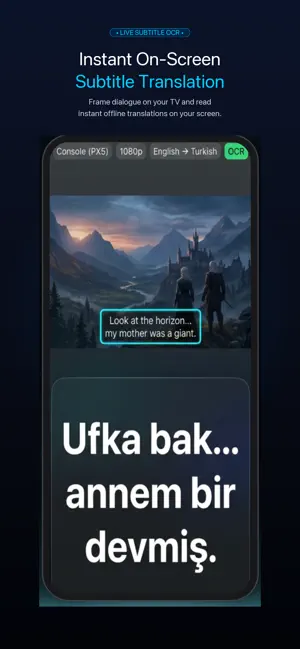
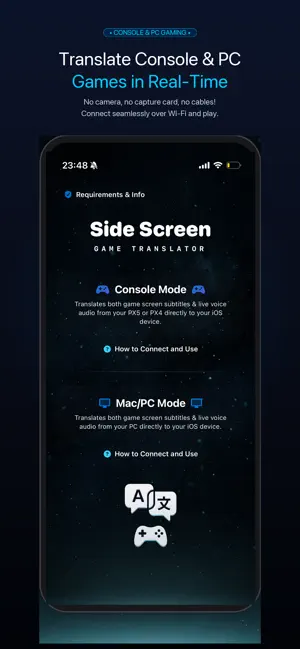
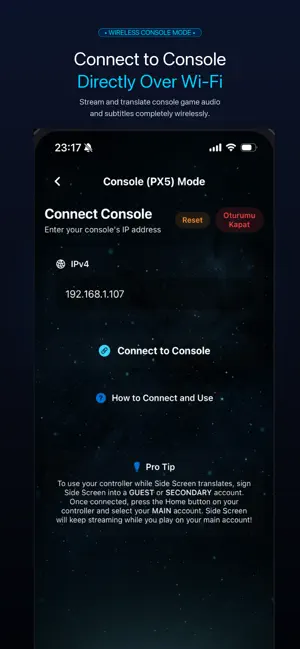
Side Screen: Game Translator - Real-Time Gaming Companion IMPORTANT NOTICE: Exclusively designed as a companion for external hardware (Console PX5 / PX4, Mac, and PC). Does NOT translate native iOS mobile games. Play on your TV or PC while your iOS device translates in real time. Play console and PC games in your language in real-time. Side Screen captures game visuals and audio over Wi-Fi, delivering instant subtitle translation, live AI voice dubbing, and direct Smart TV subtitle streaming without cameras, microphones, or capture cards. Powered by Apple Neural Engine and local AI models, text, speech, and voiceovers are processed entirely on-device with zero cloud latency and complete privacy. FREE TO USE WITH REWARDED ADS OR OPTIONAL UNLIMITED PRO ACCESS CORE MODES: - Console Mode (Headless Remote Play) Connect via local network. Side Screen streams game data in the background. Frame subtitles for instant OCR translation, listen to digital audio for speech translation (STT), or hear live voice dubbing (TTS). Camera-free and wireless! - External PC & Mac Mode Connect your computer over Wi-Fi. Side Screen captures screen text (OCR) and audio (STT) for instant translation and voice dubbing straight to your device. - Smart TV Companion Mode (NEW) Cast live translated subtitles directly onto your Smart TV screen over your local network. Enjoy uninterrupted big-screen gaming while Side Screen handles real-time translation in the background. WHY SIDE SCREEN? - Smart TV Subtitle Streaming: Broadcast translated subtitles directly to your TV over Wi-Fi. Keep your eyes on the big screen! - Direct Digital Capture: Video and audio captured over Wi-Fi. No cameras, lighting issues, or background noise. - Triple-Engine Translation: Fast OCR for subtitles, STT for live dialogue, and real-time AI Voice Dubbing (TTS). - On-Device Neural AI Dubbing: In-game dialogue spoken aloud in your language with natural on-device neural voices. - Context-Aware Engine: Considers previous dialogue lines for accurate translations and character consistency. - Private & On-Device: Video and audio never leave your device. All AI models run locally without external cloud servers. - Flexible Access: Translate free by extending time with short rewarded ads, or unlock Side Screen Pro for unlimited access. SIDE SCREEN PRO (OPTIONAL SUBSCRIPTION): - Unlimited translation time with no limits or countdowns - 100% ad-free experience with zero waiting periods - Auto-renews weekly, cancel anytime in Apple ID Settings FREQUENTLY ASKED QUESTIONS (FAQ): Q: Can I display subtitles directly on my Smart TV? A: Yes! Side Screen streams live translated subtitles directly to your Smart TV over Wi-Fi, letting you read dialogue on the big screen without looking down at your phone. Q: How does real-time voice dubbing work? A: Side Screen converts translated dialogue into natural speech using on-device neural TTS models. Q: Do I need a camera, capture card, or HDMI splitter? A: No. Side Screen acts as a wireless Remote Play receiver over Wi-Fi. While you play on your TV, your device displays translations and speaks dialogue aloud. Q: Does translation run on-device? A: Yes. All OCR, speech, translation, and dubbing run on-device via Apple Neural Engine with zero cloud lag and full privacy. SUPPORTED LANGUAGES: - Text & Speech (18 Languages): English, Spanish, French, German, Italian, Portuguese, Turkish, Russian, Chinese, Japanese, Korean, Arabic, Dutch, Indonesian, Polish, Thai, Ukrainian, Vietnamese. - Live Neural Dubbing (TTS): Turkish, English, Chinese, Arabic, Polish. Note: Requires downloaded Apple language packs for on-device translation. LEGAL & TERMS: - Privacy Policy: https://izlemvecikarim.blogspot.com/2026/08/privacy-policy-for-side-screen-game.html - Terms of Use (EULA): https://www.apple.com/legal/internet-services/itunes/dev/stdeula/
What’s new
Version 2.0.6 · Updated October 21, 2026
- Bug fixes and performance improvements. - Dual-Box & Split-Screen Translation: Scan two separate screen regions simultaneously (Top/Bottom or Side-by-Side) — ideal for RPG dialogue choices, top quest prompts, and Co-op / Split-Screen games. - Dual Subtitle Overlay on Smart TV: View both translated subtitle boxes simultaneously on your supported Smart TV screen via GuleryuzTV. - Uninterrupted Background & Lock Screen Mode: Keep real-time translation, AI voice dubbing (TTS), and Smart TV subtitle streaming running seamlessly in the background while using other apps or when your screen is locked. - Improved Console (PX) and PC local network stream stability and reduced translation latency.
App privacy
The developer, ERTUGRUL GULERYUZ, reported these privacy practices to Apple.
Data Used to Track You
The following data may be used to track you across apps and websites owned by other companies:
- Usage Data: Product Interaction
Data Linked to You
The following data, which may be collected and linked to your identity, may be used for the following purposes:
- Location: Coarse Location
- Usage Data: Product Interaction, Advertising Data
Used for: Third-Party Advertising, Developer’s Advertising or Marketing, Analytics, App Functionality
Data Not Linked to You
The following data, which may be collected but is not linked to your identity, may be used for the following purposes:
- Identifiers: Device ID
- Diagnostics: Performance Data, Other Diagnostic Data, Crash Data
- Usage Data: Product Interaction
Used for: Third-Party Advertising, Developer’s Advertising or Marketing, Analytics, App Functionality
Alternatives to Side Screen: Game Translator
Looking for apps like Side Screen: Game Translator? Here are 6 similar apps on the App Store. The highest rated is Adios (5.0/5), and 3 of the 6 are free to download.
-
 Adios
5.0
Adios
5.0
-
 QuietPlayer
5.0
QuietPlayer
5.0
-
 Game Caption: Oyun Çevirisi
4.0
Game Caption: Oyun Çevirisi
4.0
-
 AI Offline Translator
-
 Tilt de Brightness-Best Dimmer
4.0
Tilt de Brightness-Best Dimmer
4.0
-
 TV Remote for Google & Android
| App | Rating | Price | Last updated | Compare |
|---|---|---|---|---|
| Side Screen: Game Translator | 5.0 / 5 (1 rating) | Free | October 21, 2026 | |
| Adios | 5.0 / 5 (1) | 1.99 USD | Oct 25, 2026 | Compare |
| QuietPlayer | 5.0 / 5 (1) | 2.99 USD | Sep 13, 2026 | Compare |
| Game Caption: Oyun Çevirisi | 4.0 / 5 (1) | Free | Oct 24, 2026 | Compare |
| AI Offline Translator | – | Free | Sep 25, 2026 | Compare |
| Tilt de Brightness-Best Dimmer | 4.0 / 5 (8) | 1.99 USD | Mar 14, 2026 | Compare |
| TV Remote for Google & Android | – | Free | Oct 24, 2026 | Compare |