

Fluxketch: Field CAD & Markup
JUNSEO KIM Productivity iPhoneiPadiPod touch
Fluxketch: Field CAD & Markup is a free Productivity app for iPhone and iPad by JUNSEO KIM. Requires iOS 18.0. Updated October 17, 2026.
- Price
- Free
- on the App Store
- Size
- 25 MB
- Age 4+
- Updated
- Oct 17
- 2026 · v1.3.0
Screenshots

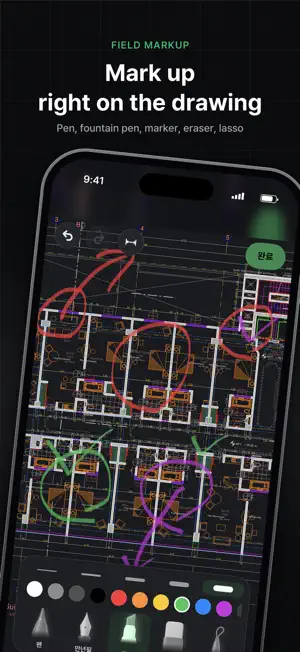


About Fluxketch: Field CAD & Markup
Fluxketch is a CAD app built for architects, interior designers and site teams. Open DWG and DXF files as they are, edit layers, dimensions and text, mark them up on site with Apple Pencil or your finger, and plot to true scale as PDF. Works on tablet and iPhone. ■ True-scale CAD · Open DWG and DXF — real project drawings with hundreds of thousands of entities · Line, polyline, circle, arc, rectangle, dimension, text; move, copy, trim, fillet · Endpoint, intersection and perpendicular snaps, object snap tracking, drag alignment guides · Layers on, off, locked, recolored; blocks and layout tabs · Export your edits as DXF that opens in AutoCAD ■ Site markup · Apple Pencil ink — pen, marker, pencil; strokes hold up even when you write fast · Mark up over a PDF underlay, attach photos, drop pins for defects, checks and notes · Scale calibration — measure a printed sheet with a ruler and the screen matches it · Notes — handwrite on off-white grid paper ■ On iPhone too · Open drawings on site with your iPhone: layers, measure, pins, markup, line drawing, plots and markup PDF sharing · With a Pro subscription on your tablet, everything on iPhone is included at no extra cost ■ Plot and share · True-scale PDF from A4 to A0 at 1:50, 1:100 and more, with a 50 mm ruler on the sheet · Markup PDF sharing — pick an area and get one PDF with your markup, the CAD view and every pin's notes and photos · Site reports and inspection records generated from your pins ■ Calendar and iCloud · Work schedule and daily notes (typed or handwritten); imported drawings and PDFs are logged on that day; export the calendar as PDF · Schedule and notes sync automatically between iPhone and tablet on the same Apple ID · Upload a project to iCloud and import it on another device ■ Plans · Free — every feature for your first 5 DWG/DXF imports, new drawings or iCloud imports within 30 days of the first one (iPhone and tablet); after that, viewing only. PDF imports are unlimited · Lite — unlimited DWG/DXF import, drafting and editing, blocks, layout tabs, true-scale PDF plots, DXF export · Markup — markup, field pins, notes, reports, true-scale PDF plots, unlimited DWG/DXF import (no drafting or editing) · Pro — everything in Lite and Markup, plus every feature on iPhone · iPhone plan — every feature on iPhone (tablet features not included) Subscriptions renew automatically unless cancelled at least 24 hours before the period ends, and can be cancelled at any time in your App Store account settings. Terms https://fluxketch.com/terms · Privacy https://fluxketch.com/privacy Support: [email protected]
What’s new
Version 1.3.0 · Updated October 17, 2026
■ Redesigned pins · Pins are now check marks — the bend of the check is the exact pin point · Five states: Defect, Repair, Needs check, Request, Done (color-coded) · Tap the pin button to see the pin list and site photos right on the drawing — New pin → pick a state → Done → keep placing · Select several pins and delete them at once; reports and markup PDFs use the new pins too ■ Now on iPhone · iPhone support — open and zoom drawings, layers, measure, pins, markup, line drawing, true-scale PDF plots, markup PDF sharing, notes and schedule, iCloud · With a Pro subscription on your tablet, everything on iPhone is included at no extra cost. iPhone-only users can choose the iPhone plan ■ Try it free first · Every feature is free for your first 5 DWG/DXF imports within 30 days of the first one (iPhone and tablet). PDF imports don't count · No subscription pop-up on first launch — remaining imports are shown when you import ■ AutoCAD compatibility · DXF export fixed so that layer changes (delete, rename, hide), colors, linetypes, fillets and text edited in the app open correctly in AutoCAD · DWG conversion: larger drawings (up to 100 MB) and long non-Latin text no longer garbled ■ Faster and easier · Much smoother zoom and pan on large drawings · Fingertip loupe — magnifies what's under your finger when placing points · Trash (restore deleted projects), Save As, show or hide all layers at once · Work schedule and daily notes sync over iCloud between iPhone and tablet on the same Apple ID
App privacy
The developer, JUNSEO KIM, reported these privacy practices to Apple.
Data Not Collected
The developer does not collect any data from this app.
Alternatives to Fluxketch: Field CAD & Markup
Looking for apps like Fluxketch: Field CAD & Markup? Here are 6 similar apps on the App Store. The highest rated is PhotoMount (5.0/5), and all 6 are free to download.


| App | Rating | Price | Last updated | Compare |
|---|---|---|---|---|
| Fluxketch: Field CAD & Markup | – | Free | October 17, 2026 | |
| 콘보 | – | Free | Oct 23, 2026 | Compare |
| PhotoMount | 5.0 / 5 (2) | Free | Aug 12, 2026 | Compare |
| Surveying Leveling Field Notes | 4.6 / 5 (5) | Free | Aug 9, 2026 | Compare |
| CaasWorks - Contech | – | Free | Aug 22, 2026 | Compare |
| 현장일지 | – | Free | Sep 17, 2026 | Compare |
| Papering | 5.0 / 5 (7) | Free | Oct 23, 2026 | Compare |