
Papering
Kihoon Lee Productivity iPad
Papering is a free Productivity app for iPad by Kihoon Lee. Rated 5.0/5 from 4 ratings. Requires iOS 18.0. Updated October 12, 2026.
- Rating
- 5.0
- 4 ratings
- Price
- Free
- on the App Store
- Size
- 80 MB
- Age 4+
- Updated
- Oct 12
- 2026 · v1.7.2
Screenshots



About Papering
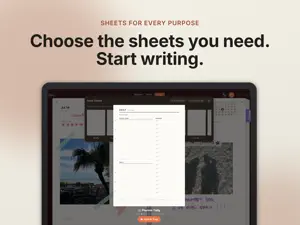
Papering brings the feel of a ring binder to your iPad. Make it a planner, a journal, a sketchbook, or a place for whatever you want to put on paper. Paper you can move Open the rings with the lever. Take out a sheet, change its place, or move it to another binder. Your handwriting and decorations move with it. Turn pages with your fingers and choose a one-page view or a two-page spread. Choose your inserts Pick yearly, monthly, weekly, daily, journal, and to-do inserts, or start with lined, grid, dot, or blank paper. Import a PDF as a binder or individual sheets. Use your own PDF or image as an insert design. Write, decorate, and find Write and draw with your finger or Apple Pencil. Add stickers, memo notes, photos, washi tape, and index tabs. Search your handwriting; recognition happens on your iPad. Your writing stays yours Papering does not collect the contents of your pages. Handwriting recognition runs on your iPad, and sync uses your iCloud account. Your page contents are not sent to a Papering server. No Papering account or separate sign-in is needed. Free and Pro The free Free lets you create one binder, with no limit on its sheet count. A binder in the trash still counts toward this limit. iCloud sync and PDF export are free. Pro is a one-time purchase for unlimited binders, with Family Sharing. There is no recurring subscription. Binders you have already made remain available to open and write in. Requires an iPad with iPadOS 18 or later. Apple Pencil is optional. Available for iPad only.
What’s new
Version 1.7.2 · Updated October 12, 2026
- Fixed brief pauses while writing on a zoomed page, and handwriting that later vanished when written over an erased spot. - Zoom now stays when you pull down Notification Center or Control Center. - Stickers respond only inside their cut line, so you can write with Apple Pencil right next to a small sticker. - You can grab a selected photo's handles even when another photo or sticker covers them. - The palette no longer disappears when you write on the other page of a spread in full screen, or close a binder while holding the photo tool. - Added Dot Journal inserts, and all inserts now come in 11 languages. - When a PDF can't be opened, "Report a Problem" appears next to the message so you can send an email with the file's details already filled in.
App privacy
The developer, Kihoon Lee, reported these privacy practices to Apple.
Data Linked to You
The following data, which may be collected and linked to your identity, may be used for the following purposes:
- Purchases: Purchase History
- Location: Coarse Location
- Identifiers: Device ID
- Usage Data: Product Interaction, Other Usage Data
- Diagnostics: Crash Data, Performance Data
Used for: Analytics, App Functionality
Alternatives to Papering
Looking for apps like Papering? Here are 6 similar apps on the App Store. The highest rated is LiveNote - LockScreen Memo App (5.0/5), and all 6 are free to download.
-
 LiveNote - LockScreen Memo App
5.0
LiveNote - LockScreen Memo App
5.0
-
 Eisenhower Matrix: Todo & Task
4.6
Eisenhower Matrix: Todo & Task
4.6
-
 Ultimate Focus - Visual Timer
4.6
Ultimate Focus - Visual Timer
4.6
-
 DailyHack
4.8
DailyHack
4.8
-
 AnySchedule Calendar & Planner
4.7
AnySchedule Calendar & Planner
4.7
-
 Across: Calendar, Your Way
4.8
Across: Calendar, Your Way
4.8
| App | Rating | Price | Last updated | Compare |
|---|---|---|---|---|
| Papering | 5.0 / 5 (4 ratings) | Free | October 12, 2026 | |
| LiveNote - LockScreen Memo App | 5.0 / 5 (42) | Free | Aug 28, 2026 | Compare |
| Eisenhower Matrix: Todo & Task | 4.6 / 5 (101) | Free | Sep 21, 2026 | Compare |
| Ultimate Focus - Visual Timer | 4.6 / 5 (188) | Free | Sep 21, 2026 | Compare |
| DailyHack | 4.8 / 5 (105) | Free | Oct 11, 2026 | Compare |
| AnySchedule Calendar & Planner | 4.7 / 5 (106) | Free | Oct 10, 2026 | Compare |
| Across: Calendar, Your Way | 4.8 / 5 (485) | Free | Oct 8, 2026 | Compare |
Compare Papering with the top alternatives: ratings, updates, ASO score and keyword gaps →