

Sift & Remember
Ali Abidi Productivity iPhoneiPadiPod touch
Sift & Remember is a free Productivity app for iPhone and iPad by Ali Abidi. Requires iOS 15.0. Updated October 19, 2026.
- Price
- Free
- on the App Store
- Size
- 23 MB
- Age 17+
- Updated
- Oct 19
- 2026 · v1.0.1
Screenshots


About Sift & Remember
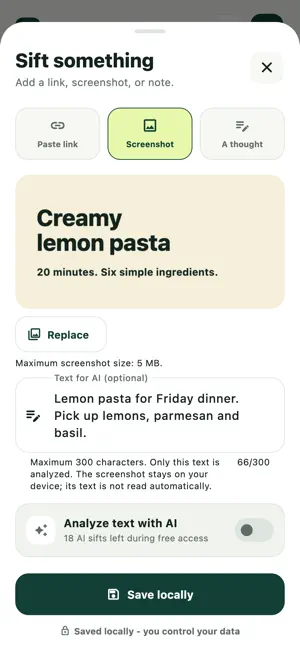
Save links to read later, keep screenshots with context, and organize notes and ideas in one place. Sift & Remember is a bookmark manager and personal organizer for the things you want to come back to: recipes to try, places to visit, shopping ideas, useful articles and everyday thoughts. For adults aged 18 and older. SAVE THE THING. REMEMBER WHY. - Paste a link and add a comment about why it matters. - Keep a screenshot in your local library, with optional typed or pasted text. - Capture a short thought before you forget it. - Search your saves and browse Buy, Go, Do and Read collections. - Mark items done and use undo when you need it. OPTIONAL AI, WITH YOUR PERMISSION Choose AI for a useful title, summary, category and key details. Before sending, Sift names Google Gemini and its Supabase backend and explains the selected data shared: a link URL, public page content and your comment; a thought; or screenshot text you type or paste, plus your locale and timezone. AI starts off for every new save. Choose Continue with AI to review permission, then Allow and send or Keep local. You can optionally remember permission for future items you choose on this account and device; that skips repeat prompts, not your choice of each item. Reset permission in You > AI privacy. Updated disclosures require a fresh choice. Screenshot images and filenames stay on your device. Sift does not scan your photo library or read text from images. Only screenshot text you type or paste is eligible for AI. AI can make mistakes and cannot read every website. Review results before relying on them. REDISCOVER YOUR SAVES Opt in to a weekend snapshot notification, scheduled for Saturday at 9:00 AM in your device timezone. See a local count of active saves across your collections. Notification permission and device settings affect delivery. 14-DAY FREE ACCESS Eligible verified-email accounts can choose one 14-day free-access period with unlimited saves and 20 successful AI enrichments total. No card or Apple purchase is required. Free access ends without a charge, does not renew, and never starts a paid subscription. Continuing afterward requires a separate purchase. SEPARATE PAID APPLE SUBSCRIPTIONS Monthly and yearly Sift Pro subscriptions include unlimited saves and 200 successful AI enrichments per UTC calendar month while active. Review your localized price, billing period and renewal terms beside the purchase button. Payment is charged to your Apple Account when you confirm a purchase, including during free access; it does not wait until free access ends. No free period is included with this purchase. Paid subscriptions automatically renew at the displayed price for the selected period unless canceled at least 24 hours before the current period ends. Manage or cancel in your Apple subscription settings. New saves require a signed-in account, active free access or a paid subscription, and an online access check, even with AI off. AI also requires internet access, available allowance and a supported service region. Usage and request-rate limits apply. After access ends, you can still view, search and delete existing saves. Your library stays on this device; signing in does not provide cloud sync or backup. Keep separate copies of important content. INPUT LIMITS - Screenshots: up to 5 MB each. - Thoughts and screenshot text: up to 300 characters. - Screenshot text for AI: at least 3 characters. Support: [email protected] Privacy: https://mindgameapps.com/apps/sift/privacy/ Terms: https://mindgameapps.com/apps/sift/terms/
What’s new
Version 1.0.1 · Updated October 19, 2026
Startup and privacy improvements. Sift does not show advertising-measurement prompts when you open or return to the app. Your library remains stored locally, and existing subscription plans are unchanged.
App privacy
The developer, Ali Abidi, reported these privacy practices to Apple.
Data Linked to You
The following data, which may be collected and linked to your identity, may be used for the following purposes:
- Purchases: Purchase History
- Location: Coarse Location
- Contact Info: Email Address, Name
- User Content: Photos or Videos, Customer Support, Other User Content
- Browsing History: Browsing History
- Identifiers: User ID
- Usage Data: Product Interaction
- Diagnostics: Performance Data, Other Diagnostic Data
- Other Data: Other Data Types
Used for: App Functionality
Alternatives to Sift & Remember
Looking for apps like Sift & Remember? Here are 6 similar apps on the App Store. The highest rated is Key-Tone-Decoder (1.0/5), and 5 of the 6 are free to download.
-
 Arca: Save Links, Keep Value
-
 Nota: AI Note Taker
-
 Nimivo: AI Task Planner
-
 Remember: To-do List/Calendar
-
 Key-Tone-Decoder
1.0
-
 Velumo
1.0
| App | Rating | Price | Last updated | Compare |
|---|---|---|---|---|
| Sift & Remember | – | Free | October 19, 2026 | |
| Arca: Save Links, Keep Value | – | Free | Aug 15, 2026 | Compare |
| Nota: AI Note Taker | – | Free | Oct 27, 2026 | Compare |
| Nimivo: AI Task Planner | – | Free | Oct 12, 2026 | Compare |
| Remember: To-do List/Calendar | – | Free | Apr 22, 2026 | Compare |
| Key-Tone-Decoder | 1.0 / 5 (1) | 0.99 USD | Nov 21, 2024 | Compare |
| Velumo | 1.0 / 5 (1) | Free | Aug 26, 2026 | Compare |
Compare Sift & Remember with the top alternatives: ratings, updates, ASO score and keyword gaps →