

Flip Mirror: True Face
Seung Been Wee Utilities iPhoneiPadiPod touch
Flip Mirror: True Face is a free Utilities app for iPhone and iPad by Seung Been Wee. Requires iOS 16.4. Updated October 19, 2026.
- Price
- Free
- on the App Store
- Size
- 37 MB
- Age 4+
- Updated
- Oct 19
- 2026 · v1.0.3
Screenshots

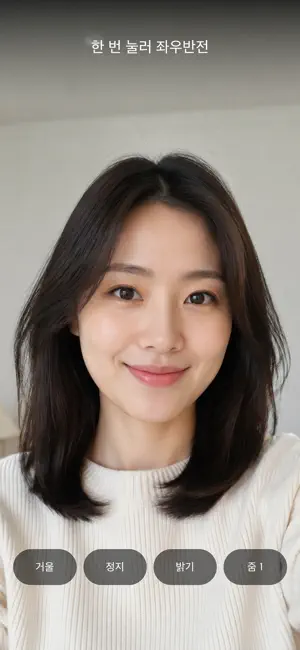


About Flip Mirror: True Face
Ever felt that your face in photos looks different from your face in the mirror? A mirror shows you left-right reversed. We spend our whole lives used to that flipped version of ourselves, but the face other people see is the opposite. That is why photos of you can feel unfamiliar. Flip Mirror shows you the face other people actually see. ■ Flip mirror One button switches between Mirror mode and Real mode. Mirror mode is the familiar reflection you know. Real mode is the face others see. Switch back and forth and you will notice immediately how much a left-right flip changes an impression. ■ Freeze the screen Tap Freeze and the moment holds still. Put your hand down and take your time - useful for checking the back of your hair, your profile, or a new hairstyle. ■ Save the photo Save the frozen frame to your photo library. It saves exactly as you saw it on screen, so you can save both modes and compare them side by side. ■ Brightness Adjust screen brightness with a slider. Check your face clearly in a dim room or at night. ■ 3-step zoom Zoom in step by step on the details you want to see up close - eyes, lips, skin. ■ When to use it Before an interview or a date, to see the face others will see Touching up makeup or fixing your bangs When you wonder why photos of you look off When facial asymmetry is on your mind Checking how you look before heading out When you want a quick look without a hand mirror ■ No waiting The app opens straight to the mirror. If loading is slow, we show the mirror first instead of making you wait. No sign-up, no login, no complicated settings. ■ Privacy The camera view is only displayed on your device. It is never stored or sent anywhere. A frozen frame is saved to your photo library only when you tap the save button yourself. The app does not read your photo library or access other photos, and it never requests microphone or location permission. The only permissions needed are camera and photo saving. ■ Note This app is free and contains ads. Ads are kept to a minimum and never block the screen while you are using the mirror. Privacy policy: https://ss-088-mirror-privacy.vercel.app
What’s new
Version 1.0.3 · Updated October 19, 2026
Fewer ads covering the screen, so you get a larger, cleaner mirror view.
App privacy
The developer, Seung Been Wee, reported these privacy practices to Apple.
Data Not Linked to You
The following data, which may be collected but is not linked to your identity, may be used for the following purposes:
- Identifiers: Device ID
- Usage Data: Product Interaction, Advertising Data
- Diagnostics: Crash Data, Performance Data, Other Diagnostic Data
Used for: Third-Party Advertising
Alternatives to Flip Mirror: True Face
Looking for apps like Flip Mirror: True Face? Here are 6 similar apps on the App Store. The highest rated is Days Until – Countdown Widget (5.0/5), and all 6 are free to download.
-
 Quick Count: Cash Calculator
-
 Photo Cleaner - Broom
-
 Days Until – Countdown Widget
5.0
-
 Aesthetic Widgets - AnyWidget
5.0
-
 Tap Counter (Easy To Count)
-
 Alarmax: Gentle Fading Alarm
5.0
| App | Rating | Price | Last updated | Compare |
|---|---|---|---|---|
| Flip Mirror: True Face | – | Free | October 19, 2026 | |
| Quick Count: Cash Calculator | – | Free | Oct 4, 2026 | Compare |
| Photo Cleaner - Broom | – | Free | Sep 5, 2025 | Compare |
| Days Until – Countdown Widget | 5.0 / 5 (1) | Free | Oct 19, 2026 | Compare |
| Aesthetic Widgets - AnyWidget | 5.0 / 5 (2) | Free | Oct 15, 2026 | Compare |
| Tap Counter (Easy To Count) | – | Free | Oct 26, 2026 | Compare |
| Alarmax: Gentle Fading Alarm | 5.0 / 5 (4) | Free | Apr 29, 2026 | Compare |