

Tap Counter (Easy To Count)
Jinyoung Lee Utilities iPhoneiPadiPod touch
Tap Counter (Easy To Count) is a free Utilities app for iPhone and iPad by Jinyoung Lee. Requires iOS 17.0. Updated October 10, 2026.
- Price
- Free
- on the App Store
- Size
- 7 MB
- Age 4+
- Updated
- Oct 10
- 2026 · v2.2.0
Screenshots


About Tap Counter (Easy To Count)
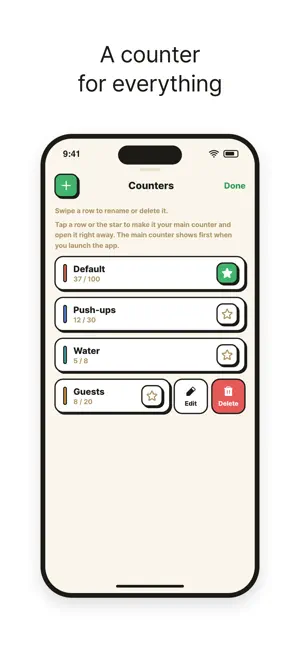
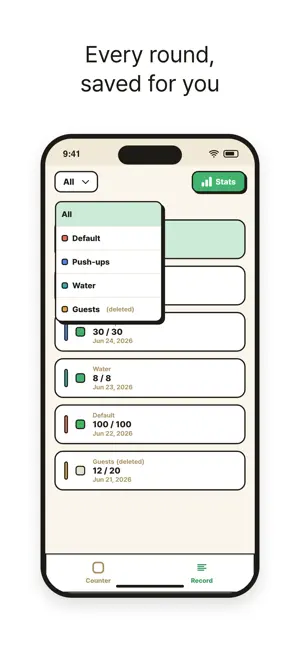
Tap anywhere on the screen and the count goes up by one. No tiny buttons, no looking down. Set a goal, and when you reach it the screen turns green and your phone buzzes. Every round is saved, so your reps, items and prayers turn into a record you can look back on. COUNT WITH ONE TAP - Tap anywhere on the screen to add 1 - Set a goal number: the counter stops there, turns green and vibrates - Big, bold numbers you can read at a glance A COUNTER FOR EVERYTHING - Make as many counters as you need, each with its own name, goal and color - Star your main counter and it opens the moment you launch the app - Swipe a counter to edit or delete it EVERY ROUND IS SAVED - When you reset, or when the day changes, that round is saved as a record - Records stay even after you delete a counter - Filter your records by counter SEE YOUR PROGRESS - Totals for today, this week and this month - Weekly and monthly bar charts, stacked in each counter's color Great for workout reps, jump rope, inventory checks, prayer and rosary counts, habits, or anything you used to count on your fingers. ADS AND REMOVE ADS TapCounter shows a banner ad on some screens. A one-time "Remove Ads" purchase removes all ads for good. Privacy Policy: https://www.junu.co.kr/terms/tapcounter/privacy/
What’s new
Version 2.2.0 · Updated October 10, 2026
- Contact Support now opens an email that's ready to write: your cursor starts at the top, and app and device details are added below so we can help you faster. - The "tap to count" hint no longer gets cut off on smaller screens.
App privacy
The developer, Jinyoung Lee, reported these privacy practices to Apple.
Data Used to Track You
The following data may be used to track you across apps and websites owned by other companies:
- Location: Coarse Location
- Identifiers: Device ID
- Usage Data: Advertising Data
- Diagnostics: Crash Data, Other Diagnostic Data
Data Not Linked to You
The following data, which may be collected but is not linked to your identity, may be used for the following purposes:
- Location: Coarse Location
- Identifiers: Device ID
- Usage Data: Advertising Data
- Diagnostics: Crash Data, Other Diagnostic Data
Used for: Third-Party Advertising, Analytics, App Functionality
Alternatives to Tap Counter (Easy To Count)
Looking for apps like Tap Counter (Easy To Count)? Here are 6 similar apps on the App Store. The highest rated is ZeroCounter (5.0/5), and all 6 are free to download.
-
 Tap counter 탭 카운터
-
 Tap Counter(Simple & Multiple)
-
 TapCounter: Count taps
-
 SimpleTally - Tap to Count
4.9
SimpleTally - Tap to Count
4.9
-
 ZeroCounter
5.0
ZeroCounter
5.0
-
 Simple Countings
| App | Rating | Price | Last updated | Compare |
|---|---|---|---|---|
| Tap Counter (Easy To Count) | – | Free | October 10, 2026 | |
| Tap counter 탭 카운터 | – | Free | Sep 10, 2026 | Compare |
| Tap Counter(Simple & Multiple) | – | Free | Mar 10, 2025 | Compare |
| TapCounter: Count taps | – | Free | Feb 3, 2025 | Compare |
| SimpleTally - Tap to Count | 4.9 / 5 (18) | Free | Jan 25, 2026 | Compare |
| ZeroCounter | 5.0 / 5 (2) | Free | Mar 26, 2024 | Compare |
| Simple Countings | – | Free | Feb 9, 2026 | Compare |