

Private Photo Vault - Dearkept
Sharath Kumar Photo & Video iPhoneiPadiPod touch
Private Photo Vault - Dearkept is a free Photo & Video app for iPhone and iPad by Sharath Kumar. Requires iOS 17.0. Updated October 20, 2026.
- Price
- Free
- on the App Store
- Size
- 21 MB
- Age 4+
- Updated
- Oct 20
- 2026 · v1.1
Screenshots


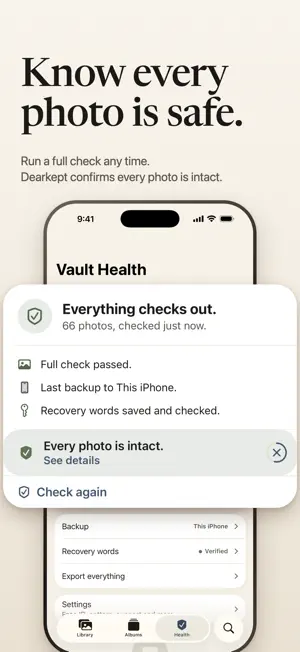

About Private Photo Vault - Dearkept
A private photo vault on your iPhone that checks each photo it saves. Dearkept copies the photos you choose into an encrypted library that only you can open. Every photo is checked after it is saved. Choose a backup folder, such as iCloud Drive, and keep your 12 recovery words to restore on your next iPhone. No account, no server of ours, no tracking. Free for your first 100 photos. HOW IT WORKS • Each photo is read back and compared with the original before Dearkept calls it verified. Run a full check any time. • Once a copy is checked, Dearkept offers to remove the original from iPhone Photos. You decide. • Turn on Back Up Automatically and Dearkept backs up your changes while it is open, into an encrypted backup in a folder you choose, such as iCloud Drive, and checks it. • Your Vault Code is yours alone, so not even Dearkept can reset it. Your checked backup and 12 recovery words restore the photos it holds on your next iPhone. • Export to Photos or Files any time, one photo or your whole Library. Never paywalled or watermarked. • Trash waits 30 days, then deletes for good while Dearkept is open and unlocked. • The camera in Dearkept saves to Dearkept only. • Nothing leaves your iPhone unless you send it yourself: an export, a backup, or the share sheet. No analytics, no ads. DEARKEPT PRO Unlimited photos, and a decoy vault that opens with its own code and shows everyday photos. The decoy deletes nothing and does not hide the app. A yearly or monthly subscription, or a one-time Lifetime purchase. Subscriptions renew until you cancel them in Settings. The free 100 photos count Library, Trash and photos waiting for attention. Export, backup and restore stay free on every plan. Terms of Use: https://www.apple.com/legal/internet-services/itunes/dev/stdeula/ Privacy Policy: https://dearkept.com/privacy/
What’s new
Version 1.1 · Updated October 20, 2026
New in 1.1 Open it your way: Face ID, a pattern you draw, or your Vault Code. Albums, for the people and days you care about. A camera in Dearkept. Photos you take with it save to Dearkept only. Back Up Automatically. Dearkept backs up changes while it is open, to the folder you choose, and checks every backup. Restore on a New iPhone. Your checked backup and 12 recovery words restore the photos it holds. No account needed. Remove originals from iPhone Photos once a copy is checked. Dearkept offers, you decide, and iOS asks you to confirm. Decoy Vault, with Pro. A second, separate vault with its own code, for when someone insists on looking. It deletes nothing and does not hide the app. Trash empties itself. Photos in Trash are deleted permanently after 30 days, only while Dearkept is open and unlocked. You can also delete permanently yourself. Dearkept Pro Lifetime: pay once, no renewal.
App privacy
The developer, Sharath Kumar, reported these privacy practices to Apple.
Data Not Collected
The developer does not collect any data from this app.
Alternatives to Private Photo Vault - Dearkept
Looking for apps like Private Photo Vault - Dearkept? Here are 6 similar apps on the App Store. The highest rated is SwipeLock: Photo Privacy Guard (5.0/5), and all 6 are free to download.
-
 Decoy Photo Vault - Noxium
-
 Visual Locker
-
 SwipeLock: Photo Privacy Guard
5.0
-
 Privaro - Photo & Video vault
-
 PureVault: Private Photo Vault
4.3
-
 3Q Album(photo organizer)
| App | Rating | Price | Last updated | Compare |
|---|---|---|---|---|
| Private Photo Vault - Dearkept | – | Free | October 20, 2026 | |
| Decoy Photo Vault - Noxium | – | Free | Nov 15, 2026 | Compare |
| Visual Locker | – | Free | Nov 12, 2026 | Compare |
| SwipeLock: Photo Privacy Guard | 5.0 / 5 (2) | Free | Mar 13, 2026 | Compare |
| Privaro - Photo & Video vault | – | Free | Nov 14, 2026 | Compare |
| PureVault: Private Photo Vault | 4.3 / 5 (6) | Free | Nov 3, 2026 | Compare |
| 3Q Album(photo organizer) | – | Free | Oct 13, 2026 | Compare |