

Visual Locker
Handlr Ai Photo & Video iPhoneiPadiPod touch
Visual Locker is a free Photo & Video app for iPhone and iPad by Handlr Ai. Requires iOS 18.0. Updated October 18, 2026.
- Price
- Free
- on the App Store
- Size
- 19 MB
- Age 12+
- Updated
- Oct 18
- 2026 · v1.2.0
Screenshots


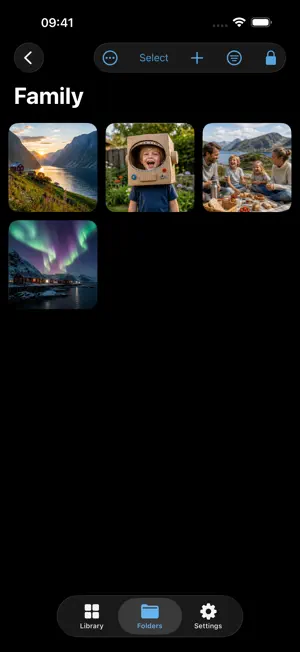

About Visual Locker
Keep your personal photos and videos in a private vault on iPhone and iPad. Choose the items you want to add and organize them into folders. Photos and videos stay in the app's private storage with Apple's file protection, and your vault catalog is encrypted. Each device keeps its own independent vault. Visual Locker does not sync your media between Apple devices or store your vault on a Visual Locker server. Create a separate six-digit vault passcode or choose a password. You can then add Face ID or Touch ID for convenient access on supported devices. Your device passcode cannot open a vault protected by a separate vault credential directly. Alternatively, choose device unlock using the biometric method or passcode configured on your device. With Visual Locker, you can: • Import selected photos and videos privately • Organize personal moments into folders • Search, sort and filter your private library with Pro • View photos and play videos using familiar controls • Save items back to Photos whenever you choose • Choose whether your vault is included in Apple device backup • Choose a vault passcode, password or device unlock at no extra cost Free includes private storage, all access choices, up to 25 items and three folders. A one-time Pro purchase unlocks unlimited items and folders, private on-device search and filters. No subscription. Already purchased Visual Locker Pro on another Apple device? Restore Purchases. IMPORTANT: We cannot recover a forgotten vault passcode or password. And if you delete the app (or lose your phone) you will likely lose anything stored in the vault. Keep another copy of important photos and videos.
What’s new
Version 1.2.0 · Updated October 18, 2026
With Pro, import up to 250 photos and videos at once. Swipe to select multiple items in your vault. Improved folder moves and iPad layouts. This update also includes bug fixes and performance improvements.
App privacy
The developer, Handlr Ai, reported these privacy practices to Apple.
Data Not Linked to You
The following data, which may be collected but is not linked to your identity, may be used for the following purposes:
- Purchases: Purchase History
- User Content: Other User Content
- Identifiers: Device ID
- Usage Data: Product Interaction, Other Usage Data
- Diagnostics: Crash Data, Performance Data, Other Diagnostic Data
Used for: Analytics, App Functionality
Alternatives to Visual Locker
Looking for apps like Visual Locker? Here are 6 similar apps on the App Store. The highest rated is Private Vault+ Photo Locker (5.0/5), and all 6 are free to download.
-
 Private Vault+ Photo Locker
5.0
-
 Eagle Pocket
5.0
-
 Photo Vault & Locker - Cabinit
4.5
-
 Panoramas Environments
-
 Chroma key green screen app
2.5
-
 Photoscope: Best Photo Picker
4.7
| App | Rating | Price | Last updated | Compare |
|---|---|---|---|---|
| Visual Locker | – | Free | October 18, 2026 | |
| Private Vault+ Photo Locker | 5.0 / 5 (1) | Free | May 31, 2026 | Compare |
| Eagle Pocket | 5.0 / 5 (1) | Free | Oct 22, 2026 | Compare |
| Photo Vault & Locker - Cabinit | 4.5 / 5 (16) | Free | Oct 10, 2026 | Compare |
| Panoramas Environments | – | Free | Sep 21, 2026 | Compare |
| Chroma key green screen app | 2.5 / 5 (4) | Free | Jan 30, 2026 | Compare |
| Photoscope: Best Photo Picker | 4.7 / 5 (151) | Free | Oct 22, 2026 | Compare |
Compare Visual Locker with the top alternatives: ratings, updates, ASO score and keyword gaps →