

smartRenamer
Shuhei Koide Utilities iPhoneiPadiPod touchMac
smartRenamer is a free Utilities app for iPhone and iPad by Shuhei Koide. Requires iOS 17.0. Updated November 18, 2026.
- Price
- Free
- on the App Store
- Size
- 8 MB
- Age 4+
- Updated
- Nov 18
- 2026 · v1.1.2
Screenshots
Save to Pinterest
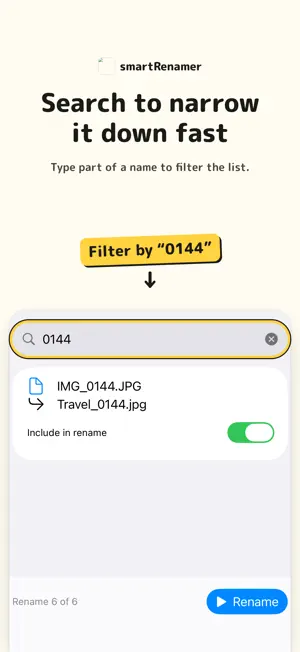
About smartRenamer
Choose a folder in Files on iPhone or iPad and batch rename its files and subfolders. Compare names before running and restore names from history. To rename a folder itself, select its parent folder. Requires iOS or iPadOS 17 or later. Keep original letters, add numbering, or choose hyphens and underscores. Preview changes before renaming files and folders. English recommendations include hyphen-separated and underscore-separated names for web and development work, plus numbering and punctuation cleanup. Recipes run only when you select and execute them. Changing recommendation language preserves saved and active recipes. The free plan includes 200 renames per month, 30 per run, 5 saved presets and 10 history records. Pro offers a one-time purchase, yearly subscription or monthly subscription and removes count and storage limits. Once the corresponding versions are released, restore the purchase on Mac, iPhone and iPad using the same Apple Account used to buy it. Feature availability varies by platform. Prices are shown in the app before purchase. Subscriptions renew automatically. File processing stays on your device. Usage synchronization stores monthly per-device counts in iCloud; file names and contents are not sent. Purchase restoration uses your App Store account, while usage synchronization uses your iCloud account. Terms of Use (Apple standard EULA): https://www.apple.com/legal/internet-services/itunes/dev/stdeula/ 1.0.2 iPhone and iPad now expose regular-expression mode with $1 and \1 capture replacement. Apply saved presets from the main screen. Keyboard dismissal and returning from sheets are easier. Pro now includes Rename and Move. Choose FROM and TO folders and filter files by name, timestamp, type and extension. Presets can optionally save folder selections, with multiple folders in Pro. Reset selections, retain saved data through updates and recover presets from backups. History now shows time, applied conditions, before/after paths and restoration status. Share logs, export detailed CSV and clear history with confirmation. File verification during undo has been improved. Added offline help in eleven languages and improved stability when removing move settings.
What’s new
Version 1.1.2 · Updated November 18, 2026
Tap anywhere in a file result, preset, or folder selection row to open it. The Home Screen now shows the app name as Renamer.
App privacy
The developer, Shuhei Koide, reported these privacy practices to Apple.
Data Not Collected
The developer does not collect any data from this app.
Alternatives to smartRenamer
Looking for apps like smartRenamer? Here are 6 similar apps on the App Store. The highest rated is Batch Rename Files (4.7/5), and all 6 are free to download.
-
 Batch Rename Files - Lote
-
 Rename: Batch File Renamer
-
 Vela Browser
-
 Batch Rename Files
4.7
-
 PhotoRex - Edit Dates in Bulk
4.5
-
 Maou Console
4.3
| App | Rating | Price | Last updated | Compare |
|---|---|---|---|---|
| smartRenamer | – | Free | November 18, 2026 | |
| Batch Rename Files - Lote | – | Free | Nov 6, 2026 | Compare |
| Rename: Batch File Renamer | – | Free | Nov 14, 2026 | Compare |
| Vela Browser | – | Free | Nov 26, 2026 | Compare |
| Batch Rename Files | 4.7 / 5 (3) | Free | Sep 11, 2026 | Compare |
| PhotoRex - Edit Dates in Bulk | 4.5 / 5 (2) | Free | Oct 22, 2026 | Compare |
| Maou Console | 4.3 / 5 (6) | Free | Nov 25, 2026 | Compare |
Compare smartRenamer with the top alternatives: ratings, updates, ASO score and keyword gaps →