

Clover: Notes for Trilium
郑 陶 Productivity iPhoneiPadiPod touch
Clover: Notes for Trilium is a free Productivity app for iPhone and iPad by 郑 陶. Rated 5.0/5 from 1 ratings. Requires iOS 17.0. Updated September 30, 2026.
- Rating
- 5.0
- 1 ratings
- Price
- Free
- on the App Store
- Size
- 32 MB
- Age 4+
- Updated
- Sep 30
- 2026 · v1.0.2
Screenshots


About Clover: Notes for Trilium
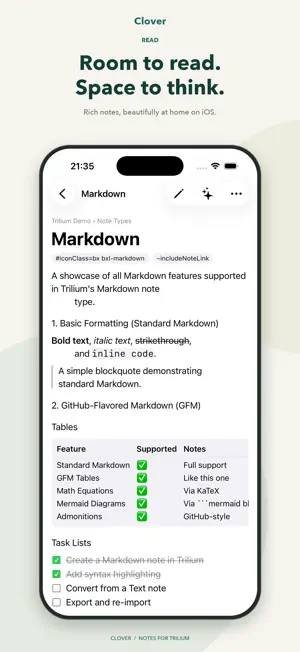
Clover is a third-party iOS client for TriliumNext Notes, designed reading-first: bring the knowledge base on your self-hosted server to your phone — readable offline, fully searchable. All core features are free. Clover Pro (one-time purchase or subscription): multiple servers, unlimited AI chats, alternate icons, home and lock screen widgets (today's journal, continue reading, quick capture), and Spotlight search. No ads. No server yet? Start with the built-in Local Vault and upload everything with one tap once you connect a Trilium server. Reading • Native typography with adjustable paper colour, font and size • Continuous multi-chapter reading for book notes, progress remembered • Images, PDF, Office documents, code highlighting, Mermaid, math • Full-text search that works for any language, including CJK Writing • Rich-text editor fully compatible with desktop Trilium • Journal: one note per day, capture fast; voice-to-text input • Share extension: save web pages, text and images from any app • Every write is queued first — nothing is lost offline, conflicts never overwrite Sync & security • Same login session as the Trilium web UI, with TOTP, SSO and Cloudflare Access • Incremental sync + live updates (foreground WebSocket), low-power and Wi-Fi-only policies • Face ID lock; protected notes unlock separately and never touch the disk • AI chat is powered by your own server — Clover stores no API keys Multiple accounts / servers, three-column iPad layout, localised in English, 简体中文, 繁體中文 and 日本語. Clover is an independent third-party client, not affiliated with the TriliumNext project. Syncing requires a TriliumNext server (0.99+); local-only use works without one. English Terms of Use (EULA): https://www.apple.com/legal/internet-services/itunes/dev/stdeula/ 简体中文 使用条款(EULA):https://www.apple.com/legal/internet-services/itunes/dev/stdeula/ 繁體中文 使用條款(EULA):https://www.apple.com/legal/internet-services/itunes/dev/stdeula/ 日本語 利用規約(EULA):https://www.apple.com/legal/internet-services/itunes/dev/stdeula/
What’s new
Version 1.0.2 · Updated September 30, 2026
• Added support for Trilium 0.106 • Enhanced search • Added Kanban board viewing and card management • Improved offline editing, sync, and localization
App privacy
The developer, 郑 陶, reported these privacy practices to Apple.
Data Not Collected
The developer does not collect any data from this app.
Alternatives to Clover: Notes for Trilium
Looking for apps like Clover: Notes for Trilium? Here are 6 similar apps on the App Store. The highest rated is Blinko Cloud (5.0/5), and all 6 are free to download.


| App | Rating | Price | Last updated | Compare |
|---|---|---|---|---|
| Clover: Notes for Trilium | 5.0 / 5 (1 rating) | Free | September 30, 2026 | |
| Blinko Cloud | 5.0 / 5 (1) | Free | Oct 11, 2026 | Compare |
| Trinote | 5.0 / 5 (14) | Free | Sep 30, 2026 | Compare |
| Triquid Notes | – | Free | Oct 20, 2026 | Compare |
| EdgeEver | – | Free | Oct 1, 2026 | Compare |
| ObjU - Item Organizer | 5.0 / 5 (1) | Free | Oct 5, 2026 | Compare |
| Veyrn | 5.0 / 5 (2) | Free | Oct 13, 2026 | Compare |