

Trinote
Vero Fide LLC Productivity iPhoneiPadiPod touch
Trinote is a free Productivity app for iPhone and iPad by Vero Fide LLC. Rated 5.0/5 from 15 ratings. Requires iOS 18.0. Updated October 28, 2026.
- Rating
- 5.0
- 15 ratings
- Price
- Free
- on the App Store
- Size
- 71 MB
- Age 4+
- Updated
- Oct 28
- 2026 · v1.22.0
Screenshots

About Trinote
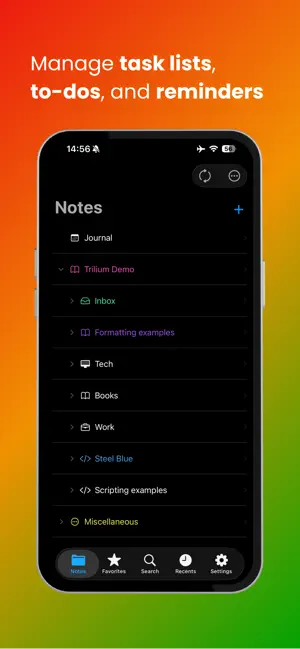
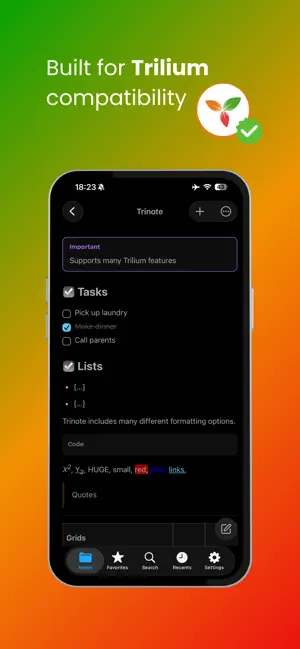
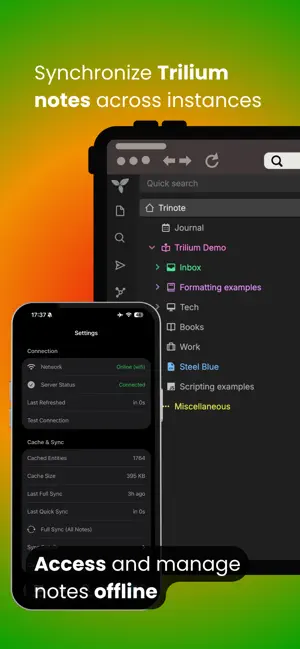
Trinote is a native, open-source iOS client for your self-hosted Trilium (TriliumNext) note server. Your notes stay on your server and your device — Trinote is a client only. Browse & organize Explore your full note tree with lazy loading, clones, and branches — the way Trilium models your workspace. Create, move, duplicate, and delete notes; keep favorites and recents at hand; optionally work with open-note tabs. Find anything Run full-text search on the server to jump to the right note fast. Offline, search titles in your cached notes. Use find-on-page once a note is open. Read & edit Open and edit text notes with a rich editor — formatting, lists, task lists, tables, callouts, code blocks, images, links, and math. Work with code, images, and files too. Also supported: canvas, Mermaid diagrams, mind maps, spreadsheets, geo maps, calendars, kanban boards, and presentations (availability can depend on your Trilium version). Attachments Add from Camera, Photos, or Files. Preview, download, rename, and share. Share & capture Save text, links, images, and files into Trinote via the iOS Share extension (Markdown becomes HTML). Manage public Trilium share links, or send notes to a nearby device over your local network. Stays useful offline Caches tree structure and note content so you can keep browsing and editing when the network drops. Changes sync when you’re back online. Full-text search and some live actions still need the server. Connect your way Sign in with your Trilium password (TOTP supported). Use multiple server profiles, and optional Cloudflare Access for protected setups. Appearance & security Choose light, dark, or system appearance, plus color themes and custom accents. Lock the app with a PIN and Face ID / Touch ID. Privacy Trinote does not host your notes. Your data lives on your Trilium server and your local device.
Ratings & reviews
5.0
15 ratings
What’s new
Version 1.22.0 · Updated October 28, 2026
Trinote 1.22.0 brings AI chat, link previews, Shortcuts and support for Trilium 0.107. NEW • AI chat: talk to the AI set up on your Trilium server. Pick a model, turn on web search, note tools or extended thinking, and attach photos and files. Replies can include diagrams and math. Open your chats with the sparkles button on the Notes tab (AI Chat in the iPad sidebar), or choose Chat with AI in a text, code or Markdown note's ⋯ menu to have the AI read and edit it. Needs Trilium 0.105 or newer. • Link previews: Trilium's link chips, cards and video previews now show in your notes and stay intact when you edit. Pasted links can turn into previews, and tapping a link lets you switch it between a plain link, chip, card or video. • Shortcuts: Add to Today's Journal, Create Note and Open Today's Journal. Put Add to Today's Journal on the Action Button for quick capture. It works offline too, and your text is added once you're back online. • Change a note's type from its ⋯ menu. • Edit a note's attributes, with explanations of Trilium's built-in ones, and fill in promoted fields at the top of the note. • Protect or unprotect a note together with all of its subnotes. • New setting "Lock Protected Notes on Exit": turn it off to keep protected notes unlocked until your server's timeout, even when you leave or restart the app. • Autosave can now save after just 1 or 2 seconds, and the save button hides once your changes are saved. IMPROVEMENTS • Ready for Trilium 0.107: search, moving notes and AI chat work with the new version. The AI asks before changing your notes, read-only notes such as Trilium's help pages can't be edited by mistake, and web clippings keep their icons. • Redesigned sign-in, with a Connecting screen you can cancel. Pasting a full server address now just works, and the sign-in screens are translated into all of Trinote's languages. • Protected note titles show throughout the tree once you unlock them. • The PIN and Face ID lock now also covers open sheets and menus, and blocks keyboard shortcuts. • Uses less memory, especially when idle. FIXES • Fixed edits that could be lost when iOS closed the editor in the background with autosave on, and notes that came back blank after returning to the app. • Fixed being signed out after force-quitting Trinote. • Fixed a crash at launch on some iPhones. • Fixed the note ⋯ menu opening too tall and the Account settings footer being cut off.
App privacy
The developer, Vero Fide LLC, reported these privacy practices to Apple.
Data Not Collected
The developer does not collect any data from this app.
Alternatives to Trinote
Looking for apps like Trinote? Here are 6 similar apps on the App Store. The highest rated is Caliu - Markdown Notes (5.0/5), and all 6 are free to download.
-
 Tiny Tools - All-in-One
-
 Clastly — Personal Database
4.8
Clastly — Personal Database
4.8
-
 Linkwarden
4.2
Linkwarden
4.2
-
 Snippety - Snippets Manager
4.8
Snippety - Snippets Manager
4.8
-
 Caliu - Markdown Notes
5.0
Caliu - Markdown Notes
5.0
-
 Idea Tiles: Connect Thoughts
| App | Rating | Price | Last updated | Compare |
|---|---|---|---|---|
| Trinote | 5.0 / 5 (15 ratings) | Free | October 28, 2026 | |
| Tiny Tools - All-in-One | – | Free | Oct 17, 2026 | Compare |
| Clastly — Personal Database | 4.8 / 5 (4) | Free | Oct 27, 2026 | Compare |
| Linkwarden | 4.2 / 5 (14) | Free | Oct 12, 2026 | Compare |
| Snippety - Snippets Manager | 4.8 / 5 (72) | Free | Oct 21, 2026 | Compare |
| Caliu - Markdown Notes | 5.0 / 5 (5) | Free | Oct 23, 2026 | Compare |
| Idea Tiles: Connect Thoughts | – | Free | Sep 2, 2026 | Compare |
Compare Trinote with the top alternatives: ratings, updates, ASO score and keyword gaps →