

PAM e-Sign
Ahmad Affan Ridha Productivity iPhoneiPadiPod touch
PAM e-Sign is a free Productivity app for iPhone and iPad by Ahmad Affan Ridha. Requires iOS 15.0. Updated October 2, 2026.
- Price
- Free
- on the App Store
- Size
- 28 MB
- Age 4+
- Updated
- Oct 2
- 2026 · v1.2.3
Screenshots



About PAM e-Sign
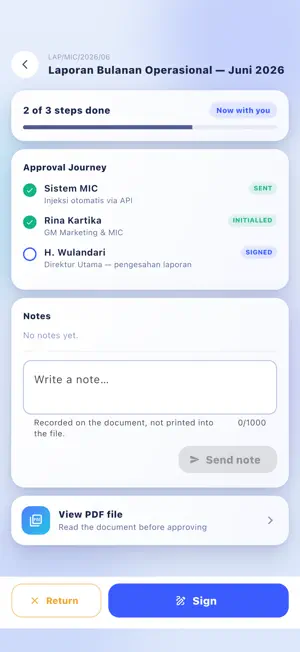
PAM e-Sign turns the document approval queue into something you can clear from your phone. Documents are prepared and uploaded on the web. What reaches this app is the part that needs you: the sheets waiting for your initials or your signature. Open one, read the PDF, and approve it — your saved signature is placed on the document exactly where it belongs. WHAT YOU CAN DO HERE • See every document waiting for you, newest first, with the approval step you are on • Read the full PDF before you approve — never sign something you have not opened • Sign or initial with the specimen you saved once, placed automatically on the sheet • Add a note that is printed permanently on the document, right above your signature • Search your history by document name, type, or the department that submitted it • Hand your authority to a colleague for a set period while you are away, and take it back when you return • Get a notification the moment a document reaches your step HOW SIGNING WORKS You draw your signature and your initials once, in the app. They are stored on your account and reused every time, so approving a document is a single confirmation rather than a fresh drawing each time. Where your organisation requires it, Face ID or your device passcode confirms it is really you before anything is signed. That check happens entirely on your device — the app is only told whether it passed. Every signature is stamped into the PDF itself, together with who signed and when. The approval trail travels with the file, so a document opened months later still shows how it was approved. WHAT THIS APP IS NOT Uploading files, building approval routes, managing accounts and reading analytics all live in the web version. This app is deliberately narrow: the things you need to do between meetings, not the things you do at a desk. WHO IT IS FOR PAM e-Sign is built for PAM Group and is used with an account issued by your organisation. It is not a general-purpose signing service, and you cannot sign up inside the app. Privacy policy: https://esign.wbl-bsb.com/privacy
What’s new
Version 1.2.3 · Updated October 2, 2026
• Fixed: while writing a note on a document, the Sign button covered the Send note button, so you had to scroll before you could send. The Sign and Return buttons now step aside while the keyboard is open, and the Send note button stays in view as you type.
App privacy
The developer, Ahmad Affan Ridha, reported these privacy practices to Apple.
Data Not Collected
The developer does not collect any data from this app.
Alternatives to PAM e-Sign
Looking for apps like PAM e-Sign? Here are 6 similar apps on the App Store. The highest rated is Melonote:AI Voice Summary Note (4.9/5), and all 6 are free to download.
-
 Dote Timer - Time Management
4.4
Dote Timer - Time Management
4.4
-
 My MIXUE
2.4
My MIXUE
2.4
-
 Melonote:AI Voice Summary Note
4.9
Melonote:AI Voice Summary Note
4.9
-
 Meeting.ai: Note Taker Agent
4.9
Meeting.ai: Note Taker Agent
4.9
-
 WPS for Pad: AI Office & PDF
4.5
WPS for Pad: AI Office & PDF
4.5
-
 TeamViewer Remote Control
4.7
TeamViewer Remote Control
4.7
| App | Rating | Price | Last updated | Compare |
|---|---|---|---|---|
| PAM e-Sign | – | Free | October 2, 2026 | |
| Dote Timer - Time Management | 4.4 / 5 (36) | Free | Oct 29, 2026 | Compare |
| My MIXUE | 2.4 / 5 (12) | Free | Oct 19, 2026 | Compare |
| Melonote:AI Voice Summary Note | 4.9 / 5 (43) | Free | Oct 31, 2026 | Compare |
| Meeting.ai: Note Taker Agent | 4.9 / 5 (114) | Free | Oct 19, 2026 | Compare |
| WPS for Pad: AI Office & PDF | 4.5 / 5 (61) | Free | Oct 26, 2026 | Compare |
| TeamViewer Remote Control | 4.7 / 5 (44,903) | Free | Oct 27, 2026 | Compare |
Compare PAM e-Sign with the top alternatives: ratings, updates, ASO score and keyword gaps →