

Snapkin: Photo Sticker Journal
Shenzhen Quanjing Digital Intelligence Technology Co., Ltd. Lifestyle iPhoneiPadiPod touch
Snapkin: Photo Sticker Journal is a free Lifestyle app for iPhone and iPad by Shenzhen Quanjing Digital Intelligence Technology Co., Ltd. Requires iOS 17.0.
- Price
- Free
- on the App Store
- Size
- 34 MB
- Age 4+
- Updated
- Sep 14
- 2026 · v1.1
Screenshots

About Snapkin: Photo Sticker Journal
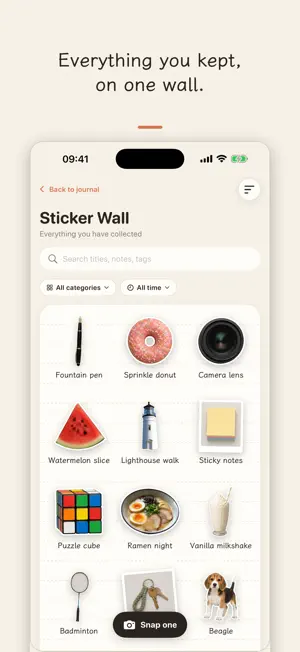
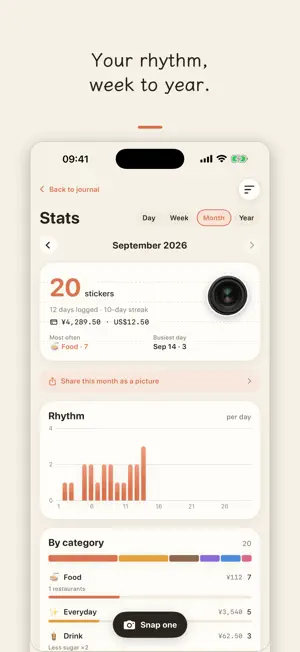
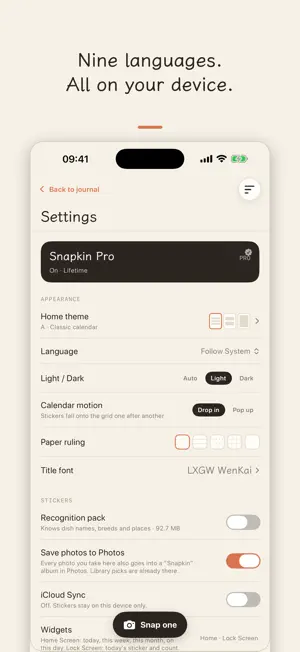
Snapkin turns everyday moments into hand-cut stickers. Take a photo or pick one from your library. The subject is cut out right on your device, gets a white die-cut border, and lands on today's page as a sticker. When no clear subject is found, it becomes a little photo card instead. • Sticker journal: every day is a page of lined paper. Stickers sit where you put them, hold one to reorder, and the first one becomes that day's cover on the calendar. • Folding calendar: see this week at a glance, pull down to open the whole month with a cover sticker in every cell. Filter by category or favorites. • On-device suggestions: a title, a category and tags are suggested right after the photo, with nothing sent anywhere. • Stats: stickers, days logged, streaks and spending by week, month or year, with trend and category charts. • Sticker wall: everything you have saved, searchable and filterable. • Share cards: three card styles to share or save to Photos. • Three home layouts: a classic calendar, a timeline tape, or one day per page — pick in Settings. • On this day: what you stuck a year (or a month) ago, on the home page and in a widget. • Widgets: today, this week, this month and on this day on the Home Screen; today's sticker and count on the Lock Screen. • Print stickers: a PDF for sticker paper (A4, Letter, L, 2L, 4×6) — cut along the white edge, stick it in your notebook. • Month and year recaps: the whole period as one picture, 9:16 for stories or 3:4 for posts. • iCloud sync (optional): your own iPhone and iPad stay in step through your private iCloud; nobody else ever sees your stickers. • Ten categories with one extra field each — sweetness, place, pet name, species, store, study time, who a fan item is for — and unlimited custom ones. • iPhone and iPad, light and dark mode, three title typefaces. • Nine languages: English, Simplified and Traditional Chinese, Japanese, Korean, German, Spanish, French and Portuguese — interface, suggested names and sample data all follow the one you pick. • There is a small surprise hidden in the calendar. Go find it. Everything stays on your device or in your own private iCloud: no account, no servers of ours, no ads, no tracking. Export a full backup anytime: a ZIP with your entries as JSON plus every sticker and original photo. Load six months of sample data on first launch to look around, then clear it with one tap. Snapkin Pro (optional): the free version keeps one sticker a day, everything you saved stays, and export is always free. Pro keeps as many stickers a day as you like and unlocks the Night and Terracotta share cards, the other two title fonts, the recognition pack (more precise dish, object and place names), the year view in Stats and unlimited custom categories. Yearly, monthly or a one-time lifetime purchase; prices are shown in the app, and subscriptions can be cancelled anytime in your device settings. Terms of Use (EULA): https://www.apple.com/legal/internet-services/itunes/dev/stdeula/ Privacy Policy: https://snapkin.pdg.red/privacy
What’s new
Version 1.1 · Updated September 14, 2026
A bigger home, and stickers that leave the phone. • Three home layouts: classic calendar, timeline tape, or one day per page. • On this day: what you stuck a year (or a month) ago, on the home page and in a new widget. • Lock Screen widgets: today's sticker and count. • Print stickers: a PDF for sticker paper — cut along the white edge, stick it in your notebook. • Month and year recaps as one shareable picture. • iCloud sync (optional) between your own iPhone and iPad. • Pull the camera open straight from the "+" button. • New Fandom category with a "fave" field. • Snapkin Pro (optional): unlimited stickers a day, all card styles and fonts, the recognition pack, the year view.
App privacy
The developer, Shenzhen Quanjing Digital Intelligence Technology Co., Ltd., reported these privacy practices to Apple.
Data Not Collected
The developer does not collect any data from this app.
Alternatives to Snapkin: Photo Sticker Journal
Looking for apps like Snapkin: Photo Sticker Journal? Here are 6 similar apps on the App Store. The highest rated is DOOD - Doodle Photo Journal (5.0/5), and all 6 are free to download.
-
 Kartka Journal
-
 Niello - AI Sticker Journal
-
 Dotie: Journal & Scrapbook
4.6
Dotie: Journal & Scrapbook
4.6
-
 DOOD - Doodle Photo Journal
5.0
DOOD - Doodle Photo Journal
5.0
-
 daplit: Sticker Journal & Zine
4.3
daplit: Sticker Journal & Zine
4.3
-
 HakoJournal - Secrets Memo
5.0
HakoJournal - Secrets Memo
5.0
| App | Rating | Price | Last updated | Compare |
|---|---|---|---|---|
| Snapkin: Photo Sticker Journal | – | Free | September 14, 2026 | |
| Kartka Journal | – | Free | Sep 14, 2026 | Compare |
| Niello - AI Sticker Journal | – | Free | Oct 17, 2026 | Compare |
| Dotie: Journal & Scrapbook | 4.6 / 5 (7) | Free | Oct 21, 2026 | Compare |
| DOOD - Doodle Photo Journal | 5.0 / 5 (5) | Free | Oct 20, 2026 | Compare |
| daplit: Sticker Journal & Zine | 4.3 / 5 (7) | Free | Oct 22, 2026 | Compare |
| HakoJournal - Secrets Memo | 5.0 / 5 (2) | Free | Sep 30, 2026 | Compare |