

WhyNot Widgets
Iskren Georgiev Utilities iPhoneiPadiPod touch
WhyNot Widgets is a free Utilities app for iPhone and iPad by Iskren Georgiev. Rated 4.0/5 from 61 ratings. Requires iOS 26.0. Updated October 19, 2026.
- Rating
- 4.0
- 61 ratings
- Price
- Free
- on the App Store
- Size
- 20 MB
- Age 4+
- Updated
- Oct 19
- 2026 · v1.9.8
Screenshots


About WhyNot Widgets
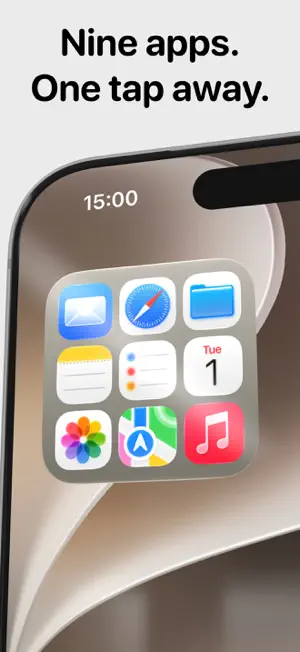
Nine apps. One widget. One tap. WhyNot puts a tiny app drawer on your Home Screen. Pick up to nine apps, choose a style, and every one of them launches with a single tap. No folders to open. Many apps launch straight from the widget, the rest pass through WhyNot for a moment, and the picker tells you which is which. BUILD IT YOUR WAY • Up to nine apps in the smallest widget size. One app or nine, the layout adapts. • Light and Dark show the real app icons, as they look on a light or a dark Home Screen. Mono and Ghost are two quieter looks. • Fill, or anchor the drawer to a corner for a folder-like cluster. • Hold a tile and drag it to rearrange. CLOCKS WITH CHARACTER • Dial: a quiet analog clock inspired by classic industrial design. Small, medium, and a large desk clock with your week laid out underneath. • Flip: a split-flap clock that rolls over on the minute. • Almanac: the month on a card, in Flip's material. Two keys turn the pages, the name brings today back. Free. • Every widget is built for light mode, dark mode, and the Clear look. Pin any widget to always light or always dark, whatever your phone is set to. MADE TO BE LOOKED AT Every widget is drawn by hand, with real shadows, real materials, and one light source. Nothing is a template. Nothing is a screenshot of something else. PACKS (one-time purchases) • Halo: three screens on one large instrument, your wallpaper showing through. Home has the week, what is next and today's steps, Move and Exercise from Health with the goals. Next has the coming events and reminders, with a countdown. Outside has the weather from sunrise to sunset, hour by hour and four days out. The keys switch screens; a slider sets how much wallpaper shows. • Quartz: a desk clock from the nineties, in seven cases from olive to cream. A window for the date, the day or the temperature, numerals in figures or Roman. Tap to open Clock. • Vinyl: your record on a turntable, drawn after the classic Braun deck. The album artwork is the label, the record turns while Apple Music plays, the arm lifts when it stops, and back, play and next work from the widget. Small is the platter, medium is the whole deck. • Tally: a desk calculator from the seventies, on your Home Screen. Every key works. Small for quick sums, large for the whole instrument. Keeps the last result. • Frontpage: your day as a newspaper front page, in the tall widget size that arrived with iOS 27. The next event is the headline, more events and your reminders run in columns, real headlines from a source you choose or your own feed fill the fold, and tomorrow's weather closes the page. Three newspaper typefaces, newsprint grain, pressed type. • Console: your day at a glance. What is next and how long until it, the week ahead, and the sky, one tap apart on the widget. Every block opens Calendar or Weather directly. • Golden: when the light will be good. Golden hour and blue hour for where you are, on one living sky where the sun rises and sets across your Home Screen. The time is lit by the light of the moment. Tap to open the Camera. • WhyNot Pro: Scenes, your drawer set in a place, with the apps that belong there. Glass, the drawer on a frosted panel with your wallpaper showing through. Unlimited drawers, each widget showing a different one. Gradient backgrounds inspired by iPhone finishes or your own two colors. Buy once, keep forever. No subscriptions. PRIVATE BY DESIGN No account. No tracking. No analytics. Your drawers live on your phone and nowhere else. Console, Golden, Frontpage and Halo use your approximate location for Apple Weather and, if you allow it, your calendars and reminder lists. Halo reads today's Health figures on your phone, only if you allow it. A feed you add is fetched by your phone, not by us. Nothing about you ever reaches us. WhyNot is made by This is E.
Ratings & reviews
4.0
61 ratings
What’s new
Version 1.9.8 · Updated October 19, 2026
The drawer can be pinned to Light or Dark on the Home Screen, under Scene in the editor. The small Vinyl opens Music on tap, as it should. Portuguese now covers Portugal as well as Brazil. Spanish keys on Halo read Inicio, Próximo and Clima. The App Store tile lands on Today.
App privacy
The developer, Iskren Georgiev, reported these privacy practices to Apple.
Data Not Linked to You
The following data, which may be collected but is not linked to your identity, may be used for the following purposes:
- Location: Coarse Location
- User Content: Other User Content
Used for: App Functionality
Alternatives to WhyNot Widgets
Looking for apps like WhyNot Widgets? Here are 6 similar apps on the App Store. The highest rated is Countdown Widget - DayDrop (4.8/5), and all 6 are free to download.
-
 MiniFolder App Folder Launcher
4.7
MiniFolder App Folder Launcher
4.7
-
 App Folder Launcher WidgetLoft
4.6
App Folder Launcher WidgetLoft
4.6
-
 Showline: TV & Movie Tracker
4.7
Showline: TV & Movie Tracker
4.7
-
 Clink: Custom Keyboards
3.8
Clink: Custom Keyboards
3.8
-
 Countdown Widget - DayDrop
4.8
Countdown Widget - DayDrop
4.8
-
 EFKey – Swipe & AI Keyboard
4.6
EFKey – Swipe & AI Keyboard
4.6
| App | Rating | Price | Last updated | Compare |
|---|---|---|---|---|
| WhyNot Widgets | 4.0 / 5 (61 ratings) | Free | October 19, 2026 | |
| MiniFolder App Folder Launcher | 4.7 / 5 (108) | Free | Oct 15, 2026 | Compare |
| App Folder Launcher WidgetLoft | 4.6 / 5 (28) | Free | Oct 19, 2026 | Compare |
| Showline: TV & Movie Tracker | 4.7 / 5 (78) | Free | Sep 17, 2026 | Compare |
| Clink: Custom Keyboards | 3.8 / 5 (39) | Free | Oct 19, 2026 | Compare |
| Countdown Widget - DayDrop | 4.8 / 5 (21) | Free | Sep 20, 2026 | Compare |
| EFKey – Swipe & AI Keyboard | 4.6 / 5 (32) | Free | Oct 12, 2026 | Compare |
Compare WhyNot Widgets with the top alternatives: ratings, updates, ASO score and keyword gaps →