

Split Keyboard
MARCO NUNNARI Utilities iPad
Split Keyboard is a paid Utilities app for iPad by MARCO NUNNARI. Requires iOS 18.0. Updated October 8, 2026.
- Price
- 3.99 USD
- on the App Store
- Size
- 20 MB
- Age 4+
- Updated
- Oct 8
- 2026 · v1.3
Screenshots


About Split Keyboard
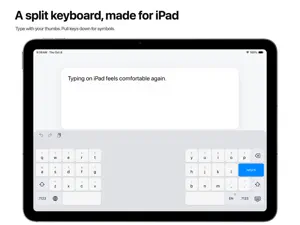
Type comfortably while holding your iPad. Split Keyboard brings the keys within reach of your thumbs, with helpful word suggestions and autocorrection. Your words stay on your iPad. KEYS WITHIN REACH Two keyboard halves bring the keys closer to your thumbs, so you can type with both hands while holding your iPad. The open center gives your thumbs space between the two sides. SUGGESTIONS THAT FOLLOW YOUR WORDS Complete words, correct spelling, and get suggestions for what comes next. Undo an automatic correction with Delete. Let the keyboard learn words you use, with the option to forget them whenever you choose. USEFUL SHORTCUTS, WITHIN REACH Pull letter keys down for numbers and symbols. Hold a letter for accented characters. Move the cursor by holding Space or dragging with two fingers. WRITE IN YOUR LANGUAGES Switch between English, Italian, German, French, Spanish, and Portuguese for Portugal and Brazil. Choose familiar layouts, including German QWERTZ and French AZERTY or QWERTY. YOUR WORDS STAY ON YOUR IPAD Suggestions and word learning work locally. No accounts, tracking, or network access. Full Access is never required. Turn learning off or delete learned words in settings. For iPad and apps that support custom keyboards. iPadOS may use the system keyboard in secure and phone-number fields.
What’s new
Version 1.3 · Updated October 8, 2026
• Word suggestions, next-word predictions, and automatic spelling corrections across all supported typing languages. • Undo an auto-correction with Delete, or keep and learn your original word. • Pull letter keys down for quick access to numbers and symbols. • Hold Space or use two fingers to move the cursor. • Redesigned keyboard settings with easier language and layout selection. • Improved capitalization after punctuation and word replacement. Suggestions and learned words stay on your iPad. No Full Access required.
App privacy
The developer, MARCO NUNNARI, reported these privacy practices to Apple.
Data Not Collected
The developer does not collect any data from this app.
Alternatives to Split Keyboard
Looking for apps like Split Keyboard? Here are 6 similar apps on the App Store. The highest rated is SplitBoard (4.5/5), and all 6 are free to download.
-
 ReachType
-
 SplitBoard
4.5
-
 litapp
-
 The Banana Split Keyboard
1.5
-
 Return Dislikes
3.0
-
 Calculator Widget -Simple calc
4.2
| App | Rating | Price | Last updated | Compare |
|---|---|---|---|---|
| Split Keyboard | – | 3.99 USD | October 8, 2026 | |
| ReachType | – | Free | Oct 27, 2026 | Compare |
| SplitBoard | 4.5 / 5 (2) | Free | Aug 7, 2026 | Compare |
| litapp | – | Free | Jul 13, 2026 | Compare |
| The Banana Split Keyboard | 1.5 / 5 (2) | Free | Oct 27, 2026 | Compare |
| Return Dislikes | 3.0 / 5 (4) | Free | Dec 9, 2024 | Compare |
| Calculator Widget -Simple calc | 4.2 / 5 (106) | Free | Oct 23, 2026 | Compare |
Compare Split Keyboard with the top alternatives: ratings, updates, ASO score and keyword gaps →