

SplitKeyboard
Max Robson Utilities iPhoneiPadiPod touch
SplitKeyboard is a free Utilities app for iPhone and iPad by Max Robson. Rated 3.0/5 from 2 ratings. Requires iOS 18.0. Updated October 22, 2026.
- Rating
- 3.0
- 2 ratings
- Price
- Free
- on the App Store
- Size
- 21 MB
- Age 4+
- Updated
- Oct 22
- 2026 · v1.03
Screenshots



About SplitKeyboard
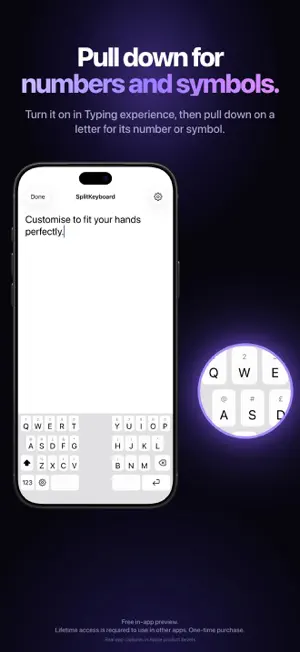
Split your keyboard properly and type comfortably. Finally. We've worked meticulously to make the best split keyboard we can, and we hope you enjoy it. Try it free in the app with no commitments. Lifetime access is required to use in other apps. It's a single purchase with no subscription, and every update is included. On iPhone • Split the keys in portrait or landscape. • Raise the keyboard so your thumbs reach it easily. • Pick a preset for how you hold your phone. On iPad • Spread two fingers to split and pinch to join. • Bring each half within reach of your thumbs. • Use a phone-size keyboard on the left, centre or right. On iPhone Duo • Closed, it types like any iPhone keyboard. • Open, it can split with an empty gap in the middle. Just like your built-in keyboard • Pull down on a key for its number or symbol. • Hold a letter for accents. • Hold Space to move the cursor. • Switch keyboards with the globe key. What we've added We designed comfort in from the ground up. Find your fit and save it as a preset so you can swap layouts on the go. • Height, reach and spacing that you set yourself. • Presets for how you type, plus your own saved fits. • Swap any key and add a number row or arrows. • Saved phrases one tap away. • Optional swipe typing in English and on-device word suggestions. • Add languages straight from the keyboard. Languages English, French, German, Spanish, Italian, Portuguese, Dutch, Swedish, Norwegian, Danish, Arabic, Persian, Hebrew, Urdu and Vietnamese. Each has its proper layout. English also offers ABC, Dvorak and Colemak. Why it's different • One purchase and never a subscription. • No account, no Full Access and no tracking. • Nothing you type leaves your device. • Designed to feel as if it came with your device. Even more • Number row, arrow keys and a Tab key. • Punctuation, currency and maths pages. • Hidden keys in the centre gap. • Larger keys and letters. • Key sounds and dark mode. • Custom characters with drag-and-drop editing. • Works offline with no sign-up. Built by those who care. Email [email protected] and we'll get back to you. Requires iOS or iPadOS 18 or later. Password fields and some apps use the system keyboard. Autocorrect, next-word prediction and dictation are not included.
What’s new
Version 1.03 · Updated October 22, 2026
SplitKeyboard now works on iPhone and iPhone Duo as well as iPad. • Pull down on a key for its number or symbol, just like on iPad. On iPhone, turn it on in Typing experience. • Keys respond instantly, even at the edges of the screen. • A new Fit page keeps every comfort setting in one place, with presets for how you type. • Search your settings, add languages from the keyboard and type in Vietnamese.
App privacy
The developer, Max Robson, reported these privacy practices to Apple.
Data Not Collected
The developer does not collect any data from this app.
Alternatives to SplitKeyboard
Looking for apps like SplitKeyboard? Here are 6 similar apps on the App Store. The highest rated is Time Vault: Memory Capsule (5.0/5), and 3 of the 6 are free to download.
-
 Time Vault: Memory Capsule
5.0
Time Vault: Memory Capsule
5.0
-
 LogiScan
-
 Word Clock Pro: Widget
4.0
Word Clock Pro: Widget
4.0
-
 Fields Area Measure GPS Map
-
 Volra: Battery & Charger Test
-
 Custom Keyboard: Themes & GIF
5.0
Custom Keyboard: Themes & GIF
5.0
| App | Rating | Price | Last updated | Compare |
|---|---|---|---|---|
| SplitKeyboard | 3.0 / 5 (2 ratings) | Free | October 22, 2026 | |
| Time Vault: Memory Capsule | 5.0 / 5 (1) | Free | Sep 24, 2026 | Compare |
| LogiScan | – | 1.99 USD | Jan 20, 2025 | Compare |
| Word Clock Pro: Widget | 4.0 / 5 (2) | 3.99 USD | Sep 8, 2026 | Compare |
| Fields Area Measure GPS Map | – | Free | May 12, 2026 | Compare |
| Volra: Battery & Charger Test | – | 1.99 USD | Aug 4, 2026 | Compare |
| Custom Keyboard: Themes & GIF | 5.0 / 5 (1) | Free | Oct 19, 2026 | Compare |
Compare SplitKeyboard with the top alternatives: ratings, updates, ASO score and keyword gaps →