

Sphere: Sky Schedule
Mason Garcera Productivity iPhoneiPadiPod touch
Sphere: Sky Schedule is a free Productivity app for iPhone and iPad by Mason Garcera. Rated 5.0/5 from 1 ratings. Requires iOS 26.0.
- Rating
- 5.0
- 1 ratings
- Price
- Free
- on the App Store
- Size
- 3 MB
- Age 4+
- Updated
- Oct 22
- 2026 · v2.4
Screenshots


About Sphere: Sky Schedule
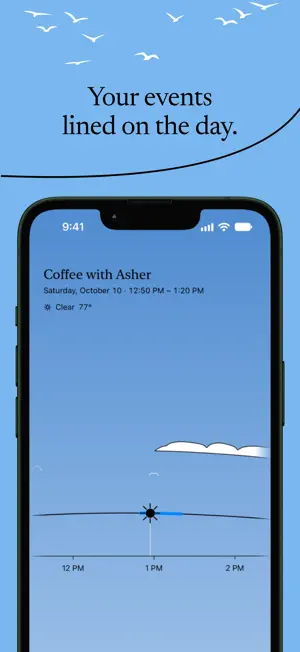
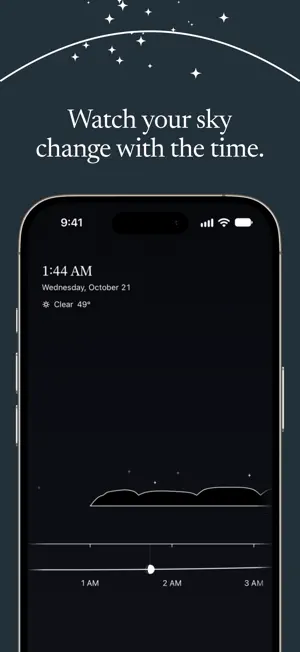
Sphere shows your schedule and weather in the sky. It's designed to have atmosphere. Each of your events is a capsule on the arc, running from start to end in the color of the calendar it came from. Clouds stack by altitude (modeled after cirrus and cumulus clouds), and you'll see rain, storms, lightning, and more. For clear hours, you'll see birds in the day and twinkling stars at night. The arc: - Drag it to move through the day. - Pinch to zoom. - Tap to make an event, open one, or pick a different date. - Tap the left or right edge to go to the previous or next event. - Press and hold to open the menu, or the gesture guide. - Scrub away from the present and the bottom left corner shows how far, like "+4 hours". Tap it to come back to now. - The menu mark in the bottom right corner opens the menu, or the gesture guide. - Events open in Apple's native calendar, so editing, deleting and replying to an invitation work exactly the way you're used to. - All-day events are under the date, where they can be read without taking room on the arc. The menu: - Today's arc with sunrise, midday and sunset. - Tonight's moon and the temperature right now. - Appearance; Natural Sky means the app is light by day and dark at night, and dark makes it dark all the time. - Calendar toggles. Outside the app: - Home Screen: the sky curve with your events on it, in small and medium. - Lock Screen: where the sun is and your next calendar event. Sphere is free. No account, no subscription, no ads, no analytics, no tracking. Privacy: https://smidgecraft.com/sphere/privacy Support: https://smidgecraft.com/sphere/support Questions, ideas, or feedback? [email protected]
What’s new
Version 2.4 · Updated October 22, 2026
Current time - The current time is a plane that flies above the weather. Scrubbing anywhere - Drag anywhere in the arc area to move through the day, not only on the arc itself. Thank you for using Sphere! Feedback: [email protected]
App privacy
The developer, Mason Garcera, reported these privacy practices to Apple.
Data Not Linked to You
The following data, which may be collected but is not linked to your identity, may be used for the following purposes:
- Location: Coarse Location
- Contact Info: Email Address
- User Content: Other User Content
Used for: App Functionality
Alternatives to Sphere: Sky Schedule
Looking for apps like Sphere: Sky Schedule? Here are 6 similar apps on the App Store. The highest rated is CraftPassAI (5.0/5), and 5 of the 6 are free to download.
-
 CraftPassAI
5.0
-
 HopStop: Your day, mapped
5.0
-
 Dialed: Radial Day Planner
-
 TMX Messenger
4.5
-
 WeekPad: Weekly Planner Diary
4.7
-
 Animal Diet Formulator App
1.0
| App | Rating | Price | Last updated | Compare |
|---|---|---|---|---|
| Sphere: Sky Schedule | 5.0 / 5 (1 rating) | Free | October 22, 2026 | |
| CraftPassAI | 5.0 / 5 (2) | 0.99 USD | May 6, 2026 | Compare |
| HopStop: Your day, mapped | 5.0 / 5 (1) | Free | Oct 4, 2026 | Compare |
| Dialed: Radial Day Planner | – | Free | Aug 26, 2026 | Compare |
| TMX Messenger | 4.5 / 5 (10) | Free | Oct 19, 2026 | Compare |
| WeekPad: Weekly Planner Diary | 4.7 / 5 (3) | Free | Oct 6, 2026 | Compare |
| Animal Diet Formulator App | 1.0 / 5 (2) | Free | Oct 1, 2026 | Compare |